Adding Rear Speakers to OEM Headunit and enabling Fade

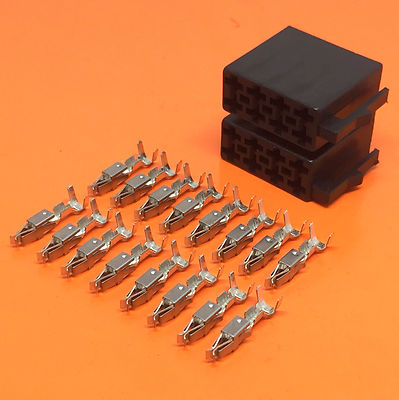
Does anyone have a link to the correct connectors to add to the connector for rear speakers please?

 
['URL unfurl="true"]https://www.t6forum.com/threads/quad-lock-pin-types-speaker.26541/[/URL]
Hi @Deaky, this is my first ever forum post, so it will probably all go wrong. Anyway I'll give it a go. @Pauly am I allowed to put these links in?
This YouTube video helped me loads. There's a good description at approximately 5:40 showing the connector layout and how to make the connections. There's also a wiring diagram at 6:25. I used a different wiring route because I don't like wires near the pedals in case they get caught up in moving parts. I brought my wires down the drivers A pillar, removed the cup holder to help with access, and passed them over the top of the instrument cluster.


These are the connector pins I used.


I couldn't get the little purple plastic thing back in the block after installing the new connectors, but it doesn't seem to matter. The crimps stay in the block very securely without it.
 
@Pauly thanks for the article! Do you know the name of these specific connectors? Trying to find them online and it's difficult to tell the exact type from the image
 
The connectors to populate xtra speaker wires are commonly referred to as JPT or junior power timer, you can just search VW crimp etc on ebay but you would need to scan through them to find the speaker ones as there a few variations for other connectors
 
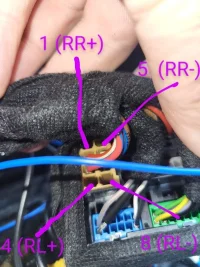
I'm just looking to wire in my rear speakers to my Kenwood DNX9190DABS head unit. This was installed by @Absolut5 for the previous owner. It looks as though the connector block in this photo (my cabling) is the same one used as the OEM unit?

20250615_111033.webp

Am I correct in saying that if I wire the rear positive/negative speaker cables in to the correct pin spaces using the JPT connectors, that my rear speakers should then work correctly? I've labelled my photo with the pin spaces that I've identified as 1, 4, 5 and 8 from the image above.

Does anyone spot any issues with this, or does that all look right?
 
I'm just looking to wire in my rear speakers to my Kenwood DNX9190DABS head unit. This was installed by @Absolut5 for the previous owner. It looks as though the connector block in this photo (my cabling) is the same one used as the OEM unit?

View attachment 291909

Am I correct in saying that if I wire the rear positive/negative speaker cables in to the correct pin spaces using the JPT connectors, that my rear speakers should then work correctly? I've labelled my photo with the pin spaces that I've identified as 1, 4, 5 and 8 from the image above.

Does anyone spot any issues with this, or does that all look right?
That is correct
 
Thanks @Absolut5 , rear speakers installed and working well.

Since I did that install, my steering wheel controls for volume, skip, etc seem to have stopped working - I'm wondering if I might have disturbed another connection while I had the heat unit out. Which wire(s) connect the MFSW buttons to the head unit?
 
Thanks @Absolut5 , rear speakers installed and working well.

Since I did that install, my steering wheel controls for volume, skip, etc seem to have stopped working - I'm wondering if I might have disturbed another connection while I had the heat unit out. Which wire(s) connect the MFSW buttons to the head unit?
I expect you have pulled the Uar plug (black din plug) slightly out causing the issue
 
Can anyone provide a link to where they bought the connector pins from? I bought what I thought were the right ones from Amazon, I have everything apart and the don’t fit 😫 They look pretty much spot on but they just won’t push into the block, needed to get this all back together tonight 🤦🏼‍♂️ Thanks!
 
Can anyone provide a link to where they bought the connector pins from? I bought what I thought were the right ones from Amazon, I have everything apart and the don’t fit 😫 They look pretty much spot on but they just won’t push into the block, needed to get this all back together tonight 🤦🏼‍♂️ Thanks!

I got these ones and did the job last week, so they're definitely right. They needed a good push to get them to clip in.
 
They are the correct ones, you need to slide out the purple pin/locking tab to insert the crimps, then insert the pin when done
 
Crisis adverted, my error, didn’t realise you have to take the purple pin out of the block to slide new pins in! 🤦🏼‍♂️ Pins fit now, if anyone needs any let me know and I can post come out.

Speaking of the purple pin, how important is it?! I may have dropped it into the head unit void 🙄
 
Its a double locking mechanism, with the pin in place it stop any crimps going in or out
As long as the barbs on the crimps hold into the plastic connector it wont matter
 
Thank you. I stole one from the next block that was empty and not being used, hopefully that’s ok!
 
Back
Top