T6.1 Lock button for sleeping / leaving dogs inside / windows open How-To Guide

Ok I have made a look up with connectors and everything I had available at work, but I'm stuck! I really can't decide where to put my lock button! Any ideas? where have you all fitted yours? On the units not possible due to the push switch I have not really being deep enough but could possibly make it fit still!

Thanks all!
Hi Fishinbrine,
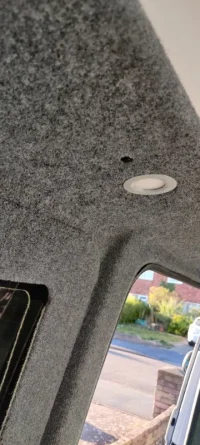
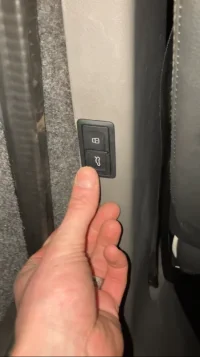
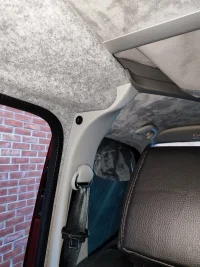
Sorry about the delay in posting this, been away this week. I placed the switch at the top of the b pillar above the sliding door. Out of the way and easy to remember to switch it on/off as you get in and out of the sliding door.
Hope this helps.
Ady D
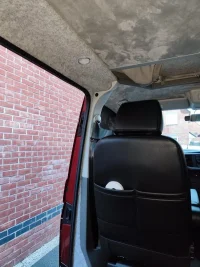
IMG_20250225_172247.webp

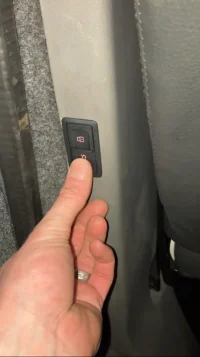
IMG_20250225_172230.webp
 
Can I ask what might appear a stupid question. If I lock the van on the door card button (Driver door, door open) and then shut the door do the sensors arm or is it just locked. I have heard some people say you have to disable it in the software menu, I'm not so sure but don't know how to check it.
 
I'm definitely going to be doing this at some point, so thanks for the guide. I'm wondering if anyone's managed to do this and have their switch light up to show when the door is locked? That's how the driver's door switch works so it must be possible, just don't know how easy it might be to tap into the wiring.
 
I'm definitely going to be doing this at some point, so thanks for the guide. I'm wondering if anyone's managed to do this and have their switch light up to show when the door is locked? That's how the driver's door switch works so it must be possible, just don't know how easy it might be to tap into the wiring.
Hi did you manage to get the switch to illuminate when the door is locked?
I have been looking into this, by my eyes the locked illumination on the drivers door switch appears to be controlled within the switch (this switch has 4 pins 1 - com, 2 - lock, 3 - unlock and 4 switch illumination when headlights are on( pin designation not necessarily in that order)).
I had thought about connecting the illumination pin of my switch in the back to the sliding door lock power supply so it flashes when the lock is activated but that might not work as it would flash when locking and unlocking (or maybe not as a led is directional so it may work if the power supply to the lock is directional for the lock and unlocking function).
 
I looked into it, but I've not had chance to actually do it yet. From the wiring diagrams it looked as though there might be a connection for the switch illumination in the same quadlock as the signal cable, but I haven't tested it out as yet.
 
I looked into it, but I've not had chance to actually do it yet. From the wiring diagrams it looked as though there might be a connection for the switch illumination in the same quadlock as the signal cable, but I haven't tested it out as yet.
The illumination pin on the back of the drivers door switch is only for switch illumination when the headlights are on not the locked indicator on the switch.
 
Hmm, that's mildly annoying. There must be some kind of signal going to the switch to tell it if a door has been opened, as that will turn off the lock illumination IIRC. But I guess there's no need for an external signal to turn it on, since the only way to do that is by pressing the switch itself.
 
Hmm, that's mildly annoying. There must be some kind of signal going to the switch to tell it if a door has been opened, as that will turn off the lock illumination IIRC. But I guess there's no need for an external signal to turn it on, since the only way to do that is by pressing the switch itself.
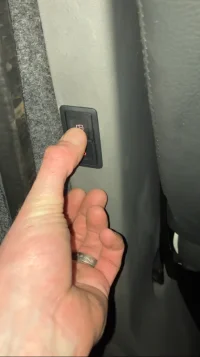
So found a solution, not perfect but it’s a solution…. Wired in an Audi q4 electric tailgate switch in as the lock/unlock switch. Wired it up as described in post 1. Then wired the illumination feed to a blank slot in the firebox under the double seat. The switch now flashes when locking and unlocking allowing you to see in the dark which button has been pressed

IMG_6690.webp

IMG_6689.webp

IMG_6678.webp
 
have been looking into this, by my eyes the locked illumination on the drivers door switch appears to be controlled within the switch (this switch has 4 pins 1 - com, 2 - lock, 3 - unlock and 4 switch illumination when headlights are on( pin designation not necessarily in that order)).
I had thought about connecting the illumination pin of my switch in the back to the sliding door lock power supply so it flashes when the lock is activated but that might not work as it would flash when locking and unlocking (or maybe not as a led is directional so it may work if the power supply to the lock is directional for the lock and unlocking function).
Just to correct what I previously said the pins at the door switch are: earth, whole switch illumination, illumination of locked led, and the final pin is comm.

I was not completely happy with the way I previously wired in the illumination to my secondary switch. So now knowing what I know I have run a wire from the wire that supplies the power to the door locked led and used that to illuminate my secondary switch. You can intercept this wire at the same connector as the above instructions.
 
Back
Top