T6.1 fog-light retrofit

Success with my Fog light installation. (back home on Leave, I work away)IMG_9532.webpIMG_9533.webp
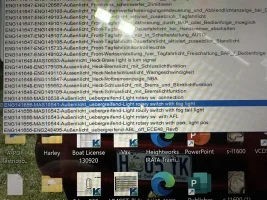
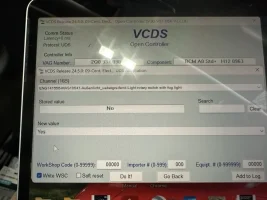
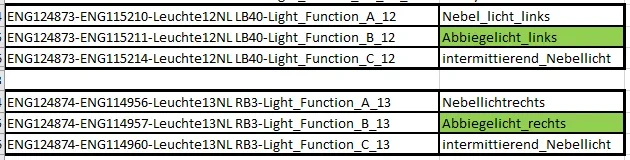
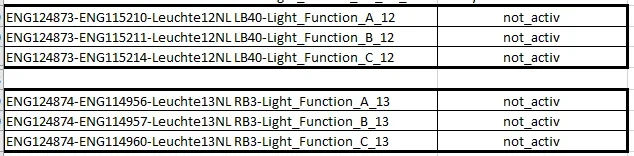
Using VCDS I was able to make an adaption to recognize the added switch position for the front Fog lights.
Could not find how to do this with OBD11 using a Pro license.
The cornering lights were functioning after doing the adaptations with OBD11, not the fogs, received a headlight fault if I left the switch on in the front foglight position.
Attached VCDS photos for information.
So I now have an OBD11 Pro and a VCDS Hex Net to play with.
 
  • Love
Reactions: mmi
Hello, new to the forum, I have t6.1 startline and have added a new bumper with front fogs, I'm ok with the wiring( I think) but struggling with vcds. Do I need to do all the wiring into bcm and new switch before adaptation with vcds and if so so can anyone talk me through it as I'm not familiar at all. Some told me you can't add new fogs into bcm using vcds but have to use an online coding service, so not really sure what to do now.
Any help will be greatly appreciated
 
Hello, new to the forum, I have t6.1 startline and have added a new bumper with front fogs, I'm ok with the wiring( I think) but struggling with vcds. Do I need to do all the wiring into bcm and new switch before adaptation with vcds and if so so can anyone talk me through it as I'm not familiar at all. Some told me you can't add new fogs into bcm using vcds but have to use an online coding service, so not really sure what to do now.
Any help will be greatly appreciated
Welcome,
If you go back and read my posts you will see I was in the same situation, but got there with out too much trouble. Need to replace the light switch with one with the additional position, you use “adaptations” in either VCDS or OBD11 or similar to add additional position to the BCM to recognise the switch.
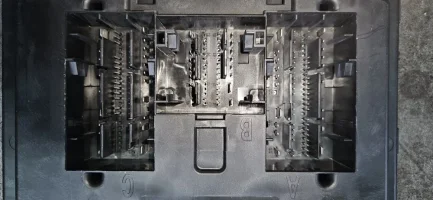
Wiring to lights from BCM pins 40 and 3 (from memory) mine work as fog lights from the switch, they work as cornering lights at any time and also illuminate when reverse is selected
 
Hello again, I'm after so more info if possible you mention left goes to pin 40 right goes to pin 3 and switch pin 9 goes to 47, but which plug on bcm? I have 3 A,B,C
 
what is the best way to get at the plugs so you can add the cables, i can see the from the bottom but struggling to get in close, would the top be easier with the clocks out
 
Last edited:
update, have got to the conhnector now and the T73A akready has a cable in so ok with that, the other 2 pins T46B I can get at but the pre wired crimps i have a too small, I dont suppose anyone has a part number for these that fit?
 
Hello all,I've followed adaptation posts on here and no success. Im seeing fog lights not coded, i have no lights working , really struggling any help guidence will be greatly appreciated, im using vcds
 
Hello all,I've followed adaptation posts on here and no success. Im seeing fog lights not coded, i have no lights working , really struggling any help guidence will be greatly appreciated, im using vcds
Just checking, have you changed the actual rotary light switch itself?
 
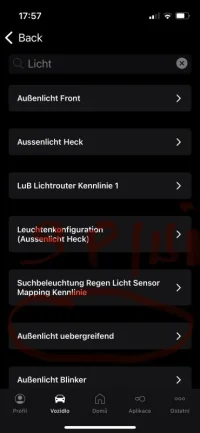
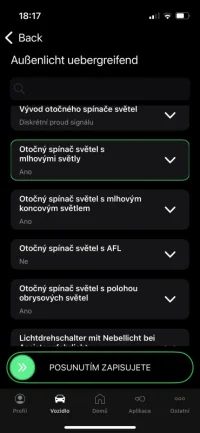
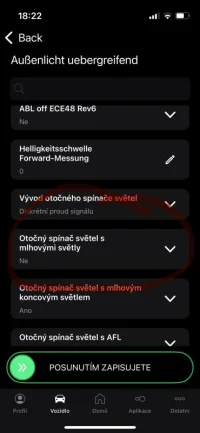
Namontoval som predné hmlové svetlá do môjho VW T6.1. Ak máte problém s nefunkčným otočným spínačom svetiel - musíte ho aktivovať v pláne OBD PRO. Riadiaca jednotka BCM 09 Pozri priložené foto: IMG_5063.webpIMG_5075.webpIMG_5076.webp
 
Please post Full Scan report so we can see how the van is configured.
There seem to several different BCMs in T6.1 depending on how van is equipped. There are at least two main variants: 2Q0 937 090 and 2Q5 937 090. Which makes me wonder what are the differences between variants...:unsure:
What coding would work for the 2Q0? I’m having issues after removing thq headlights. Now retrofitted fogs won’t work at all
 
Did the van have fog lights from factory?


Hmmm... information in in this thread

Also useful this below
No. they’re the lower fog lights. I had fitted a high line bumper and went for the kufatec oem style ones. Had the thq led headlights to begin with in which I had to code them left being right and right being left, then once I had put the standard headlights back in they’ve not been working. Pins in the bcm look fine, ground wire looks fine and the plugs for the fogs look fine so I’m not sure what went wrong with coding
 
No. they’re the lower fog lights. I had fitted a high line bumper and went for the kufatec oem style ones. Had the thq led headlights to begin with in which I had to code them left being right and right being left, then once I had put the standard headlights back in they’ve not been working. Pins in the bcm look fine, ground wire looks fine and the plugs for the fogs look fine so I’m not sure what went wrong with coding
Fog light wiring harness T6.1


Cable connection to onboard power supply control unit (label on the cables)


Label connector B PIN 5 connects to connector B PIN 3 on the T6.1


Label connector B PIN 45 connects to connector B PIN 40 on the T6.1


Fog light coding


Activate control unit 09 > Access authorization: 31347 >


Exterior light_cross-unit - set light switch with fog lights to YES


Adaptation >...


  • Leuchte 12NL LB45-Load type 12 > Set value to "10 - general headlights"
  • Leuchte12NL LB45-Lamp defect bit position 12 > Set value to "38"
  • Leuchte12NL LB45-Fault location middle byte DTC-DFCC 12 > Set value to "22"
  • Leuchte 12NL LB45-Light function A 12 > Set value to "Left fog light"
  • Leuchte12NL LB45-Light Function B 12 > Set value to "Left Cornering Light"
  • Leuchte12NL LB45-Dimming Value AB 12 > Set value to "100"
  • Leuchte13NL RB5-Load Type 13 > Set value to "10 - General Headlights"
  • Leuchte 13NL RB5-Lamp Defect Bit Position 13 > Set value to "42"
  • Leuchte13NL RB5-Fault Location Middle Byte DTC-DFCC 13 > Set value to "23"
  • Leuchte13NL RB5-Light Function A 13 > Set value to "Right Fog Light"
  • Leuchte 13NL RB5-Light Function B 13 > Set value to "Right Cornering Light"
  • Leuchte 13NL RB5-Dimming Value AB 13 > Set value to "100"
This is the coding sequence they provided. Had to google translate cause it was in German
 
 
Fog light wiring harness T6.1


Cable connection to onboard power supply control unit (label on the cables)


Label connector B PIN 5 connects to connector B PIN 3 on the T6.1


Label connector B PIN 45 connects to connector B PIN 40 on the T6.1


Fog light coding


Activate control unit 09 > Access authorization: 31347 >


Exterior light_cross-unit - set light switch with fog lights to YES


Adaptation >...


  • Leuchte 12NL LB45-Load type 12 > Set value to "10 - general headlights"
  • Leuchte12NL LB45-Lamp defect bit position 12 > Set value to "38"
  • Leuchte12NL LB45-Fault location middle byte DTC-DFCC 12 > Set value to "22"
  • Leuchte 12NL LB45-Light function A 12 > Set value to "Left fog light"
  • Leuchte12NL LB45-Light Function B 12 > Set value to "Left Cornering Light"
  • Leuchte12NL LB45-Dimming Value AB 12 > Set value to "100"
  • Leuchte13NL RB5-Load Type 13 > Set value to "10 - General Headlights"
  • Leuchte 13NL RB5-Lamp Defect Bit Position 13 > Set value to "42"
  • Leuchte13NL RB5-Fault Location Middle Byte DTC-DFCC 13 > Set value to "23"
  • Leuchte13NL RB5-Light Function A 13 > Set value to "Right Fog Light"
  • Leuchte 13NL RB5-Light Function B 13 > Set value to "Right Cornering Light"
  • Leuchte 13NL RB5-Dimming Value AB 13 > Set value to "100"
This is the coding sequence they provided. Had to google translate cause it was in German
Please share
(1) full VCDS Auto-Scan,​
(2) blockmap of 09-Central Electrics​
(3) adaptation map of 09-Central Electrics​
 
Back
Top