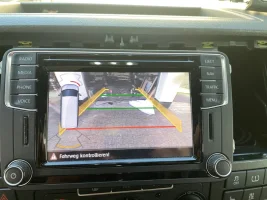
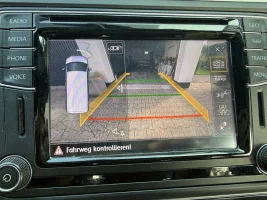
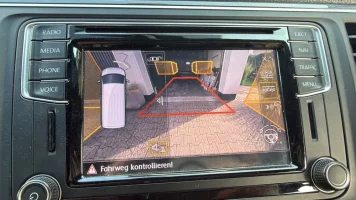
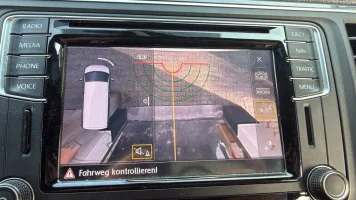
Reversing Camera - Lowline to Highline Upgrade/Retrofit

Hello, iam new here.

I have a t6.1 and will retrofit a rearview camera.

I have this Camera 5Q0980568B

After flash Firmware and parameter file with Odis e I have coding with 000000… and can’t coding the camera.

Maybe someone can help me? I do something wrong?

This files
FL_5Q0980568A__0180.frf
6C_5Q0980568B-GOLF7.xml
 
Hello, iam new here.

I have a t6.1 and will retrofit a rearview camera.

I have this Camera 5Q0980568B

After flash Firmware and parameter file with Odis e I have coding with 000000… and can’t coding the camera.

Maybe someone can help me? I do something wrong?

This files
FL_5Q0980568A__0180.frf
6C_5Q0980568B-GOLF7.xml
The encoding of the camera must fully match the data set!
I tried many different datasets and the coding was different for each of them!
 
The encoding of the camera must fully match the data set!
I tried many different datasets and the coding was different for each of them!
Ok, thank you for information.

Maybe you can send me your files?
Or do you know where I can download it?
 
Hello Robert,

in your video I see you can choose on the right side different views.

View attachment 223740

I also made this retrofit but I have no selection there.
I can only get the camera screen working on the radio if I check in Byte 19 bit 4. I think the radio handels it like a lowline camera, therefore no views selections are possible.
The guidelines are working.
If I disable Byte 19 bit 4 and enable ENG122229-ENG117712-Car_Function_List_BAP_Gen2-VPS_0x0B the radio don´t switch to the camerea screen either pdc screen.
ENG122229-ENG117713-Car_Function_List_BAP_Gen2-VPS_0x0B_msg_bus ist set to "Infotainment databus".

Once I made an update on my radio to a newer SW Version. Since that I have the error in 5F, but everything is working. I don´t know if the SW Version is the error or my coding/adaptation.

Here is my actual scan:


Can you help me what the right coding should be to use the camera like a highline camera?

I also hope with highline configuration I can activate the camera with the PDC Button, because I want to add a front camera. But with lowline configuration the camera screen is only visible in reverse gear. Not very useful for a front camera.

Thanks in advance
I have the same situation. Have you managed to resolve it? What were the final adaptations and settings? Thank you in advance!
 
My experiences tell me that I need to turn off the low camera and activate the BAP protocol.
Thank you! You are spot on. Final settings in my case :
ENG122229-ENG117712-Car_Function_List_BAP_Gen2-VPS_0x0B = Activated

ENG122227-ENG117496-Car_Function_Adaptations_Gen2-menu_display_pdc = Activated

ENG122229-ENG117713-Car_Function_List_BAP_Gen2-VPS_0x0B_msg_bus = Infotainment data bus

byte 19 bit 4 = Disabled
 
I also retrofitted the Highline RVC and Frontcamera.
Initially, I installed the 7N0 control unit and the Sharan camera.
The image quality wasn't that convincing
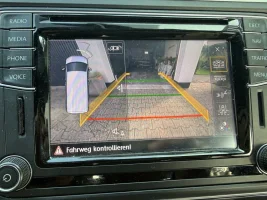
06f9bd61-9412-4c10-8159-ec08cdfc2219.jpeg So I tried the 5Q0980568B T6.1 camera in combination with the Canny converter. I have to say, I'm very satisfied with this combination. Finally, a sharp, clear image.
IMG_0790.jpeg
A0DAC1EE-E0D2-40CC-8DF9-5674FAE72B21.jpeg
420A3C29-8F75-45E9-826B-210A98D367CB.jpeg

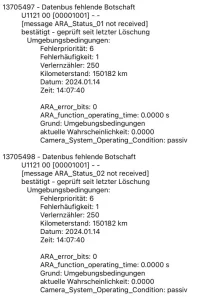
However, I received two error codes:

IMG_0798.jpeg @F-roger will take care of his firmware, so these errors will disappear.
With these errors, no basic setting/calibration of rvc is possible.
 
I also retrofitted the Highline RVC and Frontcamera.
Initially, I installed the 7N0 control unit and the Sharan camera.
The image quality wasn't that convincing
View attachment 304944 So I tried the 5Q0980568B T6.1 camera in combination with the Canny converter. I have to say, I'm very satisfied with this combination. Finally, a sharp, clear image.
View attachment 304945
View attachment 304947
View attachment 304948

However, I received two error codes:

View attachment 304946 @F-roger will take care of his firmware, so these errors will disappear.
With these errors, no basic setting/calibration of rvc is possible.
I am currently actively searching for the 568b camera in order to experience it personally! I am sure that as soon as I receive it, we will be able to update the firmware of the CANNY adapter and everything will work without a single error (this is how the 556 camera works now)
 
I am currently actively searching for the 568b camera in order to experience it personally! I am sure that as soon as I receive it, we will be able to update the firmware of the CANNY adapter and everything will work without a single error (this is how the 556 camera works now)
thank you for your effort
 
Good evening I"m tempted to modernize the camera in highline
Which camera would you recommend to me?121 ;;; 551A ,,,,568b,,566AB
Good evening gerry
 
Both versions, 7N0 module or MQB camera with Canny from @F-roger, work perfectly!

My favorite is the T6.1 camera 568B with the Canny from F-Roger.

The image resolution is better than the older cameras or 566B china version.

Look at #86 with 7N0 module #99 with 566B and #107 with T6.1 568B camera
 
What was the conclusion to get the additional parking and trailer buttons on the right of the screen, i don't have those and I believe the unit i have is 7N0907441B.
i also feel the camera i have is not that clear, what are the recommended straight swap outs to get the best image.

1762503141517.webp
 

Yeh i have read though it, but there isnt a definitive long coding code for the options to make those things work.
or clarification if a different module is required.
or clear confident answer regarding a plug and play part number swap out for a better camera.

I have the same module as @Robert and he has his icons showing! ill post my long coding i have in a sec
 
i currently have obd11, wating for new vcds to be delivered.
I dont believe i have the 1k8 unit, this is another retrofit i believe?
 
I also am looking for a list for coding - I have installed the highline camera, it works but no controls down the right hand side. Steering lines however are working.

Interestingly, in the Camera module itself it thinks its an Audi, and there are other variant options - but OBD11 does not let me change these.

There are so many different answers to this coding on here, i am just after a definitive this is the coding required to fit the highline camera....
 
I also am looking for a list for coding - I have installed the highline camera, it works but no controls down the right hand side. Steering lines however are working.

Interestingly, in the Camera module itself it thinks its an Audi, and there are other variant options - but OBD11 does not let me change these.

There are so many different answers to this coding on here, I am just after a definitive this is the coding required to fit the highline camera....
if you camera and moving guidelines are working, that's it, its programmed correctly. if you want the additional controls down the side you need to update your parking module to a 1k8 unit. I'm just in the process of updating mine over the xmas holidays.
 
Back
Top