Valence U27-12XP Lifepo4 Lithium Battery -- How We Done It --

Hi Dellmassive
I have two of theese batteries set up on solar system for two years now, they have run down to 10.5 unfortunately.. the solar has charged them to back up to 13.1 but no further, green led on is flashing 20 secs on both of them, I don't have any computer etc..
Any ideas would be great please 🙏
Thank you for your reply..
Okay as a confirmation
Join the communications cable built into battery conect together male or female.. jumper cables? from the lead acid in the engine bay of van? Or get a lithium charger?
🙏
 
Thank you for your reply..
Okay as a confirmation
Join the communications cable built into battery conect together male or female.. jumper cables? from the lead acid in the engine bay of van? Or get a lithium charger?
🙏
Definitely don’t connect to another battery!
I’m unsure if you are a new owner of the set up or have had it for a while? Make sure you read the Valence manual (available online and no doubt on this Forum).
You need a lithium profile charger, around 30A.
You need a laptop with the Valence software installed.
You need an adaptor to connect the USB to the battery.
All of the above is discussed earlier in this content.
Above all make sure you are 100% sure that you know what you are doing, there is a lot of energy involved.
 
Definitely don’t connect to another battery!
I’m unsure if you are a new owner of the set up or have had it for a while? Make sure you read the Valence manual (available online and no doubt on this Forum).
You need a lithium profile charger, around 30A.
You need a laptop with the Valence software installed.
You need an adaptor to connect the USB to the battery.
All of the above is discussed earlier in this content.
Above all make sure you are 100% sure that you know what you are doing, there is a lot of energy involved.

20251021_111444.webp
 
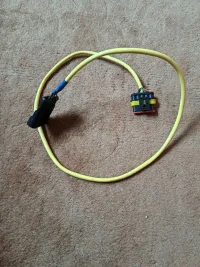
This cable was given when i purchased the batteries...have been reading this forum for few days now.. I don't know 100% what to do no I'll be honest! As the system has been working great until now! I'm not so technically minded!
 
That’s not the cable for connecting the laptop.
So if it’s been working 100%, how long have you been using it and how is it charged / monitored?
 
Lee's valance green batteries are effectively just the bank of dumb sells connected internally.

There is no fusing, no disconnect switch, no shunt.


And the only way to get the balance circuit active is to connect the laptop, and run the software.

What I would do, is connect the laptop up run the software and connect the charger and charge at 10 amps for 24 hours and see if you can bring the cells back up and in line

The selves themselves are fairly durable from what I've seen.

I've sold off all of my green batteries long ago now.
.

The current range of lithium batteries commercially available I might safer much better and come with all of the safety features built in..

So if you're green balance batteries don't come back to life,,. Just sell them on an exchange them for a more modern fully integrated lithium battery with full BMS.
 
Lee's valance green batteries are effectively just the bank of dumb sells connected internally.

There is no fusing, no disconnect switch, no shunt.


And the only way to get the balance circuit active is to connect the laptop, and run the software.

What I would do, is connect the laptop up run the software and connect the charger and charge at 10 amps for 24 hours and see if you can bring the cells back up and in line

The selves themselves are fairly durable from what I've seen.

I've sold off all of my green batteries long ago now.
.

The current range of lithium batteries commercially available I might safer much better and come with all of the safety features built in..

So if you're green balance batteries don't come back to life,,. Just sell them on an exchange them for a more modern fully integrated lithium battery w
 
Okay great I appreciate the info/time you have taken to reply,
I was wondering if I could have a chat on the phone? It would be quicker to converse about the setup I have installed..
 
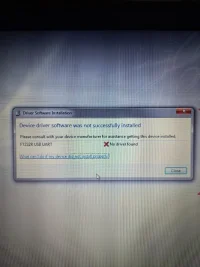
Hi dellmasive... how are you, I have purchased the USB Data cable and attachment as described in forum... assembled together only the computer I have with windows 7 has not recognised the USB device, the USB does blink but that is all...
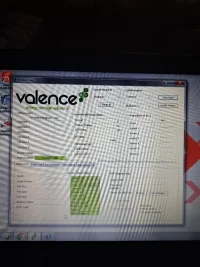
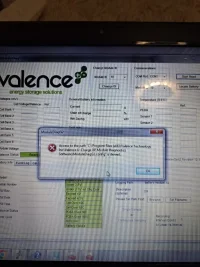
Also downloaded the valence software, nothing! Any input would be great! If not like you said they will be up for sale as I don't have time nor patience! 🙏

20251030_160658.webp

20251030_160736.webp
 
Hi dellmasive... how are you, I have purchased the USB Data cable and attachment as described in forum... assembled together only the computer I have with windows 7 has not recognised the USB device, the USB does blink but that is all...
Also downloaded the valence software, nothing! Any input would be great! If not like you said they will be up for sale as I don't have time nor patience! 🙏

View attachment 307630

View attachment 307631
You need to go on to the internet and download the ftdi rs232 device driver.

Then go into your Windows device manager so you find your USB cable, and then manually install the device driver.

For extra help just Google how to install an rs232 device driver.... Or RS 485 device driver.

They are pretty much generic and clones so I standard USB rs232 device driver should work.

Or ask the place or person that you bought the USB cable from for a link to get the device driver...


The cable should show up in Windows device manager as unknown device type or unknown device drivers that will disappear when you unplug the cable, that's how you will be able to find out which device it is.
 
Once you have the device driver installed, it will show up as a virtual COM Port..

Then once you open the valent software you can select the COM Port number of your new USB cable.
 
Do your known your battery module ID?

Follow the guide.

Post in thread 'Valence U27-12XP Lifepo4 Lithium Battery -- How We Done It --' Valence U27-12XP Lifepo4 Lithium Battery -- How We Done It --


If the ID is not written on the battery, you may need to go through all the ids and try to connect to each one...

It could be any id number in the list.... You can change it to 01 after if you wish.

Also make sure you data cable RX and TX are the right way around.....
 
Also make sure you data cable RX and TX are the right way around.....
When I first connected my battery I found that the instructions for the RX / TX were reversed, just a case of reworking the terminal.
 
Yes the locate battery works... usb flashes blue, I've tried the scan ,wich also flashes blue but then states system scan complete found no modules
 
I have followed guide as to the cable locations red 5/ yellow 4/orange 3/ black 2
Is this what you mean by Rx/tx change them around? Cheers
 
Try the RX TX the other way around.

Also has the battery got power at the terminal?...if it's dead flat the BMS might not wake up?

Try connecting a charger to the battery and try connecting.... 14.2v charge voltage.
 
Back
Top