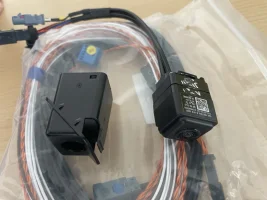
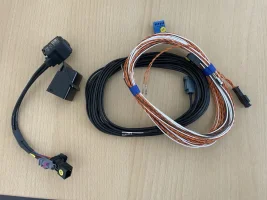
T6.1 Retrofit Reversing Camera

Excellent, thanks for the reply.
With regards to coding using VCDS, I plugged in yesterday and could see no option in the infotainment long coding helper to activate camera like i’d done previously… is it an adaption that needs to be activated or am I doing something incorrectly?
The tick box is still present in the steering coding helper.

Thanks again in advance.
Hi,
Did you manage to solve the problem? I’m struggling with exactly the same issue.
The camera is connected to the box behind the glove compartment. In VCDS, I enabled the rear camera in the Steer/Park Assist module, and also tried the following:


19 - Gateway → Installation List → Activate "6C - Backing up camera" → Save
5F - Electronic System → Adaptations →


CAR FUNCTION LIST BAP GEN2 - VPS → ACTIVE
CAR FUNCTION LIST GEN2 - VPS msg bus → TERMINAL 15


Neither method made it work.
I tested the camera with an external monitor, and it works fine that way.
 
Hi,
Did you manage to solve the problem? I’m struggling with exactly the same issue.
The camera is connected to the box behind the glove compartment. In VCDS, I enabled the rear camera in the Steer/Park Assist module, and also tried the following:


19 - Gateway → Installation List → Activate "6C - Backing up camera" → Save
5F - Electronic System → Adaptations →


CAR FUNCTION LIST BAP GEN2 - VPS → ACTIVE
CAR FUNCTION LIST GEN2 - VPS msg bus → TERMINAL 15


Neither method made it work.
I tested the camera with an external monitor, and it works fine that way.
Hiya mate,

Yes, got it sorted in the end… I believe the coding you’ve tried which is the same I did at the time is for the highline camera (the one with the moving guide lines when you turn the steering) so reverse what you did and put adaptions back to what they were, I’ve just got a standard camera with no moving guides…
Do the following:

Module 5F - (Adaptions) - ENG248800-function_configuration_rvc-rear_view_low_rvc

Change status from: not_active to status: active_no_legal_screen

You may also need to do the following aswell but can’t remember fully as was a while back now…

Module 10 - (Coding) byte 2 - bit 4-5

Fingers crossed, that’ll get you sorted…
 
Just ran all the cables from the camera to the main part of the van - vinyl wire puller is a must have tool! I bought a Highline retrofit kit off ebay, but suspect its an Aliexpress special (and i probably got scammed)... either way, it has a brown ground wire with a ring ending (see pic below). That wire will get into the main part of the van after the rubber tubing, but then not sure where i would connect it to? It won't reach down to the rear lights. All the other wires (orange / purple = Canbus).etc will reach to the headunit.

Is there a suitable ground connection in the tailgate somewhere?
 
Last edited:
When I bought my campervan the original Startline T6.1 did not have a reversing camera installed. I got the conversion company to install the camera and it worked fine so I assume they did the extra coding. The head unit display died and under my 'All In' Warranty my local VW dealer fitted a new one. The problem is, they could not (would not?) recode the camera as it was an aftermarket addition and not originally included in the build.
Is there someone local to NW London with a VCDS who would do this for me?
 
Probably worth investing in an ODB11 dongle from Amazon and use the app, the coding is on here to activate it - only a few steps required.
 
I've subscribed to AA VIXA and should be getting an OBD dongle soon. Do you know if it can be used by other apps?
 
I've subscribed to AA VIXA and should be getting an OBD dongle soon. Do you know if it can be used by other apps?
Not a generic OBD dongle, either OBD Eleven or Carista will allow you to do the long coding required.
 
Back
Top