Android Car Stereos UK

Anyone know how I connect the dab receiver to the van's dab aerial? I got the connectors recommended on this thread but can't seem to work it out.
It’s because you have pulled the plugs off incorrectly, you have the bit which is suppose to be left on the old head unit stuck in the plug, remove these then the adapters will fit
 
Hi, I managed to sort, it seems to use the existing car aerial with the DAB receiver I ordered from Amazon. That then went into the usb on the back of the unit.
 
Just to update - so far all OK. DAB working well, the existing Mic seems to work , so I have not yet installed the included external Mic.
The chap at Android Car Stereos was very helpful in getting it installed and is still answering some queries.
My current issue is I've not installed the reversing camera and when I initially select reverse this results in a "lost camera signal" message on screeen rather then the parking sensor graphics. ACS are trying to help to see how i could disable the camera using the settings, but we don't have a sloution yet.
I wasnt intending to do it, but how hard is it to install the camera? Are their any videos or guides online that could assist?
 
It’s because you have pulled the plugs off incorrectly, you have the bit which is suppose to be left on the old head unit stuck in the plug, remove these then the adapters will fit
meant to thank you for this advice. ACS also pointed out the same!
 
  • Like
Reactions: CAB
Just to update - so far all OK. DAB working well, the existing Mic seems to work , so I have not yet installed the included external Mic.
The chap at Android Car Stereos was very helpful in getting it installed and is still answering some queries.
My current issue is I've not installed the reversing camera and when I initially select reverse this results in a "lost camera signal" message on screeen rather then the parking sensor graphics. ACS are trying to help to see how i could disable the camera using the settings, but we don't have a sloution yet.
I wasnt intending to do it, but how hard is it to install the camera? Are their any videos or guides online that could assist?

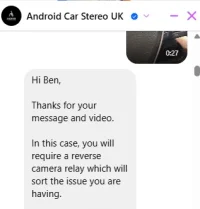
The reverse camera is apparently quite good with moving lines for steering. Could be worth installing. It's common for it to require an additional relay for a stable power feed. I set mine up and when engine off, the camera feed was fine. With engine on the voltage supplied is messy and no ffed so needs a filter/relay. Another thing is that the reverse camera warning tone doesn't have a mute option and feels like it stays on for even longer once you have reversed to a stop. One of my only gripes.

1769587814270.webp
 
I had the same issue with the reverse camera, fitted the relay and its been faultless since
 
Has anyone managed to download a boot logo to their head unit?
Tried using Bluetooth, but to no avail, I think you need to do it via USB.

Wallpapers will transfer over with BT.

And for anyone who is trying to access this area and doesn't know the code, mine worked using 1617 :thumbsup:
 
Has anyone managed to download a boot logo to their head unit?
Tried using Bluetooth, but to no avail, I think you need to do it via USB.

Wallpapers will transfer over with BT.

And for anyone who is trying to access this area and doesn't know the code, mine worked using 1617 :thumbsup:
No, I don't think there is the option to add your own.

To say it's an android system there are certainly limitations. That's why they are budget units I guess

I was hoping there would be a different DAB radio launcher or an app as the generic one is annoying and not to my taste.
 
No, I don't think there is the option to add your own.

To say it's an android system there are certainly limitations. That's why they are budget units I guess

I was hoping there would be a different DAB radio launcher or an app as the generic one is annoying and not to my taste.
Cheers for the reply, I've got one downloaded on a USB stick, and when I get round to fitting the amp, and the head unit is out, I'll have a little play around.

Totally agree about the DAB radio, not all that aesthetically pleasing, but 99% of the time I'm either on Spotify or launch the Radio UK app.
 
Has anyone managed to download a boot logo to their head unit?
Tried using Bluetooth, but to no avail, I think you need to do it via USB.
I have just tried getting a boot logo onto the head unit and failed.

Have managed to get the file into the correct folder, but when I go to change the boot logo it is no where to be seen. When I pop back into the boot logo folder, it's sitting there hanging out with all his android logo mates!

I've tried various resolutions etc, still nowt.

To access the relevant folder, I installed Total Commander - file manager - Apps on Google Play on to the head unit

Feel free to give it a try and see if you have any luck, and I used a usk stick for the file
 
Hi, couple of pretty basic questions on this unit - anyone know how to change the ringtone, it's very "Beijing" currently...?! Also I'd like to remove the door opening pop up on the display and can't work out how to disable. Any help would be appreciated.
 
Ill take a look tomorrow, you might able to access it through the settings menu, or it might be locked in the firmware.

Don't know if you could Bluetooth an mp3 file over and access it through the settings?
 
Have sorted the door opening pop up. Much prefer to have it off as every time someone opened a door you could not access the screen without dismissing the pop up first.

Just need the Chinese ringtone changed now. Do I take it that others don't have the same ringtone, or has everyone else have managed to change it?
 
Have sorted the door opening pop up. Much prefer to have it off as every time someone opened a door you could not access the screen without dismissing the pop up first.

Just need the Chinese ringtone changed now. Do I take it that others don't have the same ringtone, or has everyone else have managed to change it?

The door pop up is annoying. How did you get rid? Is it just buried in the settings?

I'm not sure about the ringtone as no one ever seems to call me 🤣🤣😐
 
The door pop up is annoying. How did you get rid? Is it just buried in the settings?

I'm not sure about the ringtone as no one ever seems to call me 🤣🤣😐

Door pop up - I'll have a look tomorrow, it was a bit whackamole with some settings but I managed to get rid of it. I'll let you know.
 
Door pop up - I'll have a look tomorrow, it was a bit whackamole with some settings but I managed to get rid of it. I'll let you know.

Car Info App / Functions / Door window setting / the door not show

I toggled door always showing off and "the door not show" on and this seemed to get rid of the the door pop up.

Can anyone help with the ringtone?!
 
Car Info App / Functions / Door window setting / the door not show

I toggled door always showing off and "the door not show" on and this seemed to get rid of the the door pop up.

Can anyone help with the ringtone?!
I’m sure my ring tone is the same as when I had the original head unit, I’ll check when I’m out in the van tomorrow
 
So I`ve just ordered one. Quick question, I never use the DAB on my current factory fitted unit, so is the new units FM good enough.
 
Im thinking of pulling the trigger on one of these too, although nervous enough on the import costs to Rep of Ireland.
Quick questions.
1. Are these plug and play? I've zero experience of changing radios and far from an auto spark.
2. We dont have DAB in Ireland how do ye find the FM functions? Getting signal and storing stations?
3. I think it comes with a reversing camera. Does this just get wired into the radio or does it need be be hardwired somewhere else to recognise when reverse is selected?

Sorry amateur questions which makes me think I should get someone professional to install.

Cheers
Dave
 
Back
Top