
You are using an out of date browser. It may not display this or other websites correctly.
You should upgrade or use an alternative browser.
You should upgrade or use an alternative browser.
T6.1 Tyre Pressure Monitoring System Activation (Indirect TPMS)
- Thread starter Pauly
- Start date


Just did this, coding all accepted, but I get 'function not available' when I try to set the tyre pressure?Hi, for those of you who want to use OBD Eleven to activate this function I've done an edit of Pauly's VCDS instructions.
OBD Eleven (This Needs - PRO Subscription)
Indirect TPMS – VW T6.1
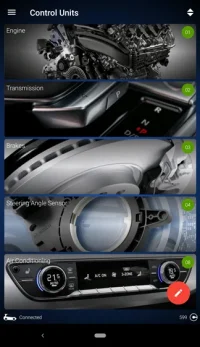
To activate TPMS we are going to start with module ‘03 Brakes’
Enter module 3 and then go into ‘Long coding’ then click the icon top right, it’s the one with ones and zeros illustrated on it.
In here you need to change the five values below, it’s important that all five are changed at the same time, changing them one at a time does not work and will generate an error.
To do this click into the area labelled ‘Byte Index’ and type in the corresponding ‘Byte Index Numbers’ below, and click ‘Done’ to go directly to that ‘Byte’:
Note – when a Byte is changed it will be highlighted in green, this is normal. They will stay green until the entire code is saved using the bottom slider. Remember to only do this after all five changes have been made.
Byte Index 0 Remove the tick from the box next to ‘Bit 5’
Byte Index 6 Remove the tick from the box next to ‘Bit 3’
Byte Index 8 Remove the tick from the box next to ‘Bit 2’
Byte Index 14 Remove the tick from the box next to ‘Bit 4’
Byte Index 17 Place a tick in the box next to ‘Bit 4’
Slide the ‘Save slider’ to the right to save the changes and exit.
--------------------------------------------------------------
Now go to module ‘17 Dashboard’
Enter module 17 and then go into ‘Long coding’ and as above click the icon top right, click into the area labelled ‘Byte Index’ again, and type in the corresponding ‘Byte Index Numbers’ below:
Byte Index 4 Place a tick in the box next to ‘Bit 0’
Slide the ‘Save slider’ to the right to save the changes and exit.
--------------------------------------------------------------
The final module that needs changing is ‘5F Multimedia’
This time enter module 5F and then go into ‘Adaptions’ and NOT Long coding.
All should show 'not active' so need to be changed to the below values (it’s quite a long list so use the search box to shortcut to search for Car Function Adaptions Gen2 and Car Function List BAP Gen2 to speed things up)
Once found tap on ‘Car Function Adaptions Gen2’.
On the next page, search for:
Menu display rdk
In the drop down menu select ‘Activated’
Once found tap on ‘Car Function Adaptions Gen2’.
On the next page, search for:
‘Menu display rdk over threshold high’
In the drop down menu select ‘Activated’
Once found tap on ‘Car Function List BAP Gen2’.
On the next page, search for:
‘Tire pressure system 0x07’
In the drop down menu select ‘Activated’
Once found tap on ‘Car Function List BAP Gen2’.
On the next page, search for:
‘Tire pressure system 0x07 msg bus’
In the drop down menu select ‘Databus Extended’
Slide the ‘Save slider’ to the right to save the changes and exit.
That's it, after all changes are made reset any fault codes that are showing.
All (cold) tyre pressures should be checked and adjusted as necessary. Then click on the ‘SET’ option on the on screen display, see below for reference.
A huge thank you to all who contribute to this forum, especially @mmi, @Pauly and @dnoermann for all their work on this little gem.
EDIT: Missed out one of the adaptations. But i do have a 'No Basic Setting' error in Module 17 now...
Last edited:


I did mine, no changes seen to anything I've done (TPMS, Rear fader etc)@Pauly Do you know if the SOS software update that VW are rolling out for the loss of G2 & G3 network will affect the changes to 5F infotainment setting we have made for indirect TPMS coding ?
I have had a email asking me to perform the update

Can’t see why it would have an effect, can’t say for sure but seems unlikely to me ?@Pauly Do you know if the SOS software update that VW are rolling out for the loss of G2 & G3 network will affect the changes to 5F infotainment setting we have made for indirect TPMS coding ?
I have had a email asking me to perform the update
Thanks for the confirmation. I had a problem a couple of years ago when the garage connected mine to ODIS. It over wrote the TPMS and the fader for the rear speakers. I had to recode to get the function back.I did mine, no changes seen to anything I've done (TPMS, Rear fader etc)


aggallim
New Member
Hi everyone
I've been trying to switch my 2020 T6.1 from direct to indirect TPMS following the excellent guide on this thread. My van has aftermarket alloys with no TPMS sensors in the wheels, so the direct system has been throwing a constant fault on the dash side I got it.
I successfully followed the indirect TPMS activation guide (Module 03 ABS, Module 17 Instruments, Module 5F Infotainment) and the indirect system appears to be present in part via the infotainment, however the tyre pressure screen flip-flops between showing the direct TPMS view (4 individual tyre pressures) and the indirect view, and I get an 'unable to save tyre pressure' error when trying to hit SET. I also still have the TPMS warning light on the dash.
I thought the issue was that Module 65 (direct TPMS/RDK) was still active on the CAN bus and conflicting with the indirect system. I attempted to code it out via Module 19 (Gateway - GW MQB High, 3Q0907530C/AC) but I went into Adaptations > Installation List > Specified Installations and changed 'Tyre Pressure Monitoring 1' from coded to not coded. This caused a gateway fault and a damper fault to appear on the dashboard.
I've since reverted that change and cleared all faults I can find, but the damper fault is persisting.
Can anyone advise:
1. Is my logic sound about coding out Module 65 from the gateway on a 3Q0907530C - is it a long coding byte change, and if so which byte/bit?
2. How to track down and clear the damper fault that appeared after my failed attempt? I've cleared all faults I can and the remaining ones were present before I started any of this.
I have OBDeleven Pro. Thanks for any help or advice you can give me.
I've been trying to switch my 2020 T6.1 from direct to indirect TPMS following the excellent guide on this thread. My van has aftermarket alloys with no TPMS sensors in the wheels, so the direct system has been throwing a constant fault on the dash side I got it.
I successfully followed the indirect TPMS activation guide (Module 03 ABS, Module 17 Instruments, Module 5F Infotainment) and the indirect system appears to be present in part via the infotainment, however the tyre pressure screen flip-flops between showing the direct TPMS view (4 individual tyre pressures) and the indirect view, and I get an 'unable to save tyre pressure' error when trying to hit SET. I also still have the TPMS warning light on the dash.
I thought the issue was that Module 65 (direct TPMS/RDK) was still active on the CAN bus and conflicting with the indirect system. I attempted to code it out via Module 19 (Gateway - GW MQB High, 3Q0907530C/AC) but I went into Adaptations > Installation List > Specified Installations and changed 'Tyre Pressure Monitoring 1' from coded to not coded. This caused a gateway fault and a damper fault to appear on the dashboard.
I've since reverted that change and cleared all faults I can find, but the damper fault is persisting.
Can anyone advise:
1. Is my logic sound about coding out Module 65 from the gateway on a 3Q0907530C - is it a long coding byte change, and if so which byte/bit?
2. How to track down and clear the damper fault that appeared after my failed attempt? I've cleared all faults I can and the remaining ones were present before I started any of this.
I have OBDeleven Pro. Thanks for any help or advice you can give me.

Logic yes, however not sure of the method...1. Is my logic sound about coding out Module 65 from the gateway on a 3Q0907530C
Is it any different if you change the installation list using the dedicated function in the Gateway (instead of tweaking adaptations) - along these linesI attempted to code it out via Module 19 (Gateway - GW MQB High, 3Q0907530C/AC) but I went into Adaptations > Installation List > Specified Installations and changed 'Tyre Pressure Monitoring 1' from coded to not coded.

Remove 69-Trailer control from gateway installation list.
Red pen = edit
Untick (69) Trailer control
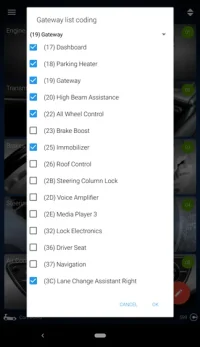
Red pen = edit
Untick (69) Trailer control
can't find anything online or here on the forum.

What were the actual fault codes?a gateway fault and a damper fault to appear on the dashboard.
What were the actual fault codes in ABS, Instruments, Gateway?I get an 'unable to save tyre pressure' error when trying to hit SET
I think the problem will be that other modules at expecting to see it and receive signals from it, if you remove it from the gateway you will need to remove it from any other modules that interface with it and I suspect that will be tricky without VCDS, in fact I think it would be tricky with VCDS and even trickier without !
Hi, I have just coded in TPMS as described in post 1 and 2 on my 2022 t6.1, everything looked ok. I then went for a test drive and then rescanned it on my return. I now appear to be getting errors associated with the Engine, ABS, Auto Dist. Reg, and Information Electr modules (removing the coding stops the errors occurring). does anyone have any thoughts what I may have done wrong?
I have attached the vcds scan containing the errors in question
I have attached the vcds scan containing the errors in question
Attachments
Hi, I have just coded in TPMS as described in post 1 and 2
Confused here. Your scan does not have any of the required codings for the TPMSI have attached the vcds scan containing the errors in question

Confused here. Your scan does not have any of the required codings for the TPMSView attachment 319137
Sorry, looks like I forgot to clear the faults after undoing the coding with that scan. The scan I should have attached it this oneConfused here. Your scan does not have any of the required codings for the TPMSView attachment 319137
Attachments
So after the coding there were no faults? (or, at least they cleared after finishing the coding).I have just coded in TPMS as described in post 1 and 2 on my 2022 t6.1, everything looked ok.
But do the faults clear, and return when driving?I then went for a test drive and then rescanned it on my return. I now appear to be getting errors
Do you have Adaptive Cruise Control, which version (on build sheet something like 8T8, 8T7,...)
Please post adaptation maps of
01-Engine,
03-ABS,
13-Auto Dist. Reg.
17-Instruments,
5F-Infotainment
How-to create a adaptation map file:
The result file is saved into directory C:\Ross-Tech\VCDS\Logs
[VCDS]
[Applications]
[Controller Channel Map]
- Single Controller Address = NN (as mentioned 01, 03, 13, 17, 5F)
- Login or security access code: Leave blank
- Function: Adaptations
- Output: CSV file
[Go]
The result file is saved into directory C:\Ross-Tech\VCDS\Logs
1) Please tick 03-ABS byte 17 bit 1 = "1" (thus byte 17 would change from 21 to 23, and with TPMS coding applied would be from 31 to 33)
Any difference, please post a fresh Auto-Scan.
2) Please redo the TPMS codings & adaptations?
Any difference now, please post a fresh Auto-Scan.
After coding there were no faults, but after the test drive the faults appeared.So after the coding there were no faults? (or, at least they cleared after finishing the coding).
But do the faults clear, and return when driving?
Do you have Adaptive Cruise Control, which version (on build sheet something like 8T8, 8T7,...)
Please post adaptation maps of
01-Engine,03-ABS,13-Auto Dist. Reg.17-Instruments,5F-Infotainment
How-to create a adaptation map file:
[VCDS][Applications][Controller Channel Map]- Single Controller Address = NN (as mentioned 01, 03, 13, 17, 5F)- Login or security access code: Leave blank- Function: Adaptations- Output: CSV file[Go]
The result file is saved into directory C:\Ross-Tech\VCDS\Logs
1) Please tick 03-ABS byte 17 bit 1 = "1"
Any difference, please post a fresh Auto-Scan.
2) Please redo the TPMS codings & adaptations?
Any difference now, please post a fresh Auto-Scan.
The faults can be cleaned but when you go for a test drive they come back.
I do not have ACC.
Will post the adaptation maps tonight once I get home from work
Well I’m confused now this time no errors occurred at the test drive and all seems to be happy.After coding there were no faults, but after the test drive the faults appeared.
The faults can be cleaned but when you go for a test drive they come back.
I do not have ACC.
Will post the adaptation maps tonight once I get home from work
I have attached the pre coding scan, after coding scan, pre test drive error cleared scan and finally the scan after the test drive (same test drive as yesterday where the faults were coming up) along with the module maps incase it is still of interest
Attachments
-
adpmap-01.CSV1.6 KB · Views: 1
-
adpmap-03.CSV6.8 KB · Views: 3
-
Scan after coding.txt11.9 KB · Views: 1
-
scan after coding error clear then test drive.txt8.7 KB · Views: 2
-
adpmap-17.CSV17.1 KB · Views: 1
-
Scan after coding and errors cleared.txt8.7 KB · Views: 2
-
adpmap-13.CSV1.5 KB · Views: 1
-
adpmap-5f.CSV75.2 KB · Views: 1
-
Scan before coding.txt8.7 KB · Views: 1
InterestingWell I’m confused now this time no errors occurred at the test drive and all seems to be happy.

Thank you. Nothing obviously wrong in the maps.I have attached the pre coding scan, after coding scan, pre test drive error cleared scan and finally the scan after the test drive (same test drive as yesterday where the faults were coming up) along with the module maps incase it is still of interest
Well, still wondering why your ABS coding seems to unique re the coding below.
1) Please tick 03-ABS byte 17 bit 1 = "1" (thus byte 17 would change from 21 to 23, and with TPMS coding applied would be from 31 to 33)
Any difference, please post a fresh Auto-Scan.
No idea, I’m getting the feeling this van has a few unique lines of code in it!! Following on from your help with the Databus error and now this one!Well, still wondering why your ABS coding seems to unique re the coding below.
Vcds is being as useful as nipples on a chicken in suggesting what byte 17 bit 1 relates to I.e. there is no description next to the tick boxes
Hi Pauly,
I made it all (I hope) and on my radio it shows a screen with the "SET" button (indirect TPMS) instead of original screen with pressures of individual tires (direct TPMS). Unfortunatelly it shows the message "this (set) function is currently unavailable". AI said I need to make longer ride to calibrate ABS sensors, but after 40 km with some stops, still that same. Pls do U have any advice?
Thanks!
I made it all (I hope) and on my radio it shows a screen with the "SET" button (indirect TPMS) instead of original screen with pressures of individual tires (direct TPMS). Unfortunatelly it shows the message "this (set) function is currently unavailable". AI said I need to make longer ride to calibrate ABS sensors, but after 40 km with some stops, still that same. Pls do U have any advice?
Thanks!
Similar threads
- Replies
- 29
- Views
- 2K


- Replies
- 17
- Views
- 6K
- Replies
- 9
- Views
- 673


- Replies
- 26
- Views
- 2K
- Replies
- 16
- Views
- 2K