
You are using an out of date browser. It may not display this or other websites correctly.
You should upgrade or use an alternative browser.
You should upgrade or use an alternative browser.
Clock shows 00:00. Fixed by VW release Dec 25
- Thread starter Derek99B
- Start date
Gen6Original
New Member
I had this too. I pressed the back button and it seemed to sort itself out and had updated itself. Essentially exit the process and I think you will find it works.

Mala23
Member
Do you mean the arrow on the screen? Because it doesn't work for me... I tried pressing the arrow but it seems to be disabled, it has no effect.I had this too. I pressed the back button and it seemed to sort itself out and had updated itself. Essentially exit the process and I think you will find it works.
Gen6Original
New Member
Yes the top right hand “back arrow”.
Just to clarify - you have installed the new software and the unit looked like to was processing and installing it, and then this screen appeared?
Or has this screen appeared before you ran the update?
If you have run the update I think the unit is updated. In which case I think I just turned the radio off using the volume button, turned it back on and it was all sorted.
But I am not an expert - just someone who had the same clock issue and followed what this thread had suggested!
Just to clarify - you have installed the new software and the unit looked like to was processing and installing it, and then this screen appeared?
Or has this screen appeared before you ran the update?
If you have run the update I think the unit is updated. In which case I think I just turned the radio off using the volume button, turned it back on and it was all sorted.
But I am not an expert - just someone who had the same clock issue and followed what this thread had suggested!
Mala23
Member
Thank you very much for the support, even if you are not an expert it doesn't matter, yes I performed the entire update, it turned off and on I think a couple of times after uploading the files, then in the end this screen appeared, but even by forcing the shutdown with the button when it turns back on the photo writing reappears and I can select the items on the list but the arrow at the top right doesn't let me go back.Yes the top right hand “back arrow”.
Just to clarify - you have installed the new software and the unit looked like to was processing and installing it, and then this screen appeared?
Or has this screen appeared before you ran the update?
If you have run the update I think the unit is updated. In which case I think I just turned the radio off using the volume button, turned it back on and it was all sorted.
But I am not an expert - just someone who had the same clock issue and followed what this thread had suggested!
JeanClaudeVanDom
New Member
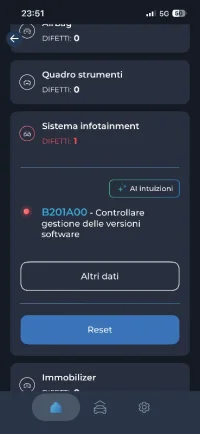
I had an identical issue happen to me a few months back. It turned out there was a dead spot on the touch screen where the back button is. I had to order a new digitiser and install that. Required taking the unit apart to do so but I was able to complete the update there after.Good evening everyone, I urgently need help, I also had the problem of the clock at 00:00, I downloaded the file and uploaded the update to the infotainment, but when it finished, this image appeared and I don't know what to do...
View attachment 323888

Derek99B
Member
Hi
From my original write up, which was a while ago now and my memory has faded.
But you seem to have the files properly expanded onto a SD Cards
So
Expand it onto the root directory of a SD Card, 4Gb to 16Gb, inserted into SD Slot 1.
Be sure the content is in the root directory.
Press and hold Menu button for 10 seconds to start Service Mode, (takes a while)
Then go -. Software update -> Versions -> Select Release and chose the file
Then let it run.
Ihope that helps Derek
From my original write up, which was a while ago now and my memory has faded.
But you seem to have the files properly expanded onto a SD Cards
So
Expand it onto the root directory of a SD Card, 4Gb to 16Gb, inserted into SD Slot 1.
Be sure the content is in the root directory.
Press and hold Menu button for 10 seconds to start Service Mode, (takes a while)
Then go -. Software update -> Versions -> Select Release and chose the file
Then let it run.
Ihope that helps Derek

Mala23
Member
Thanks Derek, the procedure was clear, but thanks for taking the time to reply. The problem finally occurred, but as suggested, I strongly suspect the problem, as suggested, is due to the touchscreen, which I hadn't realized wasn't working in the upper right corner, and which therefore prevents me from exiting at the end of the procedure. I ordered a replacement part and will replace it. Hopefully that's the solution. I'll let you know. Thanks again. Just to add some more information, hoping it'll be useful to someone else. The first link has the username "guest" and the password "guest."Hi
From my original write up, which was a while ago now and my memory has faded.
But you seem to have the files properly expanded onto a SD Cards
So
Expand it onto the root directory of a SD Card, 4Gb to 16Gb, inserted into SD Slot 1.
Be sure the content is in the root directory.
Press and hold Menu button for 10 seconds to start Service Mode, (takes a while)
Then go -. Software update -> Versions -> Select Release and chose the file
Then let it run.
Ihope that helps Derek
Mala23
Member
After replacing the digitizer, I solved the problem, I managed to complete the procedure, I then solved the error with vcds, now the time is correct and everything seems to work, thanks again for the help, to anyone interested in doing so I suggest checking the status of the touchscreen before proceeding.
Mala23
Member
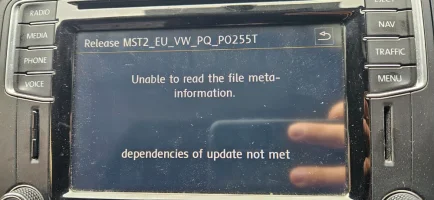
I'm absolutely no expert, but I followed the procedure, and it worked for me (in the end). I don't know if I can help you. Maybe I'm asking a stupid question, but did you expand the files? I remember it was a .rar file that needed expanding. Did you try downloading the files again?Evening! Can anyone offer advice? I have tried the update according to the instructions in this thread and the headunit displayed this message when I selected the file from the SD card. Thought the clock issue was finally resolved but not quite!!
View attachment 331067

goyaguru
Member
Thanks for replying. I am no expert either but I did follow the instructions carefully. All aspects of the download look the same as instructed (8gb card, Fat 32 format, top level file structure etc). I am wandering if the current software version on the head unit is the issue, but I have little knowledge to back uo this assumption!!! There is another thread on the forum with detailed instructions and downloads but the links for the downloads aren't working. A little lost currently!!
Mala23
Member
I'm sorry I can't help you further. I can only suggest you look at this German site, which also has links (maybe they work). I hope you can resolve the issue or that someone more knowledgeable can help you.Thanks for replying. I am no expert either but I did follow the instructions carefully. All aspects of the download look the same as instructed (8gb card, Fat 32 format, top level file structure etc). I am wandering if the current software version on the head unit is the issue, but I have little knowledge to back uo this assumption!!! There is another thread on the forum with detailed instructions and downloads but the links for the downloads aren't working. A little lost currently!!

Discover Media zeigt ständig 0:00 Uhr - mit Lösung (Update per SDKarte)
Moin, ich liebe das Forum. Ich Danke für die vielen Tips. Hab heute das Display getauscht und gleich noch den Fehler mit der Uhr behoben. Hab die 369T verwendet. Das jetzt keine Senderlogos mehr da sind, stört mich nicht.
 tx-board.de
goyaguru
Member
Thanks for taking the time to send that link. I might need to Bruch up on my German a little!!I'm sorry I can't help you further. I can only suggest you look at this German site, which also has links (maybe they work). I hope you can resolve the issue or that someone more knowledgeable can help you.
Discover Media zeigt ständig 0:00 Uhr - mit Lösung (Update per SDKarte)
Moin, ich liebe das Forum. Ich Danke für die vielen Tips. Hab heute das Display getauscht und gleich noch den Fehler mit der Uhr behoben. Hab die 369T verwendet. Das jetzt keine Senderlogos mehr da sind, stört mich nicht.
Similar threads
- Replies
- 5
- Views
- 419

- Replies
- 30
- Views
- 3K
- Replies
- 11
- Views
- 840