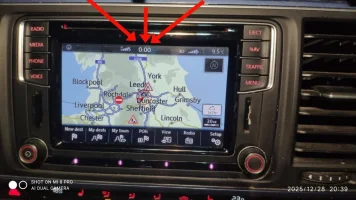
Clock on radio display

My Mac has an SD Card slot built in, so not a problem
I think, as @Chalky123 said, his IT skills are back in the 1980s, so loading Windows on Boot Camp will be more hassle than it's worth.
 
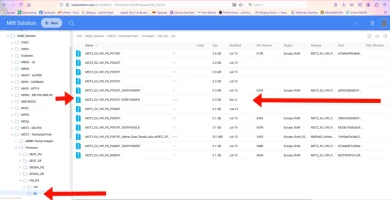
Hi looks like there is now a new FW update, to sort the 00:00 clockissue

Ill be doing this later today. depends on the weather..

Just wanted to give all that are supscribed to this post a heads up

This 00:00 issue has just cropped up on my 2016 T6 Cali!
I shall be following these instructions.
Many Thanks.
 
if you struggle then your can bootcamp IOS so have windows on your MAC and get a windows licence for £10. I then use a USB-C to SD card adaptor.
I am quite happy (usually) with MAC and IOS, and don't want to return to the dark days of PC's. However, I am at my wit's end trying to update my T6's software. I am clutching at straws. Just been outside to check that there was no second SD card slot tucked away somewhere, but of course there isn't. I have (I think( done everything that NickDaw suggests. The contents of my SD card appear to be exactly the same as his screenshot, i.e. ten items in the folder, all with identical names to his The card is brand new from PC world, formatted in every available option, but with the same dismal result. I have used unarchiver and the (purchased) professional version of RAR. When I ask the T6 to update it's software I get the same response, whether I have the SD card in or leave stout - 'No software found'. Help!
 
I suppose that if doing it on a PC would work (although NickDaw has done it on MAC) the obvious thing to do is to have a go on a friend’s PC.
 
I suppose that if doing it on a PC would work (although NickDaw has done it on MAC) the obvious thing to do is to have a go on a friend’s PC.
I wonder if it's only a fix for the Discover media with 2 SD card slots?
 
I wonder if it's only a fix for the Discover media with 2 SD card slots?
Maybe…..I tried with mine and have now ended up with this :eek: no amount of hard or soft resets will do anything for it, can’t get back to the service screen and now I have no radio at all!! Might just swap it out for something betterIMG_1813.webp
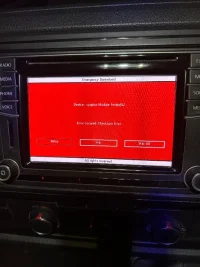
 
Maybe…..I tried with mine and have now ended up with this :eek: no amount of hard or soft resets will do anything for it, can’t get back to the service screen and now I have no radio at all!! Might just swap it out for something betterView attachment 313802
That looks odd
In a strange way i was hoping mine went ti-s up so I could get an aftermarket unit :whistle:
 

if its any use
Thank you @welshkaiboy for that I really do appreciate anyone trying to help :thumbsup: yeah I’ve watched that video from mr fix but I don’t really have that sort of equipment and at the end of the day I don’t think these units aren’t that great, I’ve had loads of issues with mine and while I like the oem look of them I think I’m gonna take the plunge and replace it with something better, I’ve been in contact with Jason from absolut5 and when funds allow I’ll be replacing it
 
Copy the ToolBox to an SD card, as if you were going to install it, insert the SD card into the unit, trigger a forced reboot, and wait for the unit's response.

Taken from another forum, might be worth seeing if you can get V240 back on there.
 
This 00:00 issue has just cropped up on my 2016 T6 Cali!
I shall be following these instructions.
Many Thanks.
Having followed the first steps, I have identified my head unit version as:
MST2_EU_VW_PQ_PO351T
Not the 240T (which seems to be an earlier version) in the instructions.
Hence it seems to be something across layer firmware too!
MIB website has other higher numbered versions, has anyone tried these?

Also, as a VW wide issue, do dealers and/or VW Customer Services have anything to say or solutions to offer?
 
Back
Top