Any issues running 480? Thinking of updating mine via SD from 0254Yup a friend of mine updated the firmware to 480 on mine and the correct time came back...

You are using an out of date browser. It may not display this or other websites correctly.
You should upgrade or use an alternative browser.
You should upgrade or use an alternative browser.
Clock on radio display
- Thread starter Mikeyg345
- Start date
-
- Tags
- clock discover media

If anyone finds the firmware download from a reputable source pleased do share. I have been looking all over and have not managed to find it yet.
Found the Navigation map updates behind the VW customer portal now. I am sure they used to be easy to find without log in from VW.
Found the Navigation map updates behind the VW customer portal now. I am sure they used to be easy to find without log in from VW.
OK. So many people have this unresolved issue, for so long, that I am probably not going to find an answer on the T6 forum. As my unit also has dead spots on the screen it would make sense to replace the whole unit. A second hand one would seem to be the solution, but an ‘expert’ has told me that Apple Car Play is only licensed to work on the unit in the original vehicle. As a new VAG unit would be prohibitively expensive, can anyone recommend an aftermarket alternative and a fitter in the East Midlands? Thanks: I live in hope.The clock on my radio display shows 00:00, it will occasionally momentarily flicker to the correct time.
Any ideas before I pull the dash apart?

Hi looks like there is now a new FW update, to sort the 00:00 clockissue
Ill be doing this later today. depends on the weather..
Just wanted to give all that are supscribed to this post a heads up
Ill be doing this later today. depends on the weather..
Just wanted to give all that are supscribed to this post a heads up

Great News everybody.
A fix for the 00:00 time problem.
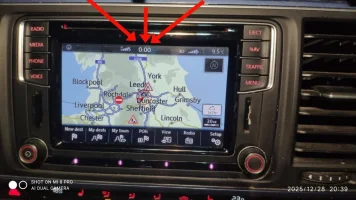
VW have the solution and have released updates.
For my VW Caravelle that uses version 02xx software that fixes this problem.
For those who know what they are doing, here is the simple method,
Upgrade to Version 0255 MST2_EU_VW_PQ_P0255T 3G8919360FD
Downloadable from https://mibsolution.one/#/1/9/MST2/-TechniSat Preh/Firmware/VW_PQ/EU
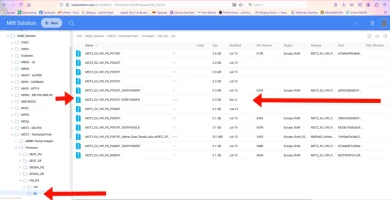
or
Expand it onto the root directory of a SD Card, 4Gb...
A fix for the 00:00 time problem.
VW have the solution and have released updates.
For my VW Caravelle that uses version 02xx software that fixes this problem.
For those who know what they are doing, here is the simple method,
Upgrade to Version 0255 MST2_EU_VW_PQ_P0255T 3G8919360FD
Downloadable from https://mibsolution.one/#/1/9/MST2/-TechniSat Preh/Firmware/VW_PQ/EU
or
Expand it onto the root directory of a SD Card, 4Gb...
- Derek99B
- Replies: 36
- Forum: Electrics, Lighting, ICE, Security


Just done mine, all good so far. thanks to @Derek99B
Hi
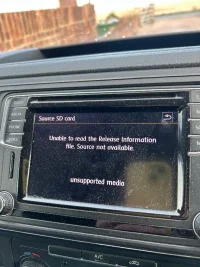
I just tried this update but didn’t work for me, I got this mess when trying to update from sd card. Any ideas anyone? I downloaded from the 99b.uk link to my phone and transferred it and it’s definitely on the cardView attachment 313232
is it the correct file for your SW train?
If it is then it needs to be unzipped to the root of the SD card.
Mib solutions shows. the pass and user on the first page

Thanks @Macmain12 for the reply, not sure how to check if it’s correct file for my van? I clicked the one in the link, I can’t do anything with it once it’s on my phone, only option is to transfer to card. No option to unzip it? Would I need a PC to do this?
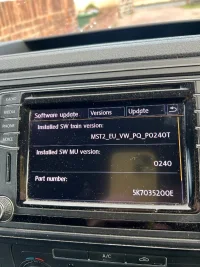
Thanks for that @Macmain12, sorry I had taken a photo of this earlier, I should’ve uploaded it as well as the original message, it matches what I have downloaded on my phone (except its the updated po255T)also included a screenshot of what I have on my phone but no options to do anything with it except copy or export it to my card.
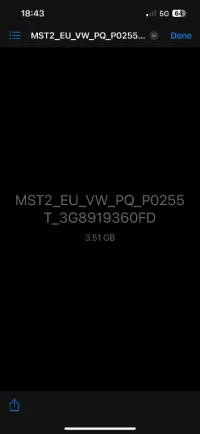
Hi as Nick says. You will need to extract the zip folder to a clean formatted SD card.View attachment 313258
Thanks for that @Macmain12, sorry I had taken a photo of this earlier, I should’ve uploaded it as well as the original message, it matches what I have downloaded on my phone (except its the updated po255T)also included a screenshot of what I have on my phone but no options to do anything with it except copy or export it to my card. View attachment 313260
File is correct SW train. I always use the mib solutions site for mine.. so unable to comment on how reliable the file will be from your download.
It tells you on the site as you open the login page, maybe you cant see it on your Phone you really need a laptop or pc to do this
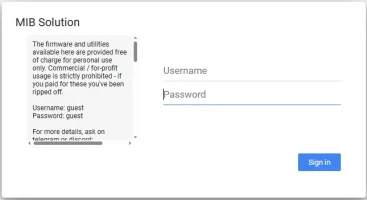
Once logged in go to @Derek99B folder layout
MQB solution,
MST2 Technisat
Firmware
VW PQ
EU
Look for the PQ_P0255T firmware
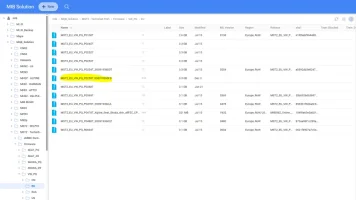
Hope this Helps
Once logged in go to @Derek99B folder layout
MQB solution,
MST2 Technisat
Firmware
VW PQ
EU
Look for the PQ_P0255T firmware
Hope this Helps
Thank you @Macmain12, yeah I couldn’t see that on mobile!  Currently got my son on the case downloading it on his PC from the mib site. Just need to get a card reader so he can put it on my card once he’s unzipped it. Will keep you updated and thank you so much for your help it’s much appreciated and also @Nickdaw for your reply too.
Currently got my son on the case downloading it on his PC from the mib site. Just need to get a card reader so he can put it on my card once he’s unzipped it. Will keep you updated and thank you so much for your help it’s much appreciated and also @Nickdaw for your reply too.
Still having trouble with this. It was put into a card from PC but it gets this far (24 of 93) and I get this message. I have now downloaded from MiB site but trouble is I only now get this screen? I can’t get back to service mode, and now have no radio etc? Any ideas welcome chaps or it’s gonna have to go in the bin isn’t it?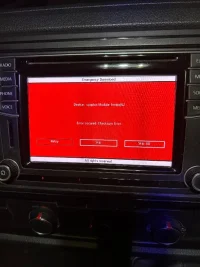
Similar threads

- Replies
- 9
- Views
- 219

- Replies
- 9
- Views
- 443

- Replies
- 3
- Views
- 730

- Replies
- 1
- Views
- 513
