Clock on radio display

Thanks for that and indeed all your help @Macmain12, I just need to get back to a normal screen so I can try another card/download but no joy as yet. I’ve messaged someone on flea bay who advertises the service to repair the clock issue, initially he responded straight away but asked if it was rebooting issue etc. I’ve told him it’s only clock issue but head unit is stuck on this screen now. I’m awaiting his reply to this.
 
Is there anyone out there who could help an old man who’s knowledge of IT is stuck in the 1980’s?
I thought that I was doing very well. I managed to download a file MST2_EU_VW_PQ_PO255 onto a brand new SD card. However, when I put it into the head unit slot in the van, and try to install it, I get the message - ‘Error: no data available. Please insert a source with software update data or check the source’. Why? What am I doing wrong or not doing right?
 
Thanks for that and indeed all your help @Macmain12, I just need to get back to a normal screen so I can try another card/download but no joy as yet. I’ve messaged someone on flea bay who advertises the service to repair the clock issue, initially he responded straight away but asked if it was rebooting issue etc. I’ve told him it’s only clock issue but head unit is stuck on this screen now. I’m awaiting his reply to this.
Try the mib face book group. That post was 17weeks ago
 
Is there anyone out there who could help an old man who’s knowledge of IT is stuck in the 1980’s?
I thought that I was doing very well. I managed to download a file MST2_EU_VW_PQ_PO255 onto a brand new SD card. However, when I put it into the head unit slot in the van, and try to install it, I get the message - ‘Error: no data available. Please insert a source with software update data or check the source’. Why? What am I doing wrong or not doing right?
You need to unzip the folder using winrar or WinZip. To the root of a formatted SD card. Format the card , a unzip the folder
 
The SD cards need to be a quality SDHC card not a micro SD in a SDHC adapter..
 
As @Macmain12 has said the files need to be unzipped on to an SD card but be sure that is at least 8GB, I first made the mistake of thinking as the file was 3.1 GB then a 4 gig card would be ok but when you unzip the files it gets larger and I couldn’t fit everything on my 4GB card.
 
Those sound like PC Windows Apps. I am using Macintosh.
Snap, I'm a Mac user
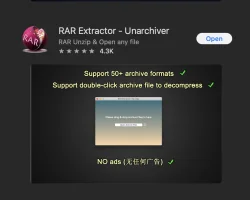
I used Rar extractor, install the app.
Double-click the MST2download, and the file should extract automatically. Make sure the sd card is formatted to fat32

Screenshot 2026-01-09 at 19.35.16.png
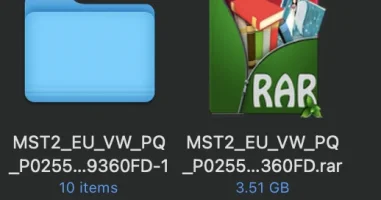
Screenshot 2026-01-09 at 19.40.36.webp
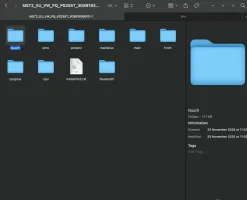
Screenshot 2026-01-09 at 19.41.04.webp
 
Thanks for that. I just paid for the ,’Professional’ version of RAR, tried to use it, but get a message to the effect that our download is not a compressed file and cannot be decompressed. Perhaps I have downloaded a wrong file. Any ideas?
 
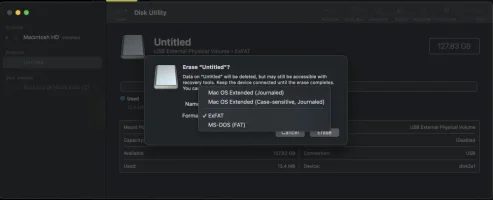
Thanks for that. I’ll have another go using your link. FAT32 doesn’t come up as an option in Mac Disk Utility. Which of the available formats should I use?
 
I am going crazy trying to make this thing work. When I expand the unzipped folder I see ten items, exactly like your screenshot. I have two versions, that look identical - one from the unarchiver and one from RAR extractor. So I must have the format right. But when I put the SD card in the head unit it tells me that there is no software on it. Is there something in the van that I am not doing? Also there is something odd about the RAR archiver. It goes on cycling: that is the coloured, spinning ball never goes away, and I cannot remove the icon from the screen. Although it purports to have unzipped the folder, I wonder if it really has. Any ideas?
 
I extracted the raw to my desktop first, then copied the files to the sd card, which takes a while.


And make sure you put it in slot 1 on the head unit.
 
if you struggle then your can bootcamp IOS so have windows on your MAC and get a windows licence for £10. I then use a USB-C to SD card adaptor.
 
Back
Top