Translating garbage PDC coding information

pematthe

Member
VIP Member
Can someone with more experience that I have with VCDS translate to VCDS the following instructions for retrofit PDC coding. The kit was bought from carsystem.eu and I purchased a fresh VCDS just for the purposes of configuring the module into the system.

VCDS version 25.3.3

The instructions are: (copied from a German translated document)

Coding
- STG 19 diagnostic interface > Installation list > Mark parking aid 2 as installed

** I haven't done this. There is a parking aid 10 listed **
- STG 10 Parking Aid 2 > Coding > Coding according to vehicle specifications
** Documents I have from carsystem.eu don't provide the code. I did find 318003 on a forum post somewhere, I stopped here! **
- STG 5F Information Electronics > Adaptation:

The following items are activated under CAR FUNCTION LIST BAP GEN2:
- PDC is set to activated
- PDC MSG bus is set to terminal 15

The following items are activated under CAR FUNCTION LIST CAN GEN2:
- PDC Audio lowering is set to Available
- PDC Audio lowering MGS bus is set to terminal 15

Under CAR FUNCTION ADAPTATIONS GEN2 the following points are activated
- Menu Display PDC is set to activated
- Menu Display PDC over Threshold is set to activated

Read error > Delete > Lock vehicle and let Canbus go to sleep


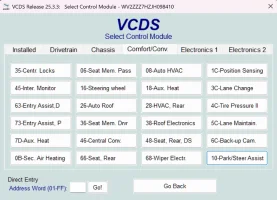
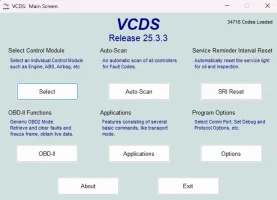
I have attached some screenshots of the VCDS pages where I think some of this is. I have never used VCDS before, so I am not able to match German translated instructions to the application.
VCDS (1).webp

VCDS (2).webp

VCDS (3).webp

VCDS (4).webp
 
Oh, and another thing. After install and my initial connection to the OBD port with VCDS, I also now have an AirBag waning in the dash as well. Not sure if they are related.
 
Anyone?

I fixed the airbag light by resetting the error codes.

I managed to follow some of the carsystems.eu instructions but cannot get PDC to work and, as an added bonus, the rear camera has stopped working. I get a loud beep from the warning buzzer and a flashing PDC switch.

As a newbie on VCDS, I am guessing the feature code will be unique to the vehicle based on things that are already installed (tower seems to be one of them. type of PDC module, rear camera etc).

I am not sure where to go from here?
 
Is the VCDS genuine Rosstech?
You should be able to see modules 5F (Infomation Electronics module) and 19 (Gateway or BCM Module) as well as 10 (actual park assist module)
 
Yes it is. I can see the modules in the app but my lack of knowledge doesn’t help! I guess i dont know what i am looking for.
 
Before you do anything, make a copy of all ECUs, so that you can go back if you need to.
ECU 19 is so that the gateway knows about and communicates with the Parking ECU - should be a tick box
ECU 5F is to allow the menu for changing settings in the Infotaiment system - Tick boxes as it suggests
ECU 10 - Is the one shown in VCDS the module you have retrofitted? What parking and steering assist extras have you installed?
 
Yes, these are the instruction I received, originally in German and was translated by Google translate.
 
OK, I am beginning to understand the menus and navigation.

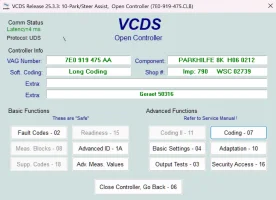
ECU10 is the new PDC module supplied with the kit. Parkhilfe 8K H06 0212. In term of existing parking and steering features: None. Other features which posts seem to suggest are important:
Westfalia detachable tow
Adaptive Cruise
Rear Camera

I am going to try and reset to original as the rear camera has now stopped working and try again.
 
UPDATE
With just a little more info I have the PDC partially working.

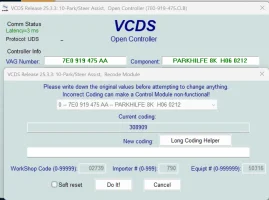
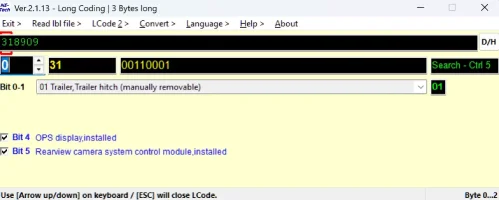
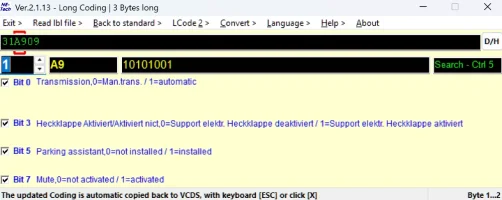
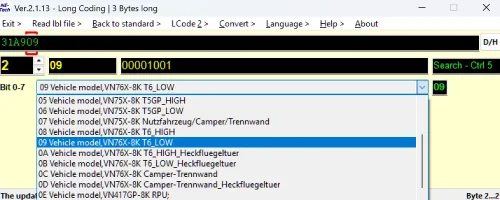
ECU coding, using the long coding method, I ended up using code '31A909'. code '318909' also works.

When I say works, it is not done yet. Working means that activating PDC doesn't trigger an error beep and flashing PDC button. It seems to engage OK. Front sensors work and respond to an obstacle, rears do not. I also don't get anything visual on the display. Either on the rear camera (now working again) or van visual.

One other note - there is a module error for the rear sounder. I haven't connected it. I read somewhere that later types have only a single sounder and the tone changes between front and rear.

I have attached the VDCS output for perusal.
 

Attachments

What would happen to the fault codes with coding 31810C ?
 
Coding instructions according to AI....

Below are general coding instructions based on typical VAG configurations.

1. Address 10 - Park/Steer Assist (PARKHILFE 8K)
This is the main module coding.
  • Access Module 10 (Park/Steer Assist)
  • Select Coding or Long Coding
  • Byte 0, Bit 0: Set to 1 for AHK (Trailer Hitch) if equipped.
  • Byte 0, Bit 4: Activate (PDC Front & Rear).
  • Byte 1: Set to 01 or activate Bits for Front and Rear sensors.
  • Byte 2: Set to 01 or activate Bits for rear camera/display visual aids.
  • Confirm/Write Coding.

2. Address 5F - Information Electronics (Display Coding)
To make the car show the parking overlay on the infotainment system.
  • Access Module 5F
  • Adaptations
  • Navigate to Car_Function_List_BAP_Gen2 or Car_Function_Adaptations_Gen2
  • Enable parking_assist_visual, menu_display_PDC, and menu_display_PDC_over_threshold_high.
  • Restart MMI/Infotainment (Hold power button or use 'hard reset' option in OBDeleven).

3. Address 17 - Instrument Panel (Optional - Visual Display)
To show the parking icon in the cluster.
  • Access Module 17
  • Long Coding
  • Byte 4, Bit 6: Set to 1 (Park Assist installed).
  • Byte 11, Bit 1: Set to 1 (If necessary).

Key Settings & Tips
  • Security Access: Before changing coding, you may need to enter security code 20103 or 71679 depending on the module.
  • Speaker/Buzzer: Ensure the front buzzer is wired to the module, or the system may show a "Speaker Fault" even after coding.
  • Troubleshooting: If the module shows "not coded" (U101300), ensure long coding is correctly calculated, especially for 8K modules.
  • 8K vs 4K: If you are downgrading to 4 sensors, you must switch from a Parkhilfe 8K module to a 4K module, or re-code/re-wire.
Note: Specific bytes and bits can vary depending on the vehicle platform (MQB, PQ35, Audi A4 8K, etc.).
 
It didn't like it, error beep and flashing button! Using a few combinations, it seems happy with 318909 and 31A909
Interesting... as the suggested code is factory coding to a similarly equipped T6.
What were the fault codes?
 
Coding instructions according to AI....

Below are general coding instructions based on typical VAG configurations.

1. Address 10 - Park/Steer Assist (PARKHILFE 8K)
This is the main module coding.
  • Access Module 10 (Park/Steer Assist)
  • Select Coding or Long Coding
  • Byte 0, Bit 0: Set to 1 for AHK (Trailer Hitch) if equipped.
  • Byte 0, Bit 4: Activate (PDC Front & Rear).
  • Byte 1: Set to 01 or activate Bits for Front and Rear sensors.
  • Byte 2: Set to 01 or activate Bits for rear camera/display visual aids.
  • Confirm/Write Coding.

2. Address 5F - Information Electronics (Display Coding)
To make the car show the parking overlay on the infotainment system.
  • Access Module 5F
  • Adaptations
  • Navigate to Car_Function_List_BAP_Gen2 or Car_Function_Adaptations_Gen2
  • Enable parking_assist_visual, menu_display_PDC, and menu_display_PDC_over_threshold_high.
  • Restart MMI/Infotainment (Hold power button or use 'hard reset' option in OBDeleven).

3. Address 17 - Instrument Panel (Optional - Visual Display)
To show the parking icon in the cluster.
  • Access Module 17
  • Long Coding
  • Byte 4, Bit 6: Set to 1 (Park Assist installed).
  • Byte 11, Bit 1: Set to 1 (If necessary).

Key Settings & Tips
  • Security Access: Before changing coding, you may need to enter security code 20103 or 71679 depending on the module.
  • Speaker/Buzzer: Ensure the front buzzer is wired to the module, or the system may show a "Speaker Fault" even after coding.
  • Troubleshooting: If the module shows "not coded" (U101300), ensure long coding is correctly calculated, especially for 8K modules.
  • 8K vs 4K: If you are downgrading to 4 sensors, you must switch from a Parkhilfe 8K module to a 4K module, or re-code/re-wire.
Note: Specific bytes and bits can vary depending on the vehicle platform (MQB, PQ35, Audi A4 8K, etc.).
OK, There is a couple of differences here to what I see.

Step1. It will only accept 318909 or 31A909. See the screenshots below
Screenshot 2026-04-03 184319.png

Screenshot 2026-04-03 184401.png

Screenshot 2026-04-03 184433.png

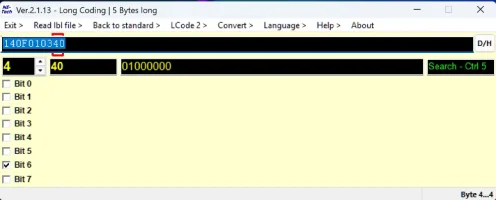
Step3. I haven't seen this module config before so I tried it. It seems there are only 4 bytes in the long coding with byte 4 without any bit guidance what so ever.
I tried changing Byte 4, bit 6 and the code was rejected as 'out of range'
There is no Byte 11
Screenshot 2026-04-03 184827.png
 
Last edited:
Interesting... as the suggested code is factory coding to a similarly equipped T6.
What were the fault codes?
Stupid question from me here. Where do I find the error codes? Programming takes the code, but the module gives a long error beep and flashing PDC button when it is activated. I haven't found any error codes reported in VCDS
 
Where do I find the error codes?
VCDS Auto-Scan (preferred method as would show possibly triggered codes in other modules)
or directly from the controller VCDS > Select > 10-Park/Steer Assist > Fault codes

Programming takes the code, but the module gives a long error beep and flashing PDC button when it is activated.
Did you cycle ignition after coding change?
 
Do you have an electric tailgate?

If I translate correctly
1775241837458.webp

Means electric tailgate???

Is the Parking assist on the Infotainment display working OK
 
Back
Top