
You are using an out of date browser. It may not display this or other websites correctly.
You should upgrade or use an alternative browser.
You should upgrade or use an alternative browser.
OBDeleven app
- Thread starter PhillH
- Start date

Care to share?It’s ok guys I found it in live data
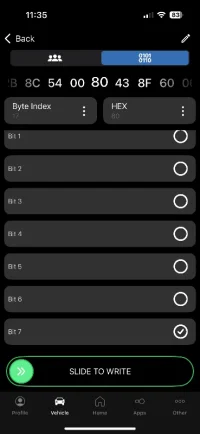
Sorry I meant 17 and not 7.Hmmm... which controller? I don't recognise byte 7 bit 7 be related at all.
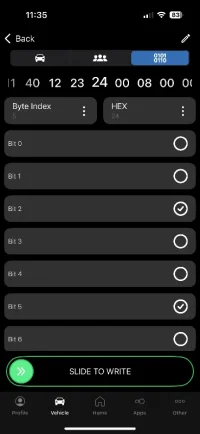
In the engine it should be byte 5 bit 5. In the BCM byte 17 bit 7.
this is what I was looking for to check the output of the stalls. The main switch and cancel are not giving an out put. I’m wondering if my wiring is correctCare to share?
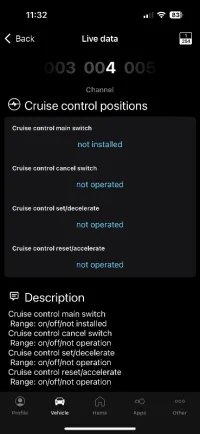
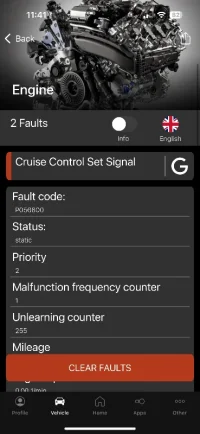
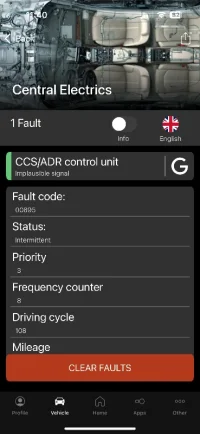
The main switch and cancel are not giving an out put. I’m wondering if my wiring is correct
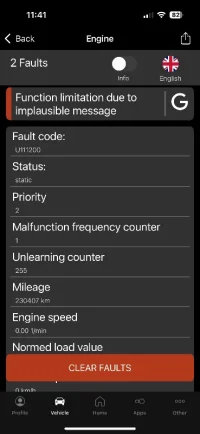
Do you see the stalk switches operated in the engine control unit?I am also getting these fault codes
I have checked the wiring between BCM and stalks and tried another set of stalks.Do you see the stalk switches operated in the engine control unit?
The live data in engine is different but this is with the switch off
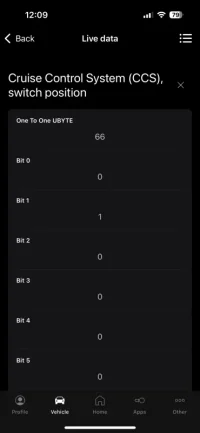 This is with switch on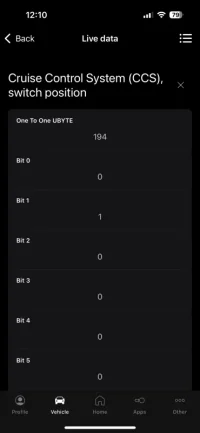
Any different when the switch is ON? Or when other switches (SET/RESET) are operated?The live data in engine is different but this is with the switch off
With the switch OFF the live data does not change when the set/reset are pressed but when the switch is ON it changes so mechanically it is working and that is why I checked the wiring.Any different when the switch is ON? Or when other switches (SET/RESET) are operated?
Thank you for your support, really appreciate. Scratching my head here
The main switch and cancel are not giving an out put. I’m wondering if my wiring is correct

Generally "not installed" equals to not coded.
Could you please post full BCM coding - preferably as text.
Should be possible under Control Units > Central Electrics > Info > Press and hold on long coding (on Android anyways)
Hi MMI, so we have some developments. There is only one fault code now but I still have the same issue with the switch when I check the live data. I have checked continuity on the terminals and checked they are in place properly.View attachment 305414
Generally "not installed" equals to not coded.
Could you please post full BCM coding - preferably as text.
Should be possible under Control Units > Central Electrics > Info > Press and hold on long coding (on Android anyways)
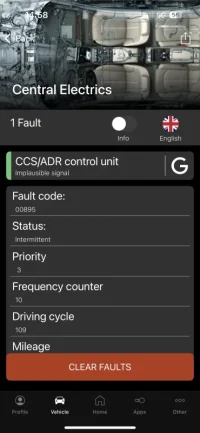
I can not get the long code in the way you asked but does this help?
A0 A0 30 3A 2A 61 24 31 80 28 48 10 2C 2B 8C 54 00 80 43 8F 60 06 00 00 32 00 00 00 00 00

I might have time to look later or it'll be in the weekday sometime.
I'm busy on weekends with the kids. Might be able to help in the evenings. I'll catch up on the posts later.
Just to doublecheck - you do have Multifunction steering wheel and now adding cruise on stalk. The MFSW works 100%?this is a euro 5.
And, there is now a wire from stalk also to engine control unit pin 64 (via connector T10 pin 1)? In the BCM wires were added to pins 45-47 only?
As per


Current flow diagrams
- Pauly
- ccs cruise control current flow diagram euro 5 wiring diagram
- VW T6 Electrical Info
Firstly I would like to thank @mmi for all the support he gave me today, it really is appreciated.
So here is what happened.
I made my own loom for the cruise control using the wiring diagram download from the forum for a Euro 5 engine and the link below
My mistake was I ran a wire from terminal T73b/45 BCM to terminal T41/29 of the steering column module and the a wire from T41/26 of the module to T10/1 ECU. I did not realise that T41/29 and T41/26 both needed to be linked together aswell as the ECU and BCM.
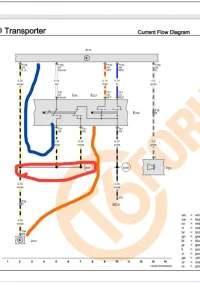
The loom supplied by VW must have the black / yellow wire linked within the loom.
Something I would also like to point out is that on lower level clocks there is no symbol to show cruise has been activated until you drive over 20mph and the green symbol appears so you need to check the live data to see the switches are working unless you have other clocks.
So it was a lesson learned for me, good job I am a mechanical engineer and not a electrical engineer
So here is what happened.
I made my own loom for the cruise control using the wiring diagram download from the forum for a Euro 5 engine and the link below
My mistake was I ran a wire from terminal T73b/45 BCM to terminal T41/29 of the steering column module and the a wire from T41/26 of the module to T10/1 ECU. I did not realise that T41/29 and T41/26 both needed to be linked together aswell as the ECU and BCM.
The loom supplied by VW must have the black / yellow wire linked within the loom.
Something I would also like to point out is that on lower level clocks there is no symbol to show cruise has been activated until you drive over 20mph and the green symbol appears so you need to check the live data to see the switches are working unless you have other clocks.
So it was a lesson learned for me, good job I am a mechanical engineer and not a electrical engineer
Similar threads


- Replies
- 4
- Views
- 1K


- Replies
- 0
- Views
- 305
