Keeping van cool in hot weather to sleep in

Yes great.

Battery powered for 1.5-12hrs depends on setting.

Comes with mains adapter for charge and 24/7 running.

And we got the 12v lead from shark to run from the leisure 12v system.

.


View attachment 292995View attachment 292996
Is there anything special about the power input plug on the back of the Shark? I'm a great 'fan' of saving ÂŁ8 if it's a normal one that I probably have already. I'm sure I have Northern roots....
 
Is there anything special about the power input plug on the back of the Shark? I'm a great 'fan' of saving ÂŁ8 if it's a normal one that I probably have already. I'm sure I have Northern roots....
Not, really.

It's a DC barrel plug.

And a 12v PSU.

I'll be getting the DC power lead off Mick on Friday and a good test.
 
No, you can use any platform that hosts your pics or videos. .. YT is also an option.

You just can't upload videos directly on the forum. (Due to the size and cost of hosting the files)

That is just a shared link from my online Google photo album.

I took the video on my phone, which copies to the cloud..... And shared the link to it .. so it's hosted on Google servers.

You can do the same with iCloud photos on iPhone.
 
No, you can use any platform that hosts your pics or videos. .. YT is also an option.

You just can't upload videos directly on the forum. (Due to the size and cost of hosting the files)

That is just a shared link from my online Google photo album.

I took the video on my phone, which copies to the cloud..... And shared the link to it .. so it's hosted on Google servers.

You can do the same with iCloud photos on iPhone.
To share a video clip from Google Photos, open the Google Photos app, select the video, tap the Share icon, and then choose your sharing method: either directly with Google Photos contacts, by creating a shared album, or by generating a shareable link.
Here's a more detailed breakdown:
1. Sharing directly within Google Photos:
Open the Google Photos app and sign in.
Select the video you want to share.
Tap the Share icon.
Choose the contacts you want to share with. You can select individual people, create a group, or search for specific contacts.
Optionally, add a message to accompany the video.
Tap Send.
2. Creating a Shared Album:
Open the Google Photos app and sign in.
Tap Photos at the bottom.
Select the photos and videos for the album.
Tap Add at the top, then Shared album.
Give the album a title.
Tap Share and select who to share it with.
3. Generating a Shareable Link:
Follow steps 1-3 from the "Sharing directly" method.
Instead of selecting contacts, look for an option to create a shareable link.
Copy the link and share it through any messaging or social media platform.
This video explains how to share photos and videos in Google Photos using the 'Create Link' option


Additional tips:
You can trim videos before sharing using the "Quick edits" feature if it's enabled in your settings, says Google Help.
When sharing via link, you can choose whether others can view only or also add their own photos.
Shared albums allow for collaborative additions from other users with Google accounts.
You can find your shared albums, conversations, and sharing activity by clicking Sharing at the top left on photos.google.com, notes Google One Help.
This video discusses the option to create a shareable album and manage permissions:


...


....
 
Yes, I have barn doors and one on each leaf.

So both doors are cracked open 15 degrees or so.

We used them at Busfest two years ago when it was super hot...... Before we had a poptop.

It was a Vietnamese sweatbox in the back of the van at night back then.

The door props defo helped.

Plus they can stay in when van is locked, so helps while.your out too.(Disable interior alarm)

.


.


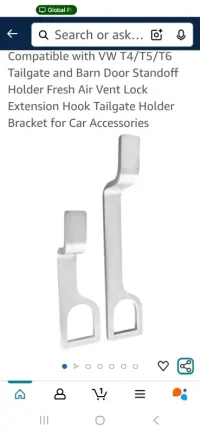
I have the older style with two short ones.


Looks newer style has one sort and one long?


Screenshot_20250625_063847_Amazon Shopping.webp
 
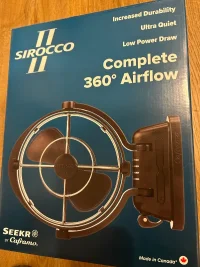
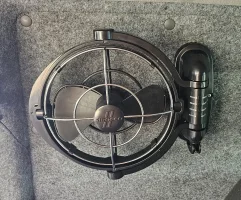
We have this fan, very quiet and very low power, they are made to mount on a flat surface with the power cable going through the mounting surface.
I wanted to be able to move it to different positions around the van, or remove when not needed so I mounted fan to a small bit of scrap hex ply, I can now, using a mini c clamp mount it anywhere I choose in the van, outdoors, at home etc, it uses a 12 v cig plug IMG_0373.webp
 
Been thinking of getting one of these too, but worried that it might be an entry point for snakes (here down under)?
And spiders! :eek:

We have the windows open on the poptop, front windows opened an inch under the window cover, sliding door open (either closed to or fully open depending on season and if we have an awning up and finally we have a fan to take and use in extreme circumstances (only used on one trip in France so far)
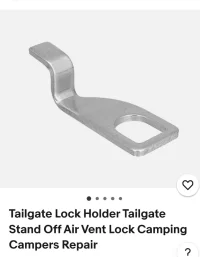
We also have the standoff bracket for the tailgate latch but have rarely used this, maybe while we were in France and it was 40C as it’s the only way to get air circulation at that end of the van but with the door open and the poptop open we found it’s not really needed.

Having an awning up and the shade that gives from the direct sunlight really helps keep temps down
 
We have this fan, very quiet and very low power, they are made to mount on a flat surface with the power cable going through the mounting surface.
I wanted to be able to move it to different positions around the van, or remove when not needed so I mounted fan to a small bit of scrap hex ply, I can now, using a mini c clamp mount it anywhere I choose in the van, outdoors, at home etc, it uses a 12 v cig plug View attachment 293259
Just fitted the same in mine.
1000013930.webp
 
Back
Top