
Braddabing
Member
So is the general consensus these are worth buying? Is it an absolute headache to fit or fairly straight forward?



AutoVox better. A direct replacement with bracket. Customer service will supply you oneSo is the general consensus these are worth buying? Is it an absolute headache to fit or fairly straight forward?

You could try mounting the wolfbox behind the instruments close to the glass. It is a little further away from your eyes. less distracting and close to where you are going, less of an angle for eyes to transit from forwards to wolfbox.I got a wolfbox strapped onto existing mirror. Looks pretty good and the videos are clear and crisp.
I have the option for front/rear/both. Always on rear.
I was able to install it myself with a fitting kit and some patience.
One thing I struggle with a video rearview is sometimes the image is a little blurry due to my sight and you don't get that with a mirror.
Yeah I had the very same idea. It's possible as and when my vision degrades further I will be doing this. Need to figure out a bracket to hold it down there on the dash. shouldn't be too hard to route the wiring down there. My only concern would be driving at night I will likely get the reflection/glare on the inside of the windscreen interfering with the A zoneYou could try mounting the wolfbox behind the instruments close to the glass. It is a little further away from your eyes. less distracting and close to where you are going, less of an angle for eyes to transit from forwards to wolfbox.
I’ll be honest. It’s the wiring that worries me and messing up the trims. After doing my apprenticeship at Audi some 15 years ago, I’m as good as a newbie again and trims always haunted me.I've got the Wolfbox 840H installed in mine, didnt go for the top end 900 as I wanted the wifi version so I can download videos straight to my phone via Wifi connection. Fitted it myself, took about 2 hours.
It was the first time I'd tried fitting one myself and went quite well. Mine is a T6 work van so I didn't have to remove as much trim.I’ll be honest. It’s the wiring that worries me and messing up the trims. After doing my apprenticeship at Audi some 15 years ago, I’m as good as a newbie again and trims always haunted me.
Sounds a bit like me from having perfect vision and now fine at range not so good close up the latter particularly so in poor light. Age is a pain in the arse. The other thing with eyes and age is dryness, the eye is not lubricated so much and that affects vision too, it alters the normal refractive index and can be part of the causes that slight blurring, it is sometimes random and at times might be affected more than at other times. All Age related .Yeah I had the very same idea. It's possible as and when my vision degrades further I will be doing this. Need to figure out a bracket to hold it down there on the dash. shouldn't be too hard to route the wiring down there. My only concern would be driving at night I will likely get the reflection/glare on the inside of the windscreen interfering with the A zone
Very useful. Mines converted and got some fancy roof lining with lights in so I really don’t want to butcher that. I’ll have to see how simple it’ll be to feed it I guess!It was the first time I'd tried fitting one myself and went quite well. Mine is a T6 work van so I didn't have to remove as much trim.
I mounted it on top of the old rear view mirror and just used a pry tool to push the wires up behind the head liner trim along the top of the windscreen and the behind the A pillar trim, then removed the lower glove box trim to route the power cable to the internal fuse box area near the gear stick.
In the load area I undone one side of the head liner and ran the cables to the back barn door, then used a roll of plumbers soldering roll to run the cables through the rear door to the number plate area and mounted the camera there.
I've got the rear view on display at all times with the image reversed in the settings and it's like have a normal view, not distracting at all for me personally. The front view is distracting though, keep thinking I'm about to get in to a head on crash!!!
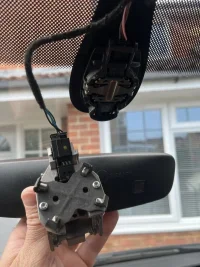
Nice one! As far as I can see then, a little modification and it will look like a full on replacement? What model van do you have? I’ve got a T6 so keen to also keep the headlights and wipers still working on auto!Here’s my fitting process.
I’ve searched the forum, but don’t see anything to answer my latest question.
I’ve bought a Wolfbox G900 dashcam / rear view mirror. Research on here showed that I needed a bracket to go between the wolfbox mirror and the bracket on the screen. I’ve gone to fit the wolfbox and the bracket is completely different.
I’ve never come across this before and seems to be a standard VW bracket. I can cobble these parts together in an OEM looking way, but…
here’s my question. One sensor will stay in the bracket on the screen. What will happen if I don’t connect the sensor that is in...
- Psm1975
- interior mirror t6.1
- Replies: 18
- Forum: Electrics, Lighting, ICE, Security
A friend of mine fitted a different brand wireless rear view camera with a dash mounted screen, saves having to run long cables to the rear, that might be a better option.Very useful. Mines converted and got some fancy roof lining with lights in so I really don’t want to butcher that. I’ll have to see how simple it’ll be to feed it I guess!
Oh nice. Does it function like a rear view camera while driving still? Or just for parking.A friend of mine fitted a different brand wireless rear view camera with a dash mounted screen, saves having to run long cables to the rear, that might be a better option.
Its constantly showing the rear view.Oh nice. Does it function like a rear view camera while driving still? Or just for parking.
Nice one! As far as I can see then, a little modification and it will look like a full on replacement? What model van do you have? I’ve got a T6 so keen to also keep the headlights and wipers still working on auto!
Ahhhh.... yeah it's an absolute pfaff to pull footage. It's like there's vid files and then ghost files. I never figured it out as I lost the clips I wanted due to user error. I had stopped for every lockable clip previously and they were accessible via the screen. Then I did a long drive to scotland and saw a bunch of saveable clips but couldn't stop so pressed the short cut pad lock icon assuming it'd save the current clip... sadly it records all subsequent clips, so all my saved clips were over written.After an incident today I decided to look at footage on the app it only shows the reverse camera footage but on the actual mirror I can see both, is there something on the app to show you the front view I have the 850 pro.
Solved it pal, I reformatted the sd card it came with, I can access all recordings now via WiFi to my phone and on the mirror itself. I use an iPhone btw.Ahhhh.... yeah it's an absolute pfaff to pull footage. It's like there's vid files and then ghost files. I never figured it out as I lost the clips I wanted due to user error. I had stopped for every lockable clip previously and they were accessible via the screen. Then I did a long drive to scotland and saw a bunch of saveable clips but couldn't stop so pressed the short cut pad lock icon assuming it'd save the current clip... sadly it records all subsequent clips, so all my saved clips were over written.
Have you tried it on desktop or in a phone? The desktop option was what I tried and it was hard to work out.
If I'd spent a bit more and got a more advanced model with bluetooth/wifi, i coulda just used phone.
Does yours have the connectivity to send to wolfbox phone app?


