Derek99B
Member
Great News everybody.
A fix for the 00:00 time problem.
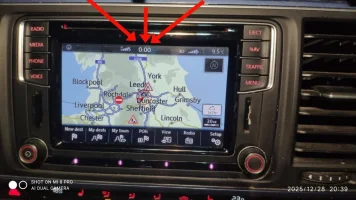
VW have the solution and have released updates.
For my VW Caravelle that uses version 02xx software that fixes this problem.
For those who know what they are doing, here is the simple method,
Upgrade to Version 0255 MST2_EU_VW_PQ_P0255T 3G8919360FD
Downloadable from https://mibsolution.one/#/1/9/MST2/-TechniSat Preh/Firmware/VW_PQ/EU
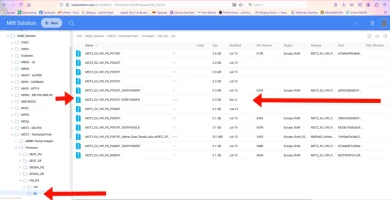
or
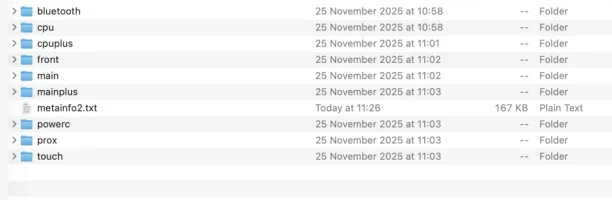
Expand it onto the root directory of a SD Card, 4Gb to 16Gb, inserted into SD Slot 1.
Be sure the content is in the root directory.
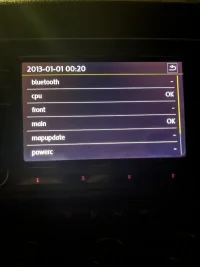
Press and hold Menu button for 10 seconds to start Service Mode, (takes a while)
Then go -. Software update -> Versions -> Select Release and chose the file
Then let it run.
Then your time will be correct. I don't think you need to go further, though the geeky people might want to have no faults recorded.
Now for the difficult bit.....
Using VCDS, if you’ve not got VCDS then I can’t help with this stage.
I found an Error in the 5F module. Though I don’t think you need to clear it as all seems to work properly.
My VCDS came up with a 1555 - Check Software Version Management error.
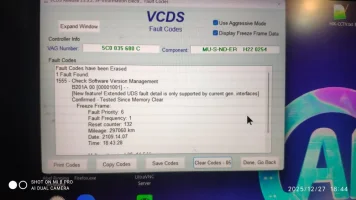
I cleared it, but it came back.
Go into Adaptations
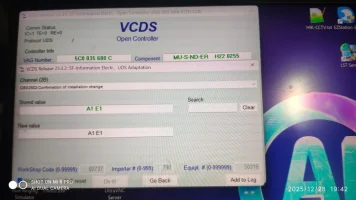
I had to find IDE02502 Confirmation of installation change.
Go into it and write down the Stored value.
Then goto website
 Enter the value, press return and see the new value.
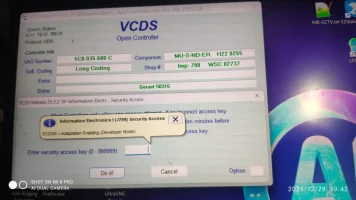
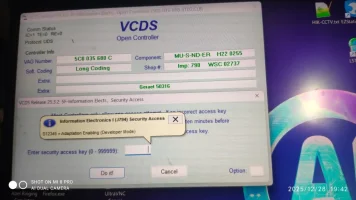
Back to the VCDS and do Go Back, then into Secure Access and enter code S12345
Then immediately back and into the Adapations IDE02502
Enter the new value, and Do it!.
Here an error appeared on mine, but the code seems to have been accepted as the error code has now gone away.
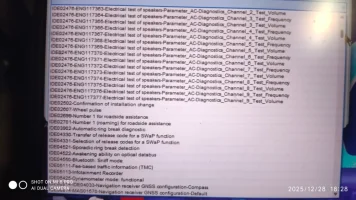
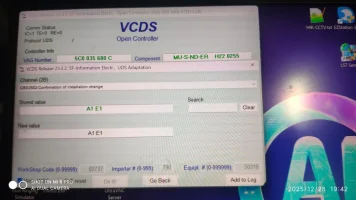
Clear up and tidy away and all should be well.
Now for more detail,
My hardware is H22
My original version was MST2_EU_VW_PQ_P0245T (0245-2).
Version 0255 is the latest available for my hardware, I tried 0369T but it failed with error
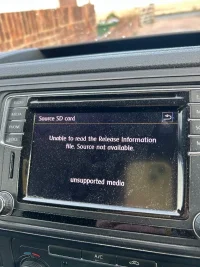
“Can’t use Update Container. The current Software Download application is too old.”
That means my motherboard is too old. So stuck at versions 02??.
So importantly, the update I used only applies where the currently installed version is “MST2_EU_VW_PQ_P0???T. Any other will probably fail and you need to start searching at
https://mibsolution.one/#/1/9 (Although I suspect the 00:00 time fault only occurs on MST2_EU_VW_PQ versions of Discover Media).
Other manufacturers, Skoda, Audi, I hope users will be able to find the correct version for their vehicles.
A fix for the 00:00 time problem.
VW have the solution and have released updates.
For my VW Caravelle that uses version 02xx software that fixes this problem.
For those who know what they are doing, here is the simple method,
Upgrade to Version 0255 MST2_EU_VW_PQ_P0255T 3G8919360FD
Downloadable from https://mibsolution.one/#/1/9/MST2/-TechniSat Preh/Firmware/VW_PQ/EU
or
Expand it onto the root directory of a SD Card, 4Gb to 16Gb, inserted into SD Slot 1.
Be sure the content is in the root directory.
Press and hold Menu button for 10 seconds to start Service Mode, (takes a while)
Then go -. Software update -> Versions -> Select Release and chose the file
Then let it run.
Then your time will be correct. I don't think you need to go further, though the geeky people might want to have no faults recorded.
Now for the difficult bit.....
Using VCDS, if you’ve not got VCDS then I can’t help with this stage.
I found an Error in the 5F module. Though I don’t think you need to clear it as all seems to work properly.
My VCDS came up with a 1555 - Check Software Version Management error.
I cleared it, but it came back.
Go into Adaptations
I had to find IDE02502 Confirmation of installation change.
Go into it and write down the Stored value.
Then goto website

Back to the VCDS and do Go Back, then into Secure Access and enter code S12345
Then immediately back and into the Adapations IDE02502
Enter the new value, and Do it!.
Here an error appeared on mine, but the code seems to have been accepted as the error code has now gone away.
Clear up and tidy away and all should be well.
Now for more detail,
My hardware is H22
My original version was MST2_EU_VW_PQ_P0245T (0245-2).
Version 0255 is the latest available for my hardware, I tried 0369T but it failed with error
“Can’t use Update Container. The current Software Download application is too old.”
That means my motherboard is too old. So stuck at versions 02??.
So importantly, the update I used only applies where the currently installed version is “MST2_EU_VW_PQ_P0???T. Any other will probably fail and you need to start searching at
https://mibsolution.one/#/1/9 (Although I suspect the 00:00 time fault only occurs on MST2_EU_VW_PQ versions of Discover Media).
Other manufacturers, Skoda, Audi, I hope users will be able to find the correct version for their vehicles.