Clayton Lithium Battery - Want to add Solar

Out of interest, why is that fuse needed on the PV+ input on the MPPT? I see lots of arguments about if a fuse is needed at all, and Victron has their fuse at the Panel end not near the MPPT, I can see why it is needed there, but then in most installs it would be outside the van.

Hi @Skyliner33 I done it for a bit more protection. I will try and get hold of the wiring diagram that Clayton sent to my friend.
 
I also have an gen 1 lps with solar so it’s definitely possible.. i think the gen 2 inbuilt mppt has a lower input max than the gen 1, so depending on how big you want to go - gen 1 could be a better option
 
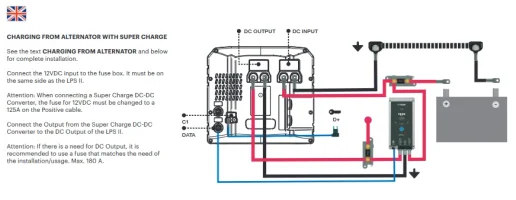
Interestingly this arrangement for an external DC charger is there in the main manuals if you look - it's how they connect the "super charger":

1705664383646.webp
 
Interestingly this arrangement for an external DC charger is there in the main manuals if you look - it's how they connect the "super charger":

View attachment 226101
thats the LPS2

i was looking at that aswell . . . it shows the DATA conection from the LPS to the SC that a stand alone MPPT wouldnt have.

but as they guys say - it works.

so im assuming the LPS Gen1 doesn't have an internal MPPT like the Gen2 LPS.

but does allow incoming charge via the DC OUT port.

im assuming the internal BMS is dealing with the current flow?

especially as they SoC increases when charging.

...

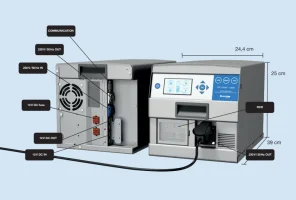
the LPS1 shows this:

1705672437402.webp


++++++++++++++++

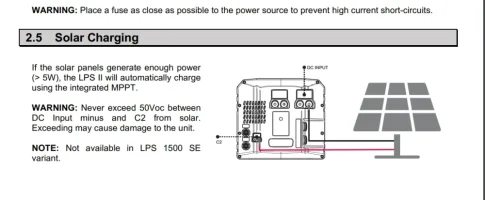
the LPS2 shows the PV. + SC via the DC Out port.


1705672367584.webp
 
I suspect the data port just allows communication so you can see the incoming charge rate - and I assume it may also throttle back the super charger outside of bulk charge periods.
 
Hi @Skyliner33 I done it for a bit more protection. I will try and get hold of the wiring diagram that Clayton sent to my friend.
Interesting, the only thing that fuse is protecting is the short bit of wire between it and the MPPT controller. Plus it introduces 4 connections which will increase voltage drop.
 
thanks - Clayton have just confirmed the same so me thinks we'll stick with the battery and add the panel with MPPT controller
Nice.

What did they say then?

What was the reply.
 
Yes I was surprised at how simple it was. The LPS does not show the watts going in but it does show the battery percentage going up as it would on hook up or the van running.

Bit late in the day for this, but I've just set up testing solar on the LPSI using this method. Currently using only a cheap PWM and 2x portable panels, but as stated it works. I've just used an additional Anderson 50A splitter on the DC output to patch in the PWM output.

seeWhat I've found is that if you go into the DC OUT menu of the LPS, it will tell you the current input from the solar under the menu there. Obviously you need to switch off any 12v DC current drains on the LPS for it to be accurate. What I've also found is that on the the LPS base menu, it shows direction of current drawn in from the DC output connection pictorially, and when it actually charges the battery, the main battery icon shows a charge sign (lightning flash icon).
It seems to only charge the battery (or at least indicate charge) when the input current is greater than ~2A - 2 5A: below this it doesn't indicate charge on the LPS.
I've had 350W of panel feed into the system (I-max of around ~12-13A ) and it takes this level of current without any problems.
 
  • Like
Reactions: CAB
Back
Top