Is the VCDS issue unsolvable..?

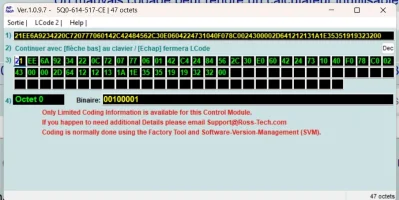
It was a wet day today, so did a little more digging on coding the 47 byte ABS module, and checked coding on similar units - see attached.

I found a few references to changing the bits on Byte 27, but without confirming by checking a car with no TPMS installed it is still unconfirmed whether this will work or not. Might be worth a try, if you want to take the risk.

As this is a Transporter forum they don't have the same ABS as yours, so no-one on this forum would be able to check, so maybe ask oh a Tiguan or Kodiaq etc forum if they could give their ABS codeing WITHOUT TPMS to see.
 

Attachments

Last edited:
  • Love
Reactions: mmi
It was a wet day today, so did a little more digging on coding the 47 byte ABS module,
Below something more for the next wet day 🧐


Reference
 
Hi everyone,
Sorry, I was away on a business trip.
First of all, I really appreciate your input, but after reading your comments, I’m afraid I’m a bit lost…
I don’t have your technical expertise to answer some of the questions above, but yes, my car is a 2017 Seat Ateca.
Why am I mentioning the Tiguan 2? It seems like it’s the same vehicle, according to some people? ..
My vehicle:
VSSZZZ5FZH6526011
1.6L 85 kW TDI - DDYA
Taking it step by step is highly recommended for a newbie like me, it seems.
I’m willing to try the step-by-step instructions, okay,
just let me know.
Thanks again
 
This afternoon I tried to clear the fault code several times, but I couldn't clear the low-tire-pressure warning!

Below is the complete code for ABS module 03.

And the detailed description of the low-tire-pressure warning.

5Q0614517AC
161401 C102D 00 10001001

2026-04-08 16 29 03.webp
 
Please, the scan and blockmaps

This afternoon I tried to clear the fault code several times, but I couldn't clear the low-tire-pressure warning!
Correct. The warning doesn't go away simply by clearing fault code.
I think that before clearing the fault code you need to use 03-ABS > Basic Settings > Reset tire pressure monitoring display warnings
 
Hi everyone,

Okay, the error code is cleared. I had a quick moment to take another look to see

if I could completely disable this indirect tire pressure monitoring system.

I think I might have found a lead!

But before I make a mistake, I want your opinion. Watch this video—in menu 03 (ABS), there are references to tire pressure; in the video, “PNEU” means tire.

One value is set to 1, the other to 2—what if I set both to “0”? I’m not sure. What do you think?

I checked the “In Service” box for tire “17” in Module 17 because there were 4 errors in Module 17—I assume that's what caused it ? (post 1)

video: ----> video

Thanks
 
Last edited:
Solved!

For anyone facing this issue, here's what you need to do.

Program the ABS module (03); set the 3rd bit of byte 27 to “0”.
In the video, I program it, then go back to check
where the error is coming from... “Nothing programmed,” but the programming is actually OK!

VIDEO 03

Then, when checking, the low tire pressure warning light remains on the dashboard—
which is normal, since I forgot to disable the tire pressure monitoring
in module 17. See the video below

Module 17: I check the ABS module (because of a doubt regarding byte 28)
then I move on to coding module 17.

VIDEO 17

There you go, perfect—no more issues with this “problematic”
low-pressure option, since I couldn’t reset it
because I no longer have the original car stereo and there’s no
reset button in the vehicle

(note: the coding error was rejected because the engine was idling
after turning off the engine and just turning the ignition on, coding was successful.

Ideally, I would have installed a reset button,
but after searching, I found nothing, and what I did find doesn’t apply to my vehicle
and isn’t explained very well, so it’ll stay like this for now.

Thanks to everyone
 
Hi,
After a few days of testing, no issues!
The modification is fine!
I was worried about the ABS—didn't this modification affect it? Normally not, because when I press the button, the dashboard indicator shows no problems!
As for the start-stop system, I disabled it on purpose (by wiring an on/off button for start/stop).
I also tested it on the road, at 60 km/h on a straight stretch with hard braking! The ABS kicks in!
(vibration in the brake pedal)
Everything is fine.

video test
 
Solved!

For anyone facing this issue, here's what you need to do.

Program the ABS module (03); set the 3rd bit of byte 27 to “0”.
In the video, I program it, then go back to check
where the error is coming from... “Nothing programmed,” but the programming is actually OK!

VIDEO 03

Then, when checking, the low tire pressure warning light remains on the dashboard—
which is normal, since I forgot to disable the tire pressure monitoring
in module 17. See the video below

Module 17: I check the ABS module (because of a doubt regarding byte 28)
then I move on to coding module 17.

VIDEO 17

There you go, perfect—no more issues with this “problematic”
low-pressure option, since I couldn’t reset it
because I no longer have the original car stereo and there’s no
reset button in the vehicle

(note: the coding error was rejected because the engine was idling
after turning off the engine and just turning the ignition on, coding was successful.

Ideally, I would have installed a reset button,
but after searching, I found nothing, and what I did find doesn’t apply to my vehicle
and isn’t explained very well, so it’ll stay like this for now.

Thanks to everyone
Bear in mind that this change was NOT on a VW T6, but a 2017 Seat Ateca with a different ABS module.
 
Back
Top