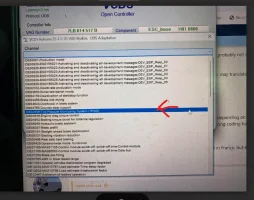
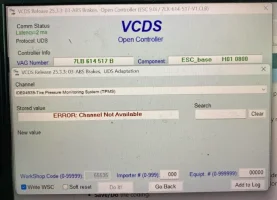
Is the VCDS issue unsolvable..?

Paris

Member
Hi,
(Please excuse my English—I'm French.)

This issue has been discussed in various forums in France, but no solution has been found!

Let me explain:
I replaced the head unit; the original MIB2 head unit in my Seat Ateca (VW Group)
was replaced, and I installed a Chinese head unit. For the past two years, there have been no issues, and it’s far superior to my old MIB2.
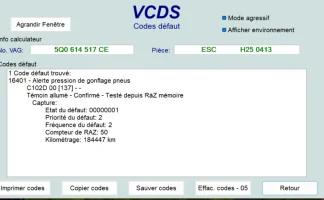
But for the past several months, a warning has been appearing: low tire pressure! (TPMS)
For no reason at all! Because the tire pressure is normal.
I clear the warning regularly...
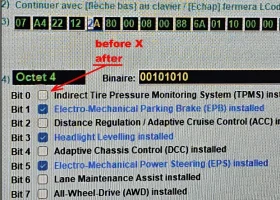
I decided to disable this tire pressure monitoring system (indirect)
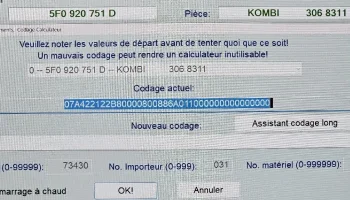
VCDS connected, in module 17, byte 4, bit 0
See the attached photo. By disabling the TPMS option, I thought I had solved the problem, but two days later, the low tire pressure warning (TPMS) appeared again!
I connect the VCDS and check module 17, byte 4, bit 0
unchecked; I don’t understand. I clear the fault, but at the same time I see the message “ECU miscoded”
miscoded???...
I assume the TPMS must be valid elsewhere, but I’ve looked and can’t find anything regarding the TPMS.
Just to clarify, my vehicle is a 2017 model (= Tiguan 2)
Thanks in advance for your helpS.jpg
2026-04-02 19 58 25.webp
 
I decided to disable this tire pressure monitoring system (indirect)
VCDS connected, in module 17, byte 4, bit 0
See the attached photo. By disabling the TPMS option, I thought I had solved the problem, but two days later, the low tire pressure warning (TPMS) appeared again!
I connect the VCDS and check module 17, byte 4, bit 0
unchecked; I don’t understand. I clear the fault, but at the same time I see the message “ECU miscoded”
miscoded???...
I assume the TPMS must be valid elsewhere, but I’ve looked and can’t find anything regarding the TPMS.
Most likely the TPMS actually lives in the 03-ABS controller. Disabling it is a tricky thing, I am afraid.

Have you tried with another set of wheels, or just swapping front/rear? Are the tyres same size and wear? Is it always the same tyre (if shown on dash)?

Please download and install English version of the VCDS - it won't interfere your French installation.


Using the English version please post

(1) VCDS Auto-Scan​

(2) blockmap files of the controllers: 03-ABS, 17-Instruments​

a) ABS blockmap - Ignition ON/engine OFF​
b) Instruments blockmap - Ignition ON/engine OFF​
c) ABS blockmap - Engine running at idle​
d) Instruments blockmap - Engine running at idle​

(2) blockmap files of the controllers: 03-ABS, 17-Instruments​

immediately, without turning ignition off, when TPMS warning has been triggered​

e) ABS blockmap - Engine running at idle​
f) Instruments blockmap - Engine running at idle​


How-to create a blockmap file:


[VCDS]
[Applications]
[Controller Channel Map]
- Single Controller Address = 03 (and 17)
- Login or security access code: Leave blank
- Function: Measuring values
- Output: CSV file
[Go]


The result files are saved into directory C:\Ross-Tech\VCDS\Logs
Please post the files.
 
This is the coding required to activate indirect TPMS if you don't have it, I would expect the reverse would be required to uninstall it.

You have reversed the change in module 17, but there are also changes required in the ABS module and the Infotainment module.......

Enter module 3 and then go into coding/long coding helper
In here we need to change the five values below, its important that all five are changed at the same time, changing them one at a time does not work and will generate an error
Byte 0 Bit 5 - 0
Byte 6 Bit 3 - 0
Byte 8 Bit 2 - 0
Byte 14 Bit 4 - 0
Byte 17 Bit 4 - 1

save the changes and exit
dont worry if faults appear they will sort them selves out when the rest of the programming is done

--------------------------------------------------------------

Now we are going to move on to module 17 instruments

Enter module 17 and then go into coding/long coding helper
Find Byte 4 Bit 0 and turn on (put a tick in the box)

save the changes and exit

--------------------------------------------------------------

Lastly is module 5F infotainment

Enter module 5F and then go into adaptions
All should show 'not active' so need to be changed to the below values (its quite a long list so use the search box to shortcut to 'rdk' and '0x07' channels)

ENG122227-ENG117541-Car_Function_Adaptions_Gen2-menu_display_rdk = activated
ENG122227-ENG117543-Car_Function_Adaptions_Gen2-menu_display_rdk_over_threshold_high = activated
ENG122229-ENG117704-Car_Function_List_BAP_Gen2-tire_pressure_system_0x07 = activated
ENG122229-ENG117705-Car_Function_List_BAP_Gen2-tire_pressure_system_0x07_msg_bus = Extended data bus

Thats it, everything can be saved and exited, after all changes are made reset any fault codes that are showing


Note - Get a copy of your ECUs before start in case you need to restore them.
 
  • Wow
Reactions: mmi
Hello,
You're really good at this!!!
Following up on mmi's post.
This morning I spent several hours running tests and then trying to do what was asked of me. I did it, but I'm not sure if that solved the problem!

Then I just discovered manfrotto’s post
(didn’t have time to apply it; I’ll probably put the equipment away tomorrow)
Actually, when I try to go to group 5F, I get an error message; I hadn’t gotten any further than that.
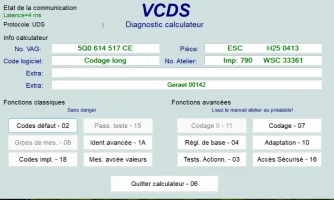
I’m attaching a scan of the ECUs in my vehicle. Sorry if some words are in French; I’ll try to switch the software to English for you tomorrow.
Tomorrow I’ll also try Manfrotto’s instructions, making sure to memorize (or write down) the changed values first, but I think this is the right track, since the original car radio was replaced with a Chinese one. which might explain the communication errors with the computer. I realize I should have changed certain values when I removed the original car radio to install the Chinese one! Probably the values in 5F that Manfrotto provides?
In the meantime, tomorrow I’ll post the log I created this morning after clearing the low-tire-pressure error.
Thanks again for your help.

To clarify, this is an indirect tire pressure monitoring system—it calculates pressure based on tire rotation.


F.webpG.webp
 

Attachments

Last edited:
  • Like
Reactions: mmi
I'm afraid that's not correct. Have you got a reference for MY17 Tiguan ABS coding?
Ah yes - I overlooked the fact that @Paris has a Tiguan not a T6. Probabbly need to search the Tiguan forums for the ABS coding instead
Also because his original Infotainment system was replaced there is now no 5F to change.

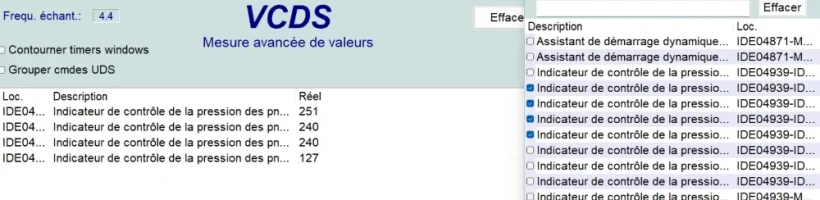
@Paris I am assuming the VCDS results above are indicating one of the tyres underinflated, but all tyres are actually at correct pressure?
 
Yes, Manfrotto, all four tires have the correct, identical pressure.
I’m talking specifically about my desire to disable the indirect tire pressure monitoring system, because before, with the original radio, I could clear the warning (via the radio menu), but now with the Chinese aftermarket radio, I no longer have access to the tire pressure warning reset function—I’m forced to “plug in” the “VCDS.”

So, is the advice I received above wrong? I don’t know about you in America, but here in France, a request to clear the warning light at the brand’s dealership will cost you a fortune!!!
I’m barely exaggerating!
Hence my search for a solution.

ABS module 03

abs 03.webp
 
Hello,
You're really good at this!!!
Following up on mmi's post.
This morning I spent several hours running tests and then trying to do what was asked of me. I did it, but I'm not sure if that solved the problem!

Then I just discovered manfrotto’s post
(didn’t have time to apply it; I’ll probably put the equipment away tomorrow)
Actually, when I try to go to group 5F, I get an error message; I hadn’t gotten any further than that.
I’m attaching a scan of the ECUs in my vehicle. Sorry if some words are in French; I’ll try to switch the software to English for you tomorrow.
Tomorrow I’ll also try Manfrotto’s instructions, making sure to memorize (or write down) the changed values first, but I think this is the right track, since the original car radio was replaced with a Chinese one. which might explain the communication errors with the computer. I realize I should have changed certain values when I removed the original car radio to install the Chinese one! Probably the values in 5F that Manfrotto provides?
In the meantime, tomorrow I’ll post the log I created this morning after clearing the low-tire-pressure error.
Thanks again for your help.

To clarify, this is an indirect tire pressure monitoring system—it calculates pressure based on tire rotation.


View attachment 321989View attachment 321990
You mention writing down or memorising the changed values. Your better off saving a scan of your vehicle to avoid any mistakes
 
Yes, Manfrotto, all four tires have the correct, identical pressure.
I’m talking specifically about my desire to disable the indirect tire pressure monitoring system, because before, with the original radio, I could clear the warning (via the radio menu), but now with the Chinese aftermarket radio, I no longer have access to the tire pressure warning reset function—I’m forced to “plug in” the “VCDS.”

So, is the advice I received above wrong? I don’t know about you in America, but here in France, a request to clear the warning light at the brand’s dealership will cost you a fortune!!!
I’m barely exaggerating!
Hence my search for a solution.

ABS module 03

View attachment 322016

I see your point about not having the ability to clear things without the original radio.

Sorry, the coding for the ABS module (03) was specifivcally for the T6, so probably not suitable for the Tiguan, but you will need to change some parameters on your ABS module.

I will see what the specific code changes are on my van and see how they may translate to the Tiguan, but this is what AI says to ENABLE it, so maybe reverse of that:
2017 VW Tiguan (MQB) Indirect TPMS Activation Steps
1. ABS Coding (Module 03)
  • Open VCDS/OBDeleven and connect to 03-ABS Brakes.
  • Select Long Coding or Coding - 07.
  • Locate the byte related to TPMS (often Byte 15, change bit 0 or 2, depending on exact ABS module part number) to activate the TPMS function.
  • Alternative: In some MQB modules, enable TPMS Function in the long coding helper.
  • Save/Do the coding.

ps - yes the VW dealers charge a lot just to do anything simple, not just in France, but everywhere.
 
this is what AI says
Can't you simply ask for a bit level coding map for a MY17 Tiguan ABS Whistle.gif
Sorry, couldn't resist.

Actually did it myself just to prove once again that currently the AI doesn't really learn. When you ask about how to code TPMS you get seemingly good answers, but then AI miserably fails to put the TPMS bytes and bits in the coding map in the same places.

E.g. none of the T6.1 coding bits as in post #4 did propagate correctly into T6.1 coding map. Didn't even get correct controller type, or code length, or part number. Actually really bad.
 
I checked the ABS coding on my van, (does not have TPMS installed) and the coding was as expected:

With it activated:
Byte 0 Bit 5 - 0
Byte 6 Bit 3 - 0
Byte 8 Bit 2 - 0
Byte 14 Bit 4 - 0
Byte 17 Bit 4 - 1

My van with TPMS NOT activated:

Byte 0 Bit 5 - 1
Byte 6 Bit 3 - 1
Byte 8 Bit 2 - 1
Byte 14 Bit 4 - 1
Byte 17 Bit 4 - 0

Unfortunately the long coding helper does not provide any suggestions for what these bytes are :(

the only thing I found was in adaptions which may work on yout Tiguan if it exists:
1775362987489.webp

1775363063613.webp
 
  • Like
Reactions: mmi
Thanks for your input, T32Rich, but my “technical expertise”

doesn't allow me to extract useful information from

this document.


Manfrotto, as you note, the coding guide—which is perfectly

described—is essential for me; I want to be sure of what I’m modifying,

even if I have a backup of the ECU modules.


What you wrote in:

My van with TPMS NOT activated:
Byte 0 Bit 5 - 1
Byte 6 Bit 3 - 1
Byte 8 Bit 2 - 1
Byte 14 Bit 4 - 1
Byte 17 Bit 4 - 0

Or... which ECU ? Maybe it would be worth trying ?

Thanks
 
My ABS ECU is:
SW:7LB-614-517-B HW:7LB-614-517 --- ABS Brakes

Very unlikely that it would have the same coding as your ABS :
SW:5Q0-614-517-GT HW:5QM-614-517 --- ABS Brakes
 
Clutching at straws here but found this on another forum. It relates to the ABS module 5Q0 XXXXXXXX so coding might also work on your car.

For the TPMS, These are the software switch options for your hex03 module:

Image


As you can see from my chart, TPMS is about the switch settings for Bits 4-6 on Byte 27. Also notice that the options refer directly to the version of TMPS installed and the type of "Radio" (which is really the MIB on your car)

Do you have 30 bytes on the long coding?

What is your existing long-code string for the ABS module Byte 27 ?
Does the code for the TPS match what TPS you actually have installed? The PR codes are on your build label of your car.

If it looks like it is a match then you could try changing Byte 27 to no TPMS - 0's for bits 4,5 and 6

Note - The binary numbers are read from right-to-left (meaning Bit 0 is the right-most digit), Bit 4-6 = hex 7x on my table (i.e. the last row). I have highlighted the values of Bit 4-6 on the "Binary" number above.
 
I wouldn’t say it’s unsolvable, just one of those frustrating VCDS quirks that can take a bit of digging.

On these vans the TPMS isn’t always controlled in just one module — it’s often tied into the ABS as well. So even if you change it in one place, another module can override it or throw up a coding error again. That’s usually why it feels like you’re going in circles.

If you haven’t already, it’s worth doing a full autoscan and then checking the ABS coding/adaptations properly rather than just ticking things on/off in individual modules. That tends to be where the “master” setting lives.

Also, if you’ve got an aftermarket head unit, it can sometimes confuse things on the CAN side, so that’s another angle to keep in mind if the issue only started after fitting it.

If it’s not causing any real problems, you might be better off just resetting it and leaving it alone—but if you want it gone properly, focusing on the ABS side is probably your best bet 👍
 
Clutching at straws here but found this on another forum. It relates to the ABS module 5Q0 XXXXXXXX so coding might also work on your car.

For the TPMS, These are the software switch options for your hex03 module:
Do you have 30 bytes on the long coding?

Per post #5, coding in @Paris ABS is 47 bytes long (bytes 0-46)
5Q0 614 517 CE Tiguan MY17 DDYA Man FWD - T6Forum/Paris
21EE6A9234220C720777060142C42484562C30E0604224731040F078C0024300002D641212131A1E35351919323200


Very unlikely that it would have the same coding as your ABS :
SW:5Q0-614-517-GT HW:5QM-614-517 --- ABS Brakes
Wherefrom these identifiers came, a much newer VW Arteon? 🤔
 
Good spotting @mmi

I missed that post #5 and therefore my post above will be totally irrelevant, as my info is only relevant for 30 Byte codes on ABS module

When I was looking I just focusrd on the coding for 5Q0 614 517 xx software, as I knew it would be a long shot to find anything, and in the initial post the OP said his car was a SEAT Ateca, but later said it was Tiguan, so didn't get too hung up on the model of car.


So we need to find the coding info for 5Q0 614 517 CE with 47 bytes of code then.
 
  • Like
Reactions: mmi
OP said his car was a SEAT Ateca, but later said it was Tiguan, so didn't get too hung up on the model of car.
You are right - unfortunately also the VCDS Auto-Scan was only a partial one, without vehicle identifier (VIN).

EDIT: according to Tiguan workshop manuals, the engine DDYA was never onboard Tiguan MY08-MY23. I guess the OP actually meant the vehicle was a derivative of Tiguan?
 
Last edited:
Back
Top