Could I/Should I get ODIS?

jfh777

Member
Ok, so I’m pretty confident I have a failing SOS e-call backup battery on my 2021 T6.1.

I get the ever so helpful “Emergency Call Restricted. Workshop” alert. However, absolutely everything continues to work just fine.

I’m adamant I’m not paying a dealer to solve a problem that’s been designed in.

I need ‘proper’ diagnostic tools to confirm the suspicion and, if I’m right, might specifically need ODIS-s as part of the fix. My cheap little Ancel VD500 OBD tool doesn’t have the functionality.

I don’t want anything that relies on ‘credits’ or a subscription or similar nonsense. I want something I can keep in the garage and expect work without ‘faff’ on the odd occasion there’s an issue with the van.

I’ve been nosing around forums such as MHH Auto and Auto GMT and found them to be quite unfriendly places, generally assuming a level of knowledge I don’t yet possess. A lot of forums in this space also want to charge a £30 registration fee, without it being clear what sort of resources support they actually have.

What I’m not clear on is how useful ODIS would be to me as a home mechanic without being about to use its online/logged in functionality. Some forums seem to suggest there are ways around this…

My hope would be that I can still diagnose/fix things, I can’t see why I would need to do security related tasks, which I think might be where the online account becomes a requirement?

Specifically, I want to be able to re-initialise the backup battery in the J949 SOS control unit once I’ve replaced it. After that, I just want a 'useful' tool for general diagnostics and fixes to save on dealer trips.

Essentially I’d be replicating the steps here;

For anyone else with SOS e-call problems, the following was also useful context;
 
I believe getting genuine odis is very difficult to obtain. Not to mention extremely expensive.
 
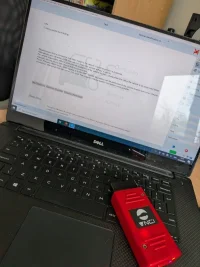
I'm finding this out... I'm going to experiment with the 'Chinese' option and have just received a VNCI tool and a knock off version of ODIS. Once setup it should give me 'offline' diagnostics. What I don't know is if the 'Guided Fault Finding' function required for the task is considered online (requiring VW server authentication) or offline.
 
I'm finding this out... I'm going to experiment with the 'Chinese' option and have just received a VNCI tool and a knock off version of ODIS. Once setup it should give me 'offline' diagnostics. What I don't know is if the 'Guided Fault Finding' function required for the task is considered online (requiring VW server authentication) or offline.
Would VCDS not be able to do this?
 
Unfortunately not, to re-initialise the new battery you specifically need the 'Guided Functions' of ODIS to force re-learning of the battery values.
 
I'm sure you will need an online link to vw to initialise the battery coding to.
 
Unfortunately not, to re-initialise the new battery you specifically need the 'Guided Functions' of ODIS to force re-learning of the battery values.
I just watched the first video. That is an absolute sh!t show of a design for battery replacement when they dont last forever. Unbelievable.
But when he had fully charged the replacement battery the dash warning triangle had gone and the red light had turned green. So why was the re-learn battery values needed?
 
That is an interesting question. I hope to get to the bottom of it when I try. I've still not got around to setting my ODIS of dubious repute up yet. I've got to do some work on the van in the next few weeks so hopefully I'll be able to do some investigating...
 
Just in case it helps anyone in future, I've been able to obtain ODIS and got it working with a VNCI adapter. It wasn't easy and you really need a dedicated laptop to keep the environment stable. The kit I purchased was this at Aliexpress, make sure you choose the version with the software to save a lot of faffing about. I have to say, I don't really know what I'm doing but so far, Guided Fault Finding (GFF) appears to work offline, which is the key requirement. Now I just need to do a bit more reading up on usage and applying adaptions.

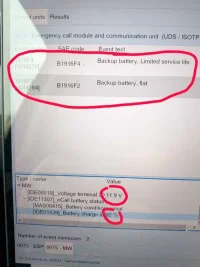
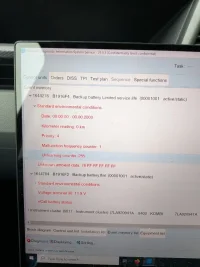
I've so far been able to verify that yes, my SOS battery is knackered at just 11.9V and 92% maximal charge value.

Rather than continue the conversation about fixing the SOS battery here, I'll add to the existing thread here

PXL_20260307_113154227 (Large).webp

PXL_20260308_132534489 (Large).webp

PXL_20260307_112824946 (Large).webp
 
Just in case it helps anyone in future, I've been able to obtain ODIS and got it working with a VNCI adapter. It wasn't easy and you really need a dedicated laptop to keep the environment stable. The kit I purchased was this at Aliexpress, make sure you choose the version with the software to save a lot of faffing about. I have to say, I don't really know what I'm doing but so far, Guided Fault Finding (GFF) appears to work offline, which is the key requirement. Now I just need to do a bit more reading up on usage and applying adaptions.

I've so far been able to verify that yes, my SOS battery is knackered at just 11.9V and 92% maximal charge value.

Rather than continue the conversation about fixing the SOS battery here, I'll add to the existing thread here

View attachment 318766

View attachment 318767

View attachment 318768
That's good to know. I use this vnci 6154a vci with vctools. Recently it as been losing connection.
I tried my vas5451a vci with vctools and thulis was a much more stable connection.
But when i tried it on odis (probably same version as yourself) it would take for ages to load data.
May try the vnci lead like you have done. See if this is any better.

Great post by the way buddy
 
Yeah the tool seems fine, the only complaint I have is when it comes to updating the firmware/software via the VNCI Manager the servers are incredibly slow. It must have taken 1.5-2 hours. So I probably won't bother updating again unless I've specific need to. I'd also recommend using cleanly installed version of Windows 10 on an old laptop that won't be used for anything else. This is because you have to disable the anti-virus and do various other things that wouldn't normally be recommended, and once you have got it working, you don't want an update to come along and mess it up.
 
Just in case it helps anyone in future, I've been able to obtain ODIS and got it working with a VNCI adapter. It wasn't easy and you really need a dedicated laptop to keep the environment stable. The kit I purchased was this at Aliexpress, make sure you choose the version with the software to save a lot of faffing about. I have to say, I don't really know what I'm doing but so far, Guided Fault Finding (GFF) appears to work offline, which is the key requirement. Now I just need to do a bit more reading up on usage and applying adaptions.

I've so far been able to verify that yes, my SOS battery is knackered at just 11.9V and 92% maximal charge value.

Rather than continue the conversation about fixing the SOS battery here, I'll add to the existing thread here

View attachment 318766

View attachment 318767

View attachment 318768

You are not reading the displayed information correctly.

Terminal 30 is the permanent (unswitched) positive voltage, unrelated to the voltage of eCall backup battery.
The figure of 92% battery charge confirms that your battery is not 'knackered', it is in excellent health.

The diagnosis and reset procedure for the eCall battery health is described in detail in several long-running threads.
 
Back
Top