Cerbo GX

I’m still having some issues with my Cerbo guys and needing some help please.
I did have everything working fine but have replaced my home router lately and can’t for the life of me find out how to get the Cerbo to hook up to my new router ?
So it’s not been updated for 16 days.
I would like to hook it up to my new home router WiFi and also hook it up to my phones data. As I’ve unlimited data and want the Cerbo just to update itself whether on home WiFi or my phones 4/5G.
The remote console only worked when on my home WiFi but never worked when I was out and about.
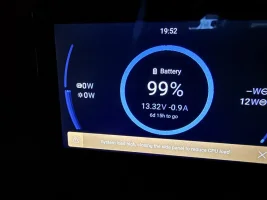
Also I’m getting this message on the Cerbo screen in the van. 🤷‍♂️
IMG_7450.webp
I must point out that it all seems to work fine. The screen always works and my battery barely runs down.
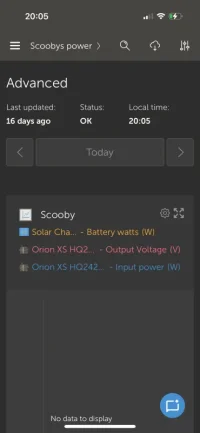
I also tried to set up widgets so I could monitor the SB but wasn’t particularly successful.
Have screenshot the one I set up but struggled with it and couldn’t find my SB on it.

IMG_7474.webp

Also I have the cable that goes direct to my Roamer battery but not been able to set up the Roamer app as I never took the code off the side of the battery before installing it. So not sure if that’s anything to do with it. I will remove the panel to get code off battery over the weekend.
Any help on any of this and advice is always appreciated.
Cheers

 
I’m still having some issues with my Cerbo guys and needing some help please.
I did have everything working fine but have replaced my home router lately and can’t for the life of me find out how to get the Cerbo to hook up to my new router ?
So it’s not been updated for 16 days.
I would like to hook it up to my new home router WiFi and also hook it up to my phones data. As I’ve unlimited data and want the Cerbo just to update itself whether on home WiFi or my phones 4/5G.
The remote console only worked when on my home WiFi but never worked when I was out and about.
Also I’m getting this message on the Cerbo screen in the van. 🤷‍♂️
View attachment 289411
I must point out that it all seems to work fine. The screen always works and my battery barely runs down.
I also tried to set up widgets so I could monitor the SB but wasn’t particularly successful.
Have screenshot the one I set up but struggled with it and couldn’t find my SB on it.

View attachment 289412

Also I have the cable that goes direct to my Roamer battery but not been able to set up the Roamer app as I never took the code off the side of the battery before installing it. So not sure if that’s anything to do with it. I will remove the panel to get code off battery over the weekend.
Any help on any of this and advice is always appreciated.
Cheers
Have you got the Roamer manual Gord? I'm sure there's a 6 digit code you need on the setty uppy pages, i dont think there is anything on the battery you need...? Download the Roamer app first if you havent already.
 
Have you got the Roamer manual Gord? I'm sure there's a 6 digit code you need on the setty uppy pages, i dont think there is anything on the battery you need...? Download the Roamer app first if you havent already.
Have the app and went to set it up but said I needed code off battery.
I will dig out bumf I got with it tomorrow and have a go at setting up the app.
 
@TallPaul_S @Dellmassive
Have you guys any idea what that message is all about on my Cerbo screen? It’s there all the time now.
Also can you tell me how to hook up my Cerbo to my house WiFi?
I’ve tried and tried but can’t find how to do it. I must of managed originally on my previous router
Thanks.
 
@TallPaul_S @Dellmassive
Have you guys any idea what that message is all about on my Cerbo screen? It’s there all the time now.
Also can you tell me how to hook up my Cerbo to my house WiFi?
I’ve tried and tried but can’t find how to do it. I must of managed originally on my previous router
Thanks.
Settings on remote console, Connectivity, Create access point. Pop in your router password when you see the one you want.
Simples!
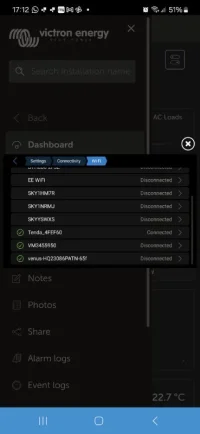
I'm at work currently, but this is from the van sat on the drive at home.
The green ticks are my logged in ones, it chooses as it sees fit, my little Tenda router is currently winning the race.
The Venus is the inbuilt one in the cerbo.

Screenshot_20250531_171234_VRM.jpg
 
Last edited:
Settings on remote console, Connectivity, Create access point. Pop in your router password when you see the one you want.
Simples!
I'm at work currently, but this is from the van sat on the drive at home.
The green ticks are my logged in ones, it chooses as it sees fit, my little Tenda router is currently winning the race.
The Venus is the inbuilt one in the cerbo.

View attachment 289546
Will go try thanks bud
 
As this thread has been revived, I'm still struggling to get the Cerbo to agree with my Smart shunt, even though I went to Roamer HQ and they set it up for me :(
 
As this thread has been revived, I'm still struggling to get the Cerbo to agree with my Smart shunt, even though I went to Roamer HQ and they set it up for me :(
What happens if you charge the Roamer up to max with an ehu lead on your drive?
 
Settings on remote console, Connectivity, Create access point. Pop in your router password when you see the one you want.
Simples!
I'm at work currently, but this is from the van sat on the drive at home.
The green ticks are my logged in ones, it chooses as it sees fit, my little Tenda router is currently winning the race.
The Venus is the inbuilt one in the cerbo.

View attachment 289546
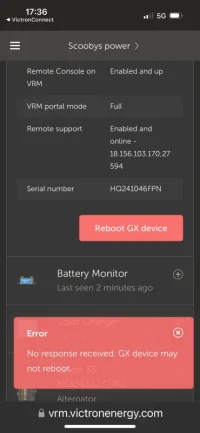
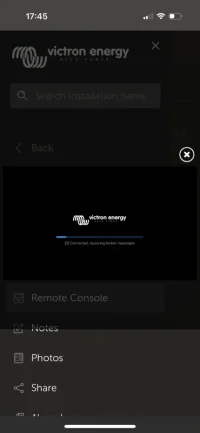
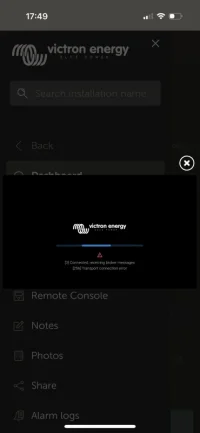
My remote console doesn’t work at all now. It just sits like this
IMG_7483.webp
 
What battery do you have? If Roamer can switch it off on the battery, if not use the breaker switch (turn off as many loads as possible first).
It’s a 230A SMART4 roamer
It’s got a power button on the top.
I will need to remove panel to access the isolation switch anyway
 
Back
Top