Unable to get on Victron app.

Rioja John

Neckender
VIP Member
T6 Legend
I’m having trouble with my Victron 50amp dc to dc charger, MPPT solar charger and shunt pass words, normally 000000, but whilst driving down to Benidorm my Samsung phone lost all it’s WiFi, phone calls etc, so no Waze or google maps and that’s why I’m driving tolls only. Any way I managed to get phone and WiFi working today but I can’t get my Victron app to operate them it keeps saying wrong password which is 000000, I’ve tried upteen times but keep getting same wrong password.
The main one is my Victron 50 ah dc to dc charger as when I left home the charger was switched off as my 300ah Lithium battery’s were full, but now I can’t switch the charger on by the app and I’ve been boiling kettles etc with my 3000 watt inverter.
Can anyone help with this please the app says you can take the code off the charger and change the password but mine is under the drivers seat, the others I can get at when unpacked on the campsite on Monday.
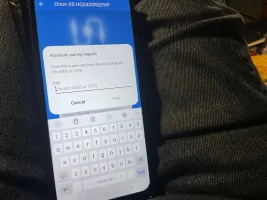
 
Try connecting via Bluetooth not Wifi using the app rather than the portal. Or shut your leisure batteries down forcing the Victron to reconnect to wifi. The passwords are on the labels on the side of each unit. Took photos of mine for this very reason. Kept having issues and needed to connect via Bluetooth to sort everything out.
 
You're going to need to get those passcodes off the side of the Orion etc for bluetooth. I tried the 000000 and it only worked woth the ones on the various labels.Try the leisure battery shut down if you can. I had this exact problem when my wifi was playing up. By shutting down the whole system and restarting everything the Victron started working via the portal again. Sorry I can't help more
 
It's easy to wizz the seat out John. 2 nuts, 2 bolts, unclip a cable and its out. You might even be able to see the code by putting the seat all the way forwards or backwards and looking with a torch.
Removed mine that quickly on a campsite when i had a problem that a Dutch guy came over to have a look at how my removable driver's seat worked. Hope you get it sorted.
 
That passcode is also on the side of the Orion box, have you got a neighbour popping in to feed your goldfish John? They could look into your beautifully manicured garage and find the box in your beautiful boxy filing system. Just a thought...
 
That passcode is also on the side of the Orion box, have you got a neighbour popping in to feed your goldfish John? They could look into your beautifully manicured garage and find the box in your beautiful boxy filing system. Just a thought...
Sadly, it's a seemingly random 6 digit number.
 
hi - you dont need to do any of that. you just have to reset the pin. instructions on web but i think along lines of switch on - press three dots on right hand side of screen. I've used several times
 
Steps to Reset the PIN:
  1. Open VictronConnect: Launch the VictronConnect app on your phone or tablet.
  2. Find Your Device: Locate your specific DC-DC charger (e.g., Orion Smart) in the device list.
  3. Access Menu: Tap the three-dots menu icon next to the device's name.
  4. Select Reset: Choose the "Reset PIN code" option from the pop-up menu.
  5. Enter PUK Code: You'll need the PUK code, which is printed on a sticker on the device itself (or sometimes on a separate label in the box).
  6. Confirm & Set New PIN: Enter the PUK code to verify; the PIN will reset to 000000. You can then set a new, unique PIN for your device.
Important Notes:
  • Default PIN: New devices often have a unique PIN on a sticker, but if you can't find it, the default is six zeros (000000).
  • PUK Code: This is crucial for resetting a forgotten PIN and is unique to your device.
  • Phone Bluetooth: If you're having trouble connecting, try forgetting (removing) the device from your phone's Bluetooth settings first, then reconnect.
 
That passcode is also on the side of the Orion box, have you got a neighbour popping in to feed your goldfish John? They could look into your beautifully manicured garage and find the box in your beautiful boxy filing system. Just a thought...
Sadly all boxes recycled. Will give Jon's way ago tomorrow in Benidorm.
 
Sadly all boxes recycled. Will give Jon's way ago tomorrow in Benidorm.
I managed to photograph my PIN code on the xs50 by removing the rear lower seat cover on the passenger side, then stuck the spare sticker with the code from the xs50 box somewhere safe! I had to reset it a couple of weeks ago, it wasn't talking to Bluetooth, but still worked on the VRM.
 
I've just done this for my newly fitted ip65 15a used the 6 zeros then once in changed the pass code to my own

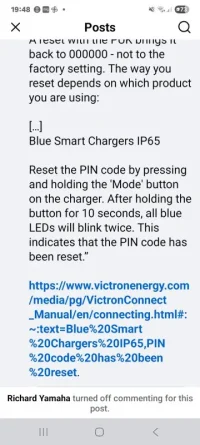
Screenshot_20251208_194826_Facebook.webp
 
Back
Top