Thinkware vs Blackvue

Spike, I am not absolutely sure TBH. I have only just got the Thinkware Connect working and video can be 'requested' and downloaded from there. I am not sure of the resolution, however. Nor am I sure just how one would save the video to file on the iPhone. I can tell you that installing the Thinkware Connect function to the iPhone was a bit of a task as I had to connect to it via the home MacBook to complete the installation..... I am still working through it....slowly.

I have found the easiest way for me to check/review and save files is to whip out the card and transfer the files to a detachable drive. I then use the aforementioned 'Thinkware Dashcam Viewer' to review the copied files on my MacBook. The video quality is very good. The main reasoning for doing things this way is if I am am ever needing to copy and use files relating to an incident, I have a hard copy to file and am not in fear of it being overwritten or lost in some way. You could call it a belt and braces approach, really.

If you are wanting to use the video you capture, presumably you will also want to edit it in some way. Having a hard copy to file will allow you to import it to editing software such as iMovie, for example to create shorter, better and more meaningful footage of your journey?...... and with headers, too!
 
Hi Jeff, thank you for the detailed reply. I’m still hoping I can download 4k from the u3000 to my iPhone then into the cloud. This is mainly to prevent overwriting when we are away for extended periods. As you say, I will need to do some editing when we get back but I don’t really want to to take a device with me just to download the memory card. I guess I will be able to find out soon enough as to how to manage the video as I ordered the u3000 today!
 
Hi Spike,

Congrats re your purchase! Here is a link you may want to have a look at to get your camera settings set up, after the initial installation.... Read through instructions and take your time with the setup.


Re video capture.... just my personal opinions and how I am set up in my van.... appreciating the potential costs involved.... :(

I think you are likely to run into problems with the size of the videos you are hoping to transfer to the iPhone at 4K resolution. The files are really big, even at a lower res. Transfer may be an issue? You may like to also consider having a router in the van? The permanent connectivity opens up a lot of avenues and extends the functionality of the U3000, regarding access and use of Thinkware Connect. I am still finding my way around it tbh.

I realise you are not intending to carry a computer but again, having one in the van does open up other useful possibilities, besides the video managing aspects. It will also give you the option to use the Thinkware Dash Cam Viewer to select and save files more easily from the road trip, saving them to a dedicated folder. Appreciating also that you won't want to be sitting at a computer while away on a trip!

As far as faffing around with the card in the camera, taking it out, capturing content and putting it back.... I think that is something you may have to accept if you choose this option re video capture?

While it is possible to capture the dash cam files and use them as video records of your trip, it is a time consuming process as the files recorded are split into fairly small segments. What you are aiming for is to use the video recording from the dash cam to give you meaningful footage of your trip, which is in some ways beyond the purpose of the dash cam, though not impossible.

An alternative and to some extent easier option would be to use a dedicated mounted video camera such as the GoPro. This would give you the option to use the video camera to capture video from places of interest you visit, away from the confines of the van, and make captured video a lot easier to manage.

If you need any help spending your hard earned cash..... I am your man! :cool:

Good luck and enjoy the experience!
 
Hi Jeff, thank you for the detailed reply. I’m still hoping I can download 4k from the u3000 to my iPhone then into the cloud. This is mainly to prevent overwriting when we are away for extended periods. As you say, I will need to do some editing when we get back but I don’t really want to to take a device with me just to download the memory card. I guess I will be able to find out soon enough as to how to manage the video as I ordered the u3000 today!
Spike let me know how you get on
 
Jeff, thank you do much for you in-depth and thought provoking insight into what I want from my dash cam.
I had considered a GoPro but didn’t want to constantly mount and unmount it from the dashboard or screen as leaving it permanently fixed would probably lead to a smashed in side window and a missing GoPro. A dash cam on the other hand would go under the radar so to speak.
You have got me reconsidering my thought process around how the whole 4k video thing would work and you make some very valid points which are making me question if I need the U3000 at all. I’m now thinking that I could reinstall my old nextbase 522 to provide the dash cam function and manage the ‘road trip’ video separately. I might look at screen/dash mounts for my iPhone to utilise the iPhone 16 pro video capabilities which might do the job. I haven’t opened the u3000 box yet so could easily return it to Amazon. Clearly I didn’t think this through enough!🤔 decisions decisions.
 
Well, my hand was kind of forced and ended up installing the U 3000 as my nextbase appeared to be dead as couldn’t connect or update the software. I will see what I can get from the u3000 and what I can do with the images. Plan b will be looking at the option of using my iPhone on a dash mount to record the road trips.
Next project is to install a WiFi antenna and router!
Thank you all for your help
 
I forgot to say one remaining job is to run a feed from the leisure battery for the parking mode. I have solar panels so hopefully will keep it topped up??
 
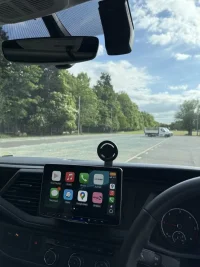
So I found the ideal solution to my road trip 4k recordings. I found a nifty mag mount for the iPhone that I attached to the rear of my alpine screen. The mount can be positioned above or to the side of the screen and swivelled out of the way when not in use. Phone sticks to the mag mount like glue so not concerned about phone falling off.
The net outcome is the u3000 will be used just as a dash cam as intended.
Now I just need to sort the Thinkware connected app which is proving challenging!
IMG_0807.webp
 
By way of an update, the mag mount and my iPhone on 4k video worked a treat. Minimal vibration and captured some great video driving through some spectacular Welsh scenery. The Thinkware u3000 works well but will be more functional once I install the van wifi.
 
By way of an update, the mag mount and my iPhone on 4k video worked a treat. Minimal vibration and captured some great video driving through some spectacular Welsh scenery. The Thinkware u3000 works well but will be more functional once I install the van wifi.
Hi I’ve just ordered the U3000 2 channel I want to purchase a portable wifi dongle to get all the functions available , what wifi device did you purchase please ?
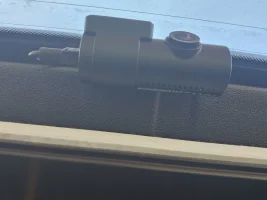
Also I have rear van shades Tailgate does the rear camera fix ok , I see there isn’t any adjustment on the radar as it’s fixed into the unit can only adjust the camera lense
Thanks.
 
Hi Alpha (excuse abbreviation!)
I’m still on the fence either way the wifi. I have been viewing the kuma and Netgear nighthawk and as it stands I’m leaning towards the netgear. The issue I have is the antenna options as I have minimal room on my pop top due to the size and positioning of my solar panel which limits mounting option and u don’t fancy the massive brick type antennas on the market. I also feel I should be forgetting 4g and opting for 5g but that changes hardware options and sim packages with increased cost implications . I like the netgear as they have a flat omnidirectional antenna that I could mount under the pop top with the hope signals will filter through the canvas and break the faraday cage effect although that might need some trials and repositioning to determine how successful that might be. I figure this would be an improvement over the window sucker attached antennas.
Like I said, still mulling this one over and ever hopeful Elon offers a 5 year cheap fixed rate for Starlink!
 
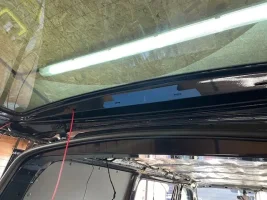
I did put an extra hole in and I fed a drawer wire from right behind the eye level brakelight and pulled it through so it was in the centre. Just be careful and you can do it with the brake light in place
 
  • Like
Reactions: sgh
I did drill an extra hole left of centre for the cable to come up further through the cavity1000027178.webp
 
  • Like
Reactions: sgh
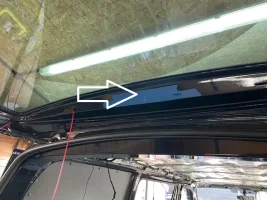
I was going to dill hole here guess the Vanshade should not have fitment issue there.

IMG_0088.webp
 
Back
Top