i could, but considering the time of year i though somone on here might know who's already installed one, i might jst go for it tommow and see what happensThe hdmi is for connecting to radio if it has hdmi out or an android box so you can have it show radio display inbetween the clocks.Can you not ask the seller for any instructions

You are using an out of date browser. It may not display this or other websites correctly.
You should upgrade or use an alternative browser.
You should upgrade or use an alternative browser.
T6 Aftermarket Digital Instrument Cluster
- Thread starter CJW
- Start date
-
- Tags
- digital dash

i could, but considering the time of year i though somone on here might know who's already installed one, i might jst go for it tommow and see what happens
just leave the wire disconected & see if it worksi could, but considering the time of year i though somone on here might know who's already installed one, i might jst go for it tommow and see what happens
That's my planjust leave the wire disconected & see if it works

well it's fitted and working, i didn't need to conect the red wire.
have a couple of niggles
1 the distance left flashes from 150 to 450 miles left?
2 (user error) i don't know how to connect it to my phone or radio, i don't have hdmi on my radio, but do have andriod auto.
and i don't even know how to enable andriod auto or bluetooth on the digi dash
have a couple of niggles
1 the distance left flashes from 150 to 450 miles left?
2 (user error) i don't know how to connect it to my phone or radio, i don't have hdmi on my radio, but do have andriod auto.
and i don't even know how to enable andriod auto or bluetooth on the digi dash
Look here for setup Everest VW - Bits & Mods
If the pioneer has an hdmi connector on it then yes or you need a usb to hdmi adapterwill this work to connect my Pioneer SPH-DA77DAB to the digi dash,(so i can get satnav?) this was the whole reason i didn't want to buy a digi dash, nothing is simple and just plug and play
Last edited:
no it doesn't, thats why i asked if the usb to hdmi converter would workIf the pioneer has an hdmi connector on it then yes
does anybody else have this probem?Hello, I've managed to launch the panel. However, the Driving range readings are incorrect, always showing 0 km and occasionally flashing 470 km. How can I fix this? Please refer to the video for more details.
does anybody else have this probem?
your link doesn,t workno it doesn't, thats why i asked if the usb to hdmi converter would work
sorry try this, although i did manage to connect the dash through andriod auto but can't remember how lolyour link doesn,t work
yeah thats what i have it works. But you have to unplug & plug it back in everytime you start the van so its a p.i.t.a so i don,t bother with it anymoresorry try this, although i did manage to connect the dash through andriod auto but can't remember how lol
the only thing that is probably going to work without changing the radio is EVEREST-VW DIGIDASH <--> HEAD UNIT Android Ai KIT: (Android Ai B

Has anyone had their firmware upgrade fail during the installation process?
On Friday I received an updated firmware version from the manufacturer / support contact from China. This is the third update I'd received since owning the cluster (I have to asked for it).
As usual I put the file onto a FAT32 formatted 32GB USB 3.0 stick and went out to the van to install it.
Turned the van on, plugged in the stick, it picked up the software as usual then proceeded to update.
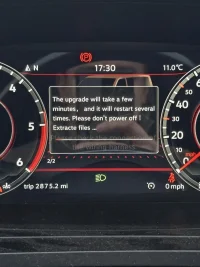
Once it got about 30 second into the update the screen went black. I left the van running for another 25 minutes assuming it was going to reboot and come back on eventually. But nothing happened.
Now my screen doesn't come on at all.
I've tried plugging in the usb stick with the previous software version but nothing happens even after leaving it running for 20 min.
I also tried leaving the USB stick in, locking the van. Waiting for everything to fully shit down, then return to the van hoping to boot from the USB. But still nothing.
I've messaged the support contact but so far they have been useless and have only replied once with instructions on how to format the USB stick, but I'm clearly past this point. Hopefully they are just not replying due to it being the weekend.
Any ideas ?
On Friday I received an updated firmware version from the manufacturer / support contact from China. This is the third update I'd received since owning the cluster (I have to asked for it).
As usual I put the file onto a FAT32 formatted 32GB USB 3.0 stick and went out to the van to install it.
Turned the van on, plugged in the stick, it picked up the software as usual then proceeded to update.
Once it got about 30 second into the update the screen went black. I left the van running for another 25 minutes assuming it was going to reboot and come back on eventually. But nothing happened.
Now my screen doesn't come on at all.
I've tried plugging in the usb stick with the previous software version but nothing happens even after leaving it running for 20 min.
I also tried leaving the USB stick in, locking the van. Waiting for everything to fully shit down, then return to the van hoping to boot from the USB. But still nothing.
I've messaged the support contact but so far they have been useless and have only replied once with instructions on how to format the USB stick, but I'm clearly past this point. Hopefully they are just not replying due to it being the weekend.
Any ideas ?
I'm assuming you've tried pressing the steering wheel buttons and nothing? Only thing I can think of is to disconnect the batteryHas anyone had their firmware upgrade fail during the installation process?
On Friday I received an updated firmware version from the manufacturer / support contact from China. This is the third update I'd received since owning the cluster (I have to asked for it).
As usual I put the file onto a FAT32 formatted 32GB USB 3.0 stick and went out to the van to install it.
Turned the van on, plugged in the stick, it picked up the software as usual then proceeded to update.
View attachment 318123
Once it got about 30 second into the update the screen went black. I left the van running for another 25 minutes assuming it was going to reboot and come back on eventually. But nothing happened.
Now my screen doesn't come on at all.
I've tried plugging in the usb stick with the previous software version but nothing happens even after leaving it running for 20 min.
I also tried leaving the USB stick in, locking the van. Waiting for everything to fully shit down, then return to the van hoping to boot from the USB. But still nothing.
I've messaged the support contact but so far they have been useless and have only replied once with instructions on how to format the USB stick, but I'm clearly past this point. Hopefully they are just not replying due to it being the weekend.
Any ideas ?
Yeah, disconnected the whole unit and reconnected too.
No change.
For now I've swapped back to the original cluster so I can drive it.
Would be gutted if I've bricked it. I worry they gave me the wrong firmware as there are at least two different hardware versions.
No change.
For now I've swapped back to the original cluster so I can drive it.
Would be gutted if I've bricked it. I worry they gave me the wrong firmware as there are at least two different hardware versions.
Definitely sounds like it's bricked. Can you tell my why you were updating the 'firmware' what improvements were there? I only updated the 'software' OTA two days ago and that update was from October, mainly because i wanted to install the VW boot logo and thought I may as well update it firstYeah, disconnected the whole unit and reconnected too.
No change.
For now I've swapped back to the original cluster so I can drive it.
Would be gutted if I've bricked it. I worry they gave me the wrong firmware as there are at least two different hardware versions.

I was running the June 2025 build of the firmware/ software.Definitely sounds like it's bricked. Can you tell my why you were updating the 'firmware' what improvements were there? I only updated the 'software' OTA two days ago and that update was from October, mainly because i wanted to install the VW boot logo and thought I may as well update it first
A few reasons for attempting an upgrade were:
1. There were some minor display bugs in the T7 style dash and I was hoping to see some improvements. E.g. fuel tank range not displaying in some views where you would expect it.
2. I'd read somewhere (probably on this forum) that they had come up with a fix / workaround to prevent you accidentally setting the speed warning. The fear of activating that usually stops me from interacting with the menu system.
3. Id recently had my van serviced and was getting a warning on the new cluster to say "Please check the connection of the wiring harness". But there were no new faults on any module which would be causing this. So I was hoping it was a software issue not reading a totally different message on the original cluster. After swapping back to my original cluster, I can see there was a new warning for Inspection due... seems they had reset the service interval but not the inspection interval. I assume this was the issue but can't test as its bricked...
Last edited:
Similar threads

- Replies
- 123
- Views
- 25K

- Replies
- 2
- Views
- 1K
- Replies
- 28
- Views
- 11K


- Replies
- 39
- Views
- 1K

- Replies
- 2
- Views
- 1K