STARLINK (Satellite Internet and WIFI) -- How I Done It --

Photo's
My setup
View attachment 316752
I bought this thing to "up" the power from 12volts - Simple install where the old light style socket was.

View attachment 316753
Mini dish cable puts in and stays in no matter what I'm driving over.
View attachment 316761
Ethernet socket the runs to rear of campervan where I have the router fitted.
View attachment 316755
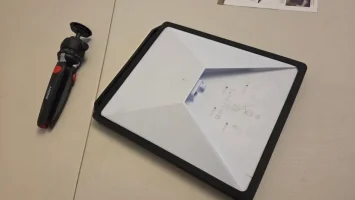
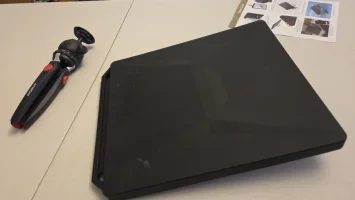
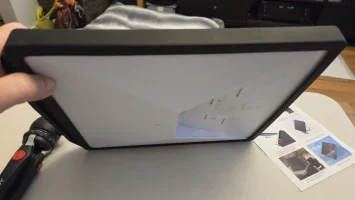
The dish slides in between roof and bed (it also fits right in the middle so hidden away, but I find sticking here is fine and does not move with roof secured in place.
View attachment 316756
Close up. The insert (Black) locks cables in place and allow me to stick a mag mount on when parked up if needs be outside.
View attachment 316757
Example of mag mount on bonnet. 95% of the time it stays inside in roof when poptop is open. Avoids anyone seeing I have Starlink.
View attachment 316759
Mag mount on rear if needs be.....
View attachment 316758
The plate and mag mount.
View attachment 316760
Mag mount fitted.... Really strong has never fallen off yet.
Thank you @Qnapper , looking forward to my next day off to try the poptop thing!
 
Thank you @Qnapper , looking forward to my next day off to try the poptop thing!
I found the built in router in the Starlink dish was fine for driving apps like waze etc, but for IPTV streaming etc switching it off and feeding a router direct with ethernet cable worked better for faster downloads. On a good day across EU I can get 150/300 down at 120kph....... and parked up sometimes more when fully lined up as per the app.......
 
I think this might be a bit of a niche question, but here goes anyway.

We spend roughly 4 months in France - and generally in the same place. Mobile reception is OK, and between a PAYG SFR sim and our home EE sim, we manage fine with data amounts. The issues is however is that mobile data speeds can grind to a halt, especially around early evening, when presumably everyone is using data and the local infrastructure can't cope.

So I have been looking at Starlink Roam - but as ever there are caveats, in particular the need to re register after 2 months to the country that your are using Starlink in. Also I note that you can only do this after 90 days after the system is activated.

I'm guessing that you need to provide a physical French address to reregister the account - not impossible, but a PITA.

Having said all that, we would only use Starlink in France and not in the UK so registering in France initially could be a way forward.

Anyone been in the same situation and got some hints as to how to progress, or am I flogging the proverbial dead horse?

Cheers
 
Well last year we used our Starlink across Spain France, Germany and Italy for the 4 months we were away from home (home is Spain) We did not receive email or warning about out of area or amount used (loads......)
The package was Roam - Unlimited and never ever failed. We found it overall cheaper than sim cards and the likes of IPTV and VPN etc worked great. Now back home we have it on standby mode ready for next run out later this year.
I think you may have to ask Starlink direct for correct details.
 
Cheers - it does only say you "may" have to reregister rather than you will "have to". So might be worth the risk of seeing how we get on and if the worst comes to the worst just revert to the standby mode if we run into problems. Clearly need to run the sums..
 
Seems a bit bizarre that a product designed to allow you to freely roam would force you to change your registered address whilst roaming. Maybe some weird law somewhere they were trying to work around in Ts and Cs?
 
I think its designed to stop consumers purchasing a service in a cheaper region then moving it to another region and is probably why it wont affect UK users because we usually pay the highest price anyway.
 
Makes sense. So drive the van to turkey and register there is probably the way forward lol
 
Space WIFI is doing very well in France.

..

It was £7 odd to upgrade the package to 50Gb for the remaining time in the month. (28th is roll over day)

Speed is good

And the SL works fine from the dash, (non heated). And with the plain black screen wrap on.

.

View attachment 307086View attachment 307087View attachment 307088View attachment 307089View attachment 307090View attachment 307091

..
following on from this,

the slight issue with the reflection in the screen.

traveling in Fance the SL did a grand job - but the reflection was anoying.

i thought about Spraying the front Black - but that was not a great idea is the Black would absorb the heat from the sunlight and probobly cook it.

other ideas were the SL office carry sack,

pair of tights . . .

etc etc - you get the idea.

well this is where this comes in.


1771755829533.webp


1771755845181.webp


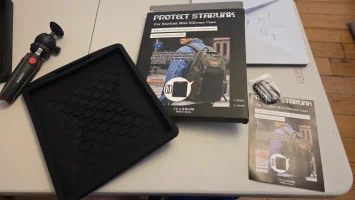
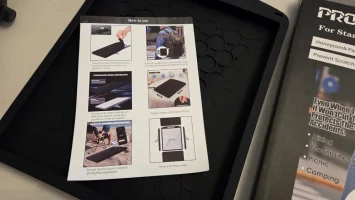
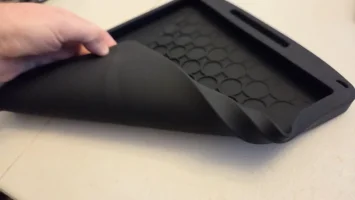
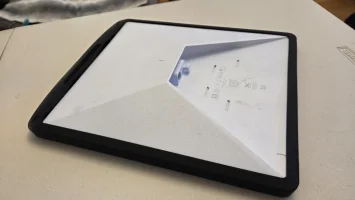
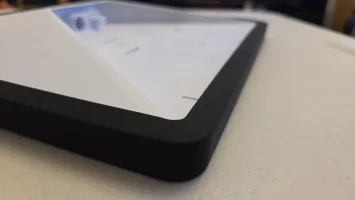
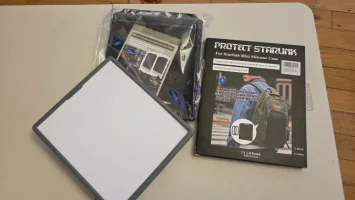
a soft silicone rubber top cover in black.


1771755871273.webp


it has a raised section to help cooling its hot on th top side.

1771755900768.webp


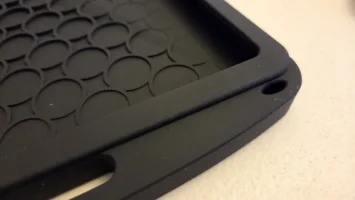
and some clip holes . . . for whatever.

1771755929741.webp1771755942365.webp


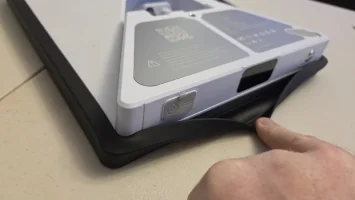
its fits like a glove. . .

1771755957708.webp1771755969687.webp


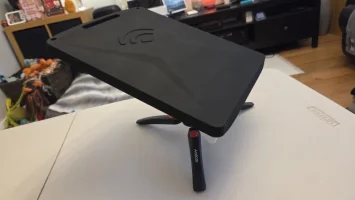
there is a nice WIFI logo on top.

1771756520115.webp


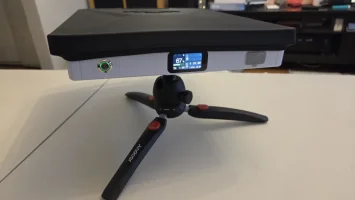
and yes - it fits with the PeakDo battery setup too ( @Mick )


1771756556938.webp1771756567143.webp1771756577741.webp


Cheap - Simple - DoesTheJob.

#Dellmassive Approved


.
 
following on from this,

the slight issue with the reflection in the screen.

traveling in Fance the SL did a grand job - but the reflection was anoying.

i thought about Spraying the front Black - but that was not a great idea is the Black would absorb the heat from the sunlight and probobly cook it.

other ideas were the SL office carry sack,

pair of tights . . .

etc etc - you get the idea.

well this is where this comes in.


View attachment 317445


View attachment 317446


a soft silicone rubber top cover in black.


View attachment 317447


it has a raised section to help cooling its hot on th top side.

View attachment 317448


and some clip holes . . . for whatever.

View attachment 317449View attachment 317450


its fits like a glove. . .

View attachment 317451View attachment 317452


there is a nice WIFI logo on top.

View attachment 317453


and yes - it fits with the PeakDo battery setup too ( @Mick )


View attachment 317454View attachment 317455View attachment 317456


Cheap - Simple - DoesTheJob.

#Dellmassive Approved


.

FYI - got a different one off webay too,

but they effectivly the same thing.


1771756675873.webp


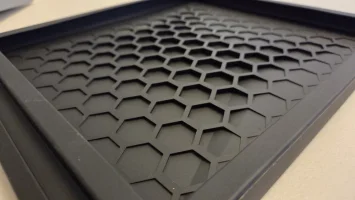
Hex design on this one,

1771756697015.webp

fits with the battery setup..


1771756713222.webp

or without.


1771756737089.webp


1771756751930.webp


1771756765062.webp


Nice. . .
 
USA Starlink in motion blocked on the standby package.....


New 450mph plane edition plan.... Lol..


"
The company has also introduced a 100 miles per hour speed cap for in-motion use on the Roam and Priority plans, effectively blocking small planes from using the satellite internet service. Instead, SpaceX has introduced new Aviation 300MPH and Aviation 450MPH plans for private-plane owners at $250 and $1,000 per month, respectively. As a result, affected users are threatening to cancel their subscriptions

"
 
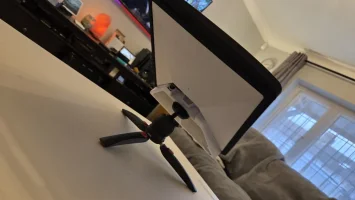
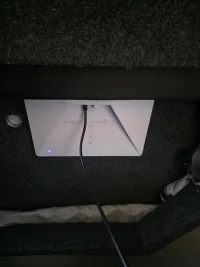
Thanks again to @Qnapper , Starlink working well in Standby mode wedged between the poptop roof and bed board. I was a little skeptical, but working well!
Plugged into the new 12/24 step up voltage socket, taking on average 30 ish watts.
Not loud but noticeable chattering coming from the 'dish', is that normal? I've never been so close to it in a confined space before!

20260308_220453.webp
 
Unfortunately the Kessler Syndrome may screw us, not just the convienience of connectivity while travelling, just think of all the financial data backbone even though most is carried on fibre, air travel hazards... the doom mongering is actually based on fact... not just in movies. Search it, find it, then make a brew or pour a stiff one and forget about it :) I wont put a link, there is plenty out there. Meanwhile ~ *cough ~ very happy with my Starlink. - NB: I am aware orbital layers exist, i.e it's like an onion, so geo-stationary are further out than Starlink & Amazon constellations.

Starlink are in a very low orbit, deliberately so for many reasons. A pertinent reason here is that even if they lose contact with a bird it's orbit will naturally de-orbit within 5 years.

Kessler syndrome is a worrying prospect, but unlikely at the low altitude at which Starlink operates, and even if the worst happened that orbital shell would naturally clear as as the debris de-orbits naturally. Its higher up where rhe real problems would lurk.
 
Stood standing in my kitchen, hooked up to povvo plan Starlink in the van, through walls and windows, I've just managed to watch and listen unhindered all through a forum members recommended tune.
Why do I need to pay £50 a month when standby works so well!

Screenshot_20260308_230926_Chrome.webp
 
Thanks again to @Qnapper , Starlink working well in Standby mode wedged between the poptop roof and bed board. I was a little skeptical, but working well!
Plugged into the new 12/24 step up voltage socket, taking on average 30 ish watts.
Not loud but noticeable chattering coming from the 'dish', is that normal? I've never been so close to it in a confined space before!

View attachment 318927
I put it in the other way so blue light is not showing. Can say I have noticed, so went down to camper last night and checked. There is a hum of sorts but need to be very close and with Tv etc on cannot hear it. Have the dish plugged in this morning to mains supply and again low hum of sorts.
 
Last edited:
y I put it in the other way so blue light is not showing. Can say I have noticed, so went down to camper last night and checked. There is a hum of sorts but need to be very close and with Tv etc on cannot hear it. Have the dish plugged in this morning to mains supply and again low hum of sorts.
I wanted to see that blue light last night to make sure power was on, I've wired in a switch to turn it off when not in use, it's the power usage of another fridge, already use 2 fridges don't want another!
 
Back
Top