RESOLVED - No Brake Lights??

SussexT6

Member
VIP Member
T6 Pro
Morning all,

Soooo,
Following a bit of playing aorund with various bit on the rear of the van at the weekend I now have no brake lights. When checking the OBD scanner it says i have a bulb out.
Once i reset the code the lights do light up again briefly before going out.
I have had to refit my original tail lights after one of the THQ LED's failed.
I also have swapped out the high level brake light for a THQ one and have LED number plate lights.
BUT i have since removed all of this and still this strange error with the brake lights.
All the other lights work on the tail lights.

Before i start pulling the wiring about has anyone come across this before?

Thanks
 
I had a similar issue when I upgraded my rear lights on my 5.1 to T6.1. I re-pinned as per instructions.
They'd light up but as soon as the brake was used they'd fail and throw a bulb error code.
If I reset the code they'd work briefly before going out again.
Tested earth connections, everything I could think of but was getting 12V at the rear terminals so couldn't figure it out.
I put the original tail lights back in and had the same issue.
Ended up taking it to a local auto-electrician.
They informed me that it was my THQ LED headlights that were causing the issue - they added a couple of relays to take direct power from the battery rather than from the BCM but using the BCM signal for the trigger. Why that would knacker up the rear lights I've no idea. Just a thought tho?
 
I had a similar issue when I upgraded my rear lights on my 5.1 to T6.1. I re-pinned as per instructions.
They'd light up but as soon as the brake was used they'd fail and throw a bulb error code.
If I reset the code they'd work briefly before going out again.
Tested earth connections, everything I could think of but was getting 12V at the rear terminals so couldn't figure it out.
I put the original tail lights back in and had the same issue.
Ended up taking it to a local auto-electrician.
They informed me that it was my THQ LED headlights that were causing the issue - they added a couple of relays to take direct power from the battery rather than from the BCM but using the BCM signal for the trigger. Why that would knacker up the rear lights I've no idea. Just a thought tho?
So tonight I borrowed the Autel reader from work and plugged it in.
It was coming up with an error saying the brake lights were going to ground.
That’s puzzling as when I reset the code the lights came on, stay on for 5 seconds flashed then went off.
Surely if they were grounded they wouldn’t come at all?
Was supposed to be taking it to Bognor Motors for suspension work next week but looks like I’m going to have to try and find an auto electrician.
To cap it off the Vland headlights arrived and I’m worried of making it all worse!
ACC error since the lack of brake lights too 🤬
 
This is normally a screw in the cable for the rear cabin lights.

From the kitchen fitting or roof fitting.

A cut cable, screwed cable, crushed cable.

The loom goes along the top shoulder of the van on the passenger side

Then down the passenger D pillar...

What work have you done just prior to the fault?
 
Last edited:
This is normally a screw in the cable for the rear cabin lights.

From the kitchen fitting or roof fitting.

A cut cable, screwed cable, crushed cable.

The look goes asking the top shoulder is the van an the passenger side

Then down the rest pillar...

What work have you done just prior to the fault?
Thank you,
Work completed the same day were fitting blackout curtains to the rear barn doors
Otherwise the campervan conversion was done months ago.
I wonder if I’ve caught the high level brake light wiring?
Whilst fairly competent wiring and fault chasing has always been a dark art to me 🙄
 
Thank you,
Work completed the same day were fitting blackout curtains to the rear barn doors
Otherwise the campervan conversion was done months ago.
I wonder if I’ve caught the high level brake light wiring?
Whilst fairly competent wiring and fault chasing has always been a dark art to me 🙄
Go back and remove any fixings at high level.

Post some pics of what's new... That will help
 
Massive thank you to you Dell!!!!!
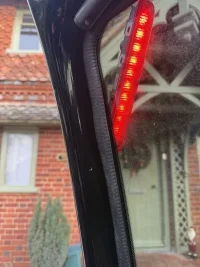
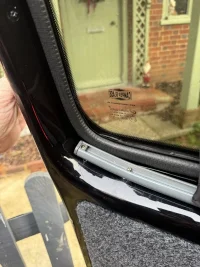
It looks as though even using the supplied screws I’ve either pinched, nicked or gone through the high level brake light cable!
Not sure of the damage to the cable but removed all the screws and it’s all working again
Will be getting some shorter screws I think!

I owe @Dellmassive a beverage that’s for sure 👌
Never thought it would be the curtains 😁IMG_1411.jpegIMG_1410.jpeg
 
Last edited:
Massive thank you to you Dell!!!!!
It looks as though even using the supplied screws I’ve either pinched, nicked or gone through the high level brake light cable!
Not sure of the damage to the cable but removed all the screws and it’s all working again
Will be getting some shorter screws I think!

I owe @Dellmassive a beverage that’s for sure 👌
Never thought it would be the curtains 😁View attachment 311765View attachment 311766
Glad your sorted...

We'll be at most the T6FORUM camping events in 2026, come join us for a beer.
 
@SussexT6 personally I would want to check out the damage to the cables- you don’t really want damaged wires rattling about in there.
 
@SussexT6 personally I would want to check out the damage to the cables- you don’t really want damaged wires rattling about in there.
Thank you,
Door panel off wiring checked, new heat shrink and all placed back in the door.
An unplanned Wednesday but sorted
Also THQ screws that come with the curtain kit could be too long in some applications! (Ask me how I know 😉)
All replaced with 1/2” no:2 counter sunk self tappers
 
Back
Top