Rear lights not working on automatic

elduderino

Member
VIP Member
T6 Pro
T6 150 T28 Highline 68

Hi
Rear lights not working on automatic, but working when switched to manually on .
Brake lights are working.
OBD11/ central electrics/ live data/ channel 17
Number 1 in list says inactive
Number 3 in list says not operated.

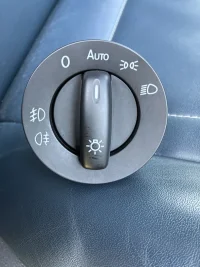
Do I need to replace the Switch?

I have the switch where the front fog lights option has to be pulled out on the dial

Thanks for any help
 
Are you saying you have no tail lights when the headlights have turned on automatically, or are you expecting the tail lights to be one with daytime running lights?
 
When my switch was set to auto, both the front DRL & the rear lights would work.
Now with the switch set to auto, only the front DRL come on , & the rear do not.

The only way to get both front & rear on at the same time is to set the switch to manually on. (The option to the right of Auto)
IMG_3536.webp
 
The auto position is only for when it gets dark and it puts the main front and rear lights on without you manually needing to. If you turn the switch to 0 you will still have the front DRL. I don't believe DRL is used on the back.
 
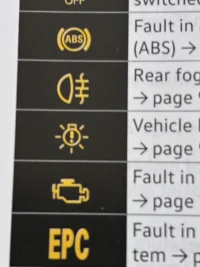
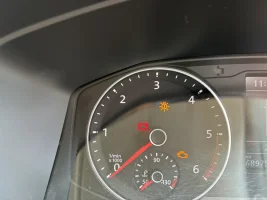
I first got the “Vehicle lighting is not working “ sign on the dashboard two days ago.
Middle of picture.
That warning light went out as soon as I turned the switch off, & back on again.
I will have a look tonight to see if the rear comes on.
IMG_3539.webp
 
No need to wait until dark. Keep the switch in the Auto position, with the ignition on, cover the light sensor in the windscreen (behind the mirror) and the dipped headlights and tail lights should come on.
 
Covered the sensor . DRL front came on , not the rear. But the warning icon is back on dashboard
Odd. Covering the sensor in Auto should put dipped beam and tail lights on. DRLs should be on in daylight with the switch in the Off or Auto position.

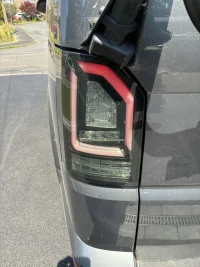
I'd say those aftermarket LED taillights are giving an intermittent bulb out warning.
 
When my switch was set to auto, both the front DRL & the rear lights would work.
Now with the switch set to auto, only the front DRL come on , & the rear do not.

The only way to get both front & rear on at the same time is to set the switch to manually on. (The option to the right of Auto)
Have you altered anything on the van recently or been dabbling with any coding? I know there is an option for coding tail lights to illuminate with drls
 
no. All I am capable of with obd11 is check for faults, & clear them.
I used google AI for this;
OBD11/ central electrics/ live data/ channel 17
Number 1 in list says inactive
Number 3 in list says not operated.

It said the switch was faulty.

Hence my first post
 
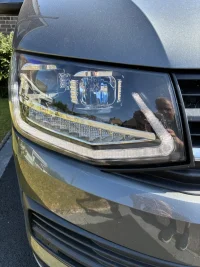
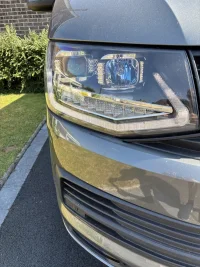
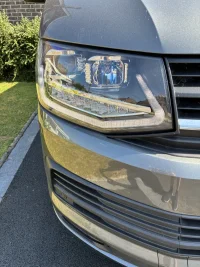
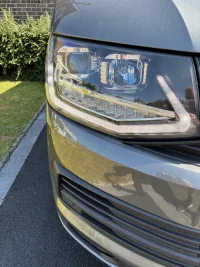
Can you post photos of your headlights showing which lights are illuminated in each light switch position with the ignition on and one with the sensor covered in the Auto position?
 
Ignition on . Switch off
IMG_3545.webp
Ignition on Switch on side lights position

IMG_3548.webp
Ignition on. Switch on auto

IMG_3547.webp
Ignition on. Switch auto. Sensor covered

IMG_3546.webp
 
From what I can make out from your photos, They all look fine, with the exception of the last one as dipped headlights should be on.
 
Dipped headlight will come on when the headlight option is selected , but not on auto, as you say.
Could it be the switch that’s faulty?
Could that be why the “lighting not working”icon is lit on the dash
 
Quite possibly given what your code reader suggests, however your original post was referring to rear lights not working, so I've tried to help on that basis.

Maybe treat yourself to a new switch and report back as it may help others reading this in the future.
 
Back
Top