
Hi All, well after lots of research and help on here i invested in a VNCI tool and have been using VCTool to make some changes to my MY19 Caravelle. I went for VCTool primarily because its a cost effective solution that allows a month by month which is hopefully all i will need for now and allows within that month for me to flash modules. I've been having a good play and it seems a really good tool and works from what i could see in a similar fashion to VCDS(although i have never owned or used VCDS).
Sadly there are no oneclick solutions available on it for T6 so i have been making changes in either coding or adaptions. So far i have managed to set the instruments to celebration so they do the sweep, set the big mph speedo, deactivate drl's when the handbrake is on, set up the extra wipe from the wipers after a few seconds and also add a couple of bits to the MFD like the amount of fuel until refill etc. I even managed to flash the ECU with the park heater firmware files and then put it back to standard so i didnt get faults as i have not yet installed the telestart...That will be this weekends playing
But the one i cant get to work is the auto locking when above 10mph and unlock on key removal. I can select both these in adaptions but it just fails to lock when driving away or unlock when the key is removed if i have locked it. Are there any other adaptions i need to make or coding to change?
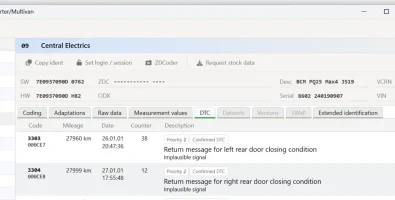
The only other issue i have is that i have 'return message from left (and right) rear door closing position is implausible' as per picture. Would this prevent the auto locking from working? Any idea what causes this fault and how to correct, both electric side doors open close and lock on the key remote as expected.
Thanks for any help
Andy
Sadly there are no oneclick solutions available on it for T6 so i have been making changes in either coding or adaptions. So far i have managed to set the instruments to celebration so they do the sweep, set the big mph speedo, deactivate drl's when the handbrake is on, set up the extra wipe from the wipers after a few seconds and also add a couple of bits to the MFD like the amount of fuel until refill etc. I even managed to flash the ECU with the park heater firmware files and then put it back to standard so i didnt get faults as i have not yet installed the telestart...That will be this weekends playing
But the one i cant get to work is the auto locking when above 10mph and unlock on key removal. I can select both these in adaptions but it just fails to lock when driving away or unlock when the key is removed if i have locked it. Are there any other adaptions i need to make or coding to change?
The only other issue i have is that i have 'return message from left (and right) rear door closing position is implausible' as per picture. Would this prevent the auto locking from working? Any idea what causes this fault and how to correct, both electric side doors open close and lock on the key remote as expected.
Thanks for any help
Andy

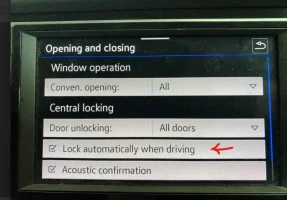

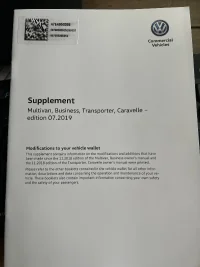
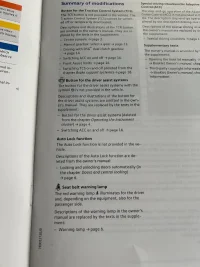
 . I will se if I can find a way to add it though on VC Tool as I can’t see it being a physical change



 . Thanks to everyone for the super help and ideas


