
You are using an out of date browser. It may not display this or other websites correctly.
You should upgrade or use an alternative browser.
You should upgrade or use an alternative browser.
T6.1 USB-C ports given up
- Thread starter g33k0ut
- Start date


WeeCobi
Member
I am going to give it a go. Ordered the partHey! Yes, I did it all myself. I'm an enthusiastic amateur (at best!) - and I wouldn't say it was too tough. Basic steps here with a few pics attached to help. No warranty offered or implied and any process improvements welcomed from other contributors
Start by turning the ignition off so the infotainment system is powered off - we don't want to upset anything.
Step 1. Remove the entire cup holder assembly. It lifts up and out, but is fixed in place with some strong clips. This is probably the 'hardest' bit in the sense that you'll need some trim removal tools, or something suitable to pry it out without damaging the plastics or breaking the clips. See attached image 1 which shows the assembly removed and the location of the clips (the yellow bits) to help you find the best place to use your trim removal tool. Take it slowly, a clip at a time.
Step 2. With the assembly removed, you need to detach the green and red connectors from the 2G6035736 part. They both have a small plastic latch on the connector body itself that you need to depress before gently sliding each out. You can see the green latch on attached image 2. The red connector latch is slightly rebated inside the unit, so you can't see it on my picture - but same principle. Be careful - don't force them. If the connectors don't move, check you've fully depressed the latches.
Step 3. You need to unclip the faulty part 2G6035736 from the overall assembly. Referring to attached image 2, it's the black plastic latches at the bottom of the image (closest to the top of the cup holder assembly). There are these latches on 3 sides of the assembly, all of which need to be depressed to release the 2G6035736 part. If the image doesn't make this bit clear, don't worry - it will be obvious when you're looking at it. With the latches depressed, It will eventually slide out. Note: I've seen some posts elsewhere suggesting these latches sometimes break in normal usage which have caused USB ports to drop inside the cup holder - so be careful with these, too!
Reinstallation is the reverse of the removal steps above.
Personally I connected everything up and tested it before clipping the cup holder assembly back into place.
Easy job really - did most of it in the car park of the parts centre before I drove home
View attachment 272240
View attachment 272241


Hey everyone - just a heads up if your USBC ports are not working, make sure your dealer hasn’t unplugged them for you while supposedly fixing the trim that they broke last week when they replaced your infotainment unit that died when you tried to update your map database.
I only pulled the cup holder out thanks to this thread because I’d spent 2 hours checking all our fuses and was at my whit’s end thinking I was going to have to pay for a new USB-C unit, but then I realise what I was looking at - it was missing one of the cables! Our dealer unplugged it this morning apparently while fixing the broken clip for the trim above this.
Words fail me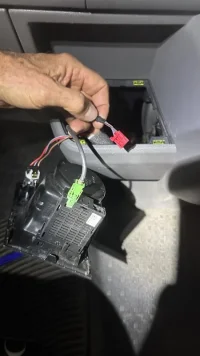
I only pulled the cup holder out thanks to this thread because I’d spent 2 hours checking all our fuses and was at my whit’s end thinking I was going to have to pay for a new USB-C unit, but then I realise what I was looking at - it was missing one of the cables! Our dealer unplugged it this morning apparently while fixing the broken clip for the trim above this.
Words fail me

I bought the new version of the USB hub, but did not fix anything.
Does anyone know if that green data wire goes somewhere other than the back of the headunit screen? I have the basic MIB2 (MEN2) radio - and i could not see that cable going into the screen. Where does it go? I have seen mentions of a USB Hub, do i have that even without any other USB connections in the back?
Does anyone know if that green data wire goes somewhere other than the back of the headunit screen? I have the basic MIB2 (MEN2) radio - and i could not see that cable going into the screen. Where does it go? I have seen mentions of a USB Hub, do i have that even without any other USB connections in the back?

Hey! Yes, I did it all myself. I'm an enthusiastic amateur (at best!) - and I wouldn't say it was too tough. Basic steps here with a few pics attached to help. No warranty offered or implied and any process improvements welcomed from other contributors
Start by turning the ignition off so the infotainment system is powered off - we don't want to upset anything.
Step 1. Remove the entire cup holder assembly. It lifts up and out, but is fixed in place with some strong clips. This is probably the 'hardest' bit in the sense that you'll need some trim removal tools, or something suitable to pry it out without damaging the plastics or breaking the clips. See attached image 1 which shows the assembly removed and the location of the clips (the yellow bits) to help you find the best place to use your trim removal tool. Take it slowly, a clip at a time.
Step 2. With the assembly removed, you need to detach the green and red connectors from the 2G6035736 part. They both have a small plastic latch on the connector body itself that you need to depress before gently sliding each out. You can see the green latch on attached image 2. The red connector latch is slightly rebated inside the unit, so you can't see it on my picture - but same principle. Be careful - don't force them. If the connectors don't move, check you've fully depressed the latches.
Step 3. You need to unclip the faulty part 2G6035736 from the overall assembly. Referring to attached image 2, it's the black plastic latches at the bottom of the image (closest to the top of the cup holder assembly). There are these latches on 3 sides of the assembly, all of which need to be depressed to release the 2G6035736 part. If the image doesn't make this bit clear, don't worry - it will be obvious when you're looking at it. With the latches depressed, It will eventually slide out. Note: I've seen some posts elsewhere suggesting these latches sometimes break in normal usage which have caused USB ports to drop inside the cup holder - so be careful with these, too!
Reinstallation is the reverse of the removal steps above.
Personally I connected everything up and tested it before clipping the cup holder assembly back into place.
Easy job really - did most of it in the car park of the parts centre before I drove home
View attachment 272240
View attachment 272241
Another hero post proving why I love forums, swapped my usb module over this evening in under 5 mins following this.
Luckily for me everything is back to working, although it’s probably only a day or two until something else fails, been chasing and replacing electrics like they are going out of fashion.

Just realised my USB C ports don't seem to be working. T6.1. They are lit up but wont charge or connect my Android phone for Android Auto. Also tried my tablet and same nothing happening. Tried a few cables that i know work elsewhere and have been working in these ports. Any obvious ideas i should try? Is it a new unit?
Original unit, was working fine@step original or after market head unit?
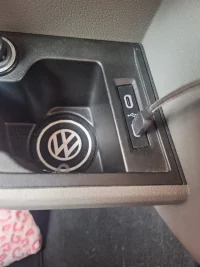
So my usb c ports still aren't working. They are illuminated but phones don't charge or connect for Android Auto. Checked the fuse and appears OK. Reset head unit still same. Tried various cables and still the same. Took the usb unit out and both cables are connected. Does it look like a replacement as shown earlier in the thread or is there something else I could look at?
Similar threads


- Replies
- 9
- Views
- 2K

- Replies
- 0
- Views
- 301
- Replies
- 4
- Views
- 1K

