
You are using an out of date browser. It may not display this or other websites correctly.
You should upgrade or use an alternative browser.
You should upgrade or use an alternative browser.
MEKEDE DUDU7 12+512GB for VW Transporter 2020 - Headunit Chat
- Thread starter Holmless
- Start date
HarryJonesT6
Member
There's a telegram group chat with loads of help and advice that's deffo worth joining.
Just search Duduauto global telegram.
Just search Duduauto global telegram.
Did the power supply harness come with your or did you buy separately don't suppose to could send me a link to where you bought it could you please. ThanksI've got reverse sensors only on mine but the distance thing doesn't work, I think I need to change the canbus settings or I need to try a different canbus module. Also, on my factory head unit I could cancel the reverse beeping by hitting the little X button but the Dudu head unit doesn't have that button on the display so it keeps beeping away then stops after about 5 annoying seconds of me taking it out of reverse.
View attachment 288876
HarryJonesT6
Member
Nah I had to contact the sender of the head unit on AliExpress,I sent them photos of the rear of my head unit and the factory connector, they then sent me a link for the wiring harness and dash adaptor to fit the head unit to my T6.Did the power supply harness come with your or did you buy separately don't suppose to could send me a link to where you bought it could you please. Thanks
I think this was the link for the wiring harness but it's best to contact the seller on AliExpress or Alibaba, they were the cheapest I could find.
I just found this on AliExpress: ibetyouibetyou
£4.15 | Navifans 40PIN/52PIN Car Radio Player CANBUS BOX Wire Harness For Volkswagen Golf 5/6/Polo/Passat/Jetta/Tiguan/TouranSkoda Cable
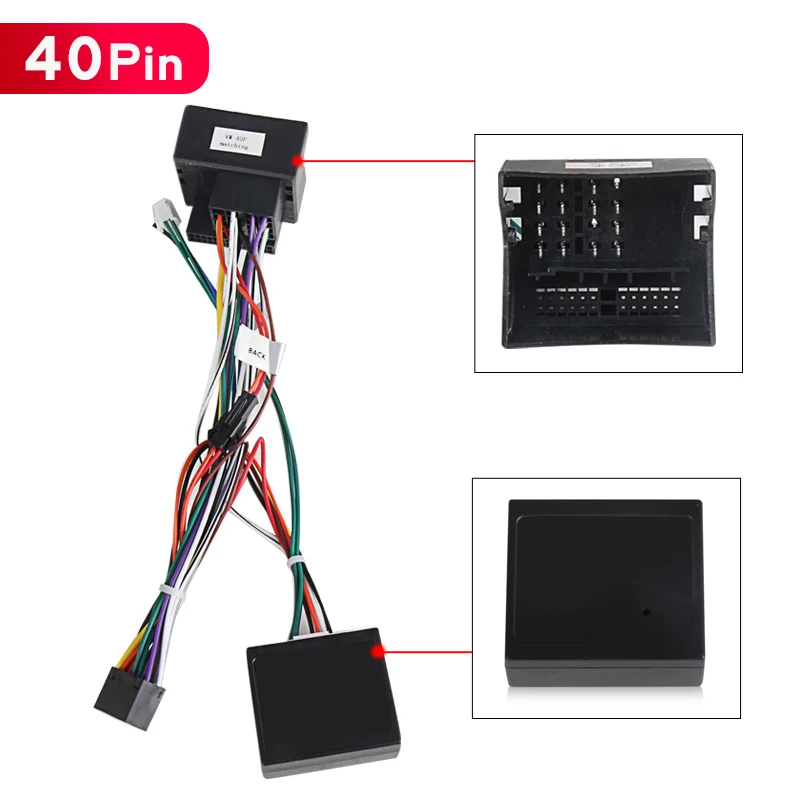
Navifans 40PIN/52PIN Car Radio Player CANBUS BOX Wire Harness For Volkswagen Golf 5/6/Polo/Passat/Jetta/Tiguan/TouranSkoda Cable - AliExpress 34
Smarter Shopping, Better Living! Aliexpress.com
 a.aliexpress.com

Holmless
Member
YesThanks all for your input was a good read.
Are you all still rating the head unit and on the dudu7 does it show reverse sensors.


I supply and fit Dudu7 360 several a week to all types of vehicles: Caddy, T5, 5.1, T6, Crafter/MAN TGE. In many variations and screen sizes from factory-fitting VW OEM through to 11.5 double din floating screens (My personal choice and a bespoke for Makede). I stock certain configurations of units (not all since you can vary RAM, Storage, and screen size, but also keep a stock of all accessories, Trims, CANBUS kits, clips, 360 Cams, 2K DVRs, DAB+ kits, Internal/External TPMS and probably a lot more, including cables and connectors to bring this into the Digidash.
Full systems purchased through me include full support to get the setup right and tackle future updates and integrations as they come in. I am customising camera fittings so make locations more discreet on the 360 systems, Laser calibrating 360 systems for the tightest camera stitching, incorporating 360 DVR functionality using only the discreet cameras located front (in the badge / Rear where the reverse cam is / and sides under the wing mirrors), including being able to set up unattended recording without ignition and much more.
Get in touch if you are looking to bring your vehicle up to speed and build a whole infotainment ecosystem!
Ant - 07841 025 908
Full systems purchased through me include full support to get the setup right and tackle future updates and integrations as they come in. I am customising camera fittings so make locations more discreet on the 360 systems, Laser calibrating 360 systems for the tightest camera stitching, incorporating 360 DVR functionality using only the discreet cameras located front (in the badge / Rear where the reverse cam is / and sides under the wing mirrors), including being able to set up unattended recording without ignition and much more.
Get in touch if you are looking to bring your vehicle up to speed and build a whole infotainment ecosystem!
Ant - 07841 025 908
Small question, if I may: ever fitted a 13 inch? Or any particular reason for not mentioning it here, though it does exist? Just wondering.I supply and fit Dudu7 360 several a week to all types of vehicles: Caddy, T5, 5.1, T6, Crafter/MAN TGE. In many variations and screen sizes from factory-fitting VW OEM through to 11.5 double din floating screens (My personal choice and a bespoke for Makede). I stock certain configurations of units (not all since you can vary RAM, Storage, and screen size, but also keep a stock of all accessories, Trims, CANBUS kits, clips, 360 Cams, 2K DVRs, DAB+ kits, Internal/External TPMS and probably a lot more, including cables and connectors to bring this into the Digidash.
Full systems purchased through me include full support to get the setup right and tackle future updates and integrations as they come in. I am customising camera fittings so make locations more discreet on the 360 systems, Laser calibrating 360 systems for the tightest camera stitching, incorporating 360 DVR functionality using only the discreet cameras located front (in the badge / Rear where the reverse cam is / and sides under the wing mirrors), including being able to set up unattended recording without ignition and much more.
Get in touch if you are looking to bring your vehicle up to speed and build a whole infotainment ecosystem!
Ant - 07841 025 908
Funny you should ask, as I have just purchased a 13 screen to try with my double DIN configuration. I am going to see how it feels in my T6, but also use it to demo as an optional upgrade for vehicles like the Crafter. I am able to recode the larger screen retrospectively also, plenty of options. We can also go bigger than that!
I'd be curious how it looks, once fitted. If you would be so kind as to post a few pictures, just to get a feel. I've made a 14-inch cutout, just to hold it up in my van and I feel that may be too big. The vents would then be fully covered.Funny you should ask, as I have just purchased a 13 screen to try with my double DIN configuration. I am going to see how it feels in my T6, but also use it to demo as an optional upgrade for vehicles like the Crafter. I am able to recode the larger screen retrospectively also, plenty of options. We can also go bigger than that!

Grab a bikkie and a brew, this may be a long one.
First off, this obviously isn’t a Dav-Tec sign-off or some official recommendation. We’re still very much in the testing and research stage with it at the minute, and we’ll keep updating things as we go until we decide whether we’re actually happy to become a reseller for them or not.
Also worth saying this whole thing started with Ant at Everest VW trying to convince me these Android head units were actually good, not like the cheap ones floating round here, there and everywhere. He bought a Gladen SoundUp kit from me and eventually wore me down over several months into trying this one, with him saying these are leagues ahead of the ones we’ve tried before. In fairness, part of that does seem to come down to the forum and manufacturer support as well, which I’ll get onto later.
Bit early for a full review as I’m still playing with it, but on the whole I’m impressed with it so far. That said, I’ve only had the unit a week or two and only done about 500 miles with it, so these are still early impressions rather than some long-term verdict.
Hardware wise it’s actually very good. Ours is the 12GB / 256GB version, so it’s not the baby spec one either. DUDU list the DUDU7 platform with an 8-core UIS7870 customised CPU, UFS 3.1 storage, AKM7739 DSP, TDA7808 amp stage, 5532 enhanced audio signal stage, optical, coaxial and RCA 5.1 outputs, USB-C 3.2, TDA7708 radio and Android 13 API 33.
That’s probably the biggest reason it interests me in the first place. For my own use I’ve got SoLow Air, Victron Connect and Fogstar all working on it properly, which is nice. I use TIDAL on Max, so I can feed up to 24-bit/96kHz into my Helix V Eight DSP Ultimate via optical, while still retaining factory steering wheel controls, which for me is one of the big selling points of it. It also means I don’t need to use my DAP day to day anymore, which for anyone that doesn’t know is basically a dedicated high quality music player rather than just using your phone.
Integration wise it’s actually done better than I expected in a few areas. I’ve retained the Highline VW reverse camera with multiple views, parking sensor retention works fine, we found a way to retain the factory microphone location, and we’ve also retained the factory USB-C ports and their illumination. That sort of thing matters to me because it helps stop it feeling like a cheap aftermarket lash-up.
General media use is good as well. YouTube, Netflix and all that stuff works fine, which is handy when you’re parked up waiting for the wife to come out of Tesco, the hairdressers or whatever. You can run a dedicated SIM in it if you want, but I’ve just got a routine set up on my phone so once Bluetooth connects my hotspot turns on, which for me is easier than paying for another SIM.
FM radio works great. I’ve not used DAB enough yet to really comment on it properly, and I’ve heard mixed things, but apps like TuneIn make that less of a big deal anyway. To be honest, with how patchy DAB coverage can be, mobile data is often the better option anyway.
Call quality is good as well. No real issues there now. When it was first fitted my wife could hear herself talking back, but that was just because the microphone volume was set two steps too high. Once that was corrected it was fine.
There are a few compromises though. What I have lost is the media and audio information, phonebook information and compass information from the virtual cockpit display. That said, it isn’t the end of the world, and from what I can see the menus and functions that are lost there can’t really be resolved anyway because that’s tied into the later MIB3 infotainment platform. You get the same issue if you’ve got a van with factory virtual cockpit but the stock non-navigation head unit, so I don’t think that part is really a DUDU7-specific issue.
The other annoyance is phone control from the steering wheel. At the moment I can’t answer a call from the steering wheel and have to press the green button on the screen instead. Again, not the end of the world, but a bit annoying. That said, this was also an issue with the factory virtual cockpit when paired with the non-navigation head unit, so that may well be part of what’s going on here too. I’m waiting to hear back from Mekede on that one.
Where a lot of people will either get on with it or hate it is the software side. Personally I actually think the software is good, but you do have to remember what it is. This isn’t a factory system built for one exact vehicle. It’s basically a full Android infotainment ecosystem designed to work across loads of different vehicles, so it’s never going to have the same OEM-level polish as a factory unit. That’s just the reality of it.
One of my bugbears with it at the moment is Google Maps. It uses the full tablet version, but every time the unit restarts it seems to default back out of drive mode rather than staying in it. Not the end of the world, but it is a bit annoying. I think I’ve found a workaround for that though, so that may well sort that side of things.
Another little annoyance with the way I currently like it set up is that it doesn’t show the currently playing app properly. So whether that’s Spotify, TIDAL or something else, it just shows whichever app has been assigned to that pane rather than reflecting what’s actually playing. Again, Mekede are aware of that and hopefully it’ll get sorted on the next software update.
The other thing they need to sort is their own built-in assistant. DUDU have their own sodding assistant built in and it’s a nightmare. For the love of all things car audio, I cannot get Google Assistant to be the default assistant. I have got Google voice assistant working, but I’m not sure whether that will remain the case if I get the Google Maps drive mode mod working, so that still needs a bit more time before I can say exactly where that ends up.
That said, there’s also stuff here that mainstream brands simply don’t really offer in the same way. That’s why I think it needs to be judged for what it actually is, not against a factory VW head unit that only has to do one job in one vehicle.
Another plus is that updates can be done OTA, so over the air, although DUDU also provide local and USB-based update routes as well. In fairness to Mekede and the wider DUDU setup, they do seem very good with support and ongoing development. Official releases are pushed through the forum, Telegram group and OTA. That, to me, is a big part of why this seems ahead of a lot of the other Android stuff we’ve seen before.
It’s also worth saying this does appear to be genuine Android 13 on the DUDU7, which ties in with both DUDU’s own published spec pages and what users on the DUDUAUTO forum have been saying as well.
I’m also working on a way to standardise the setup, because if we do decide to start offering these to customers it needs to be a quick and repeatable process rather than reinventing the wheel every time. More importantly, it needs to be user friendly. At the minute, if you’re decent with tech and happy to learn it, fine. If you struggle with basic tech, it may be a bit much. That said, I am trying to get them set up in a way that makes them as easy to live with as possible, because that side of it matters just as much as the hardware.
It’s also worth noting that if we do end up offering these, for me it would never just be about the head unit itself. The interesting part is how well it can be made to work in a Transporter, what factory functions can be retained, how clean the install is, and how user friendly it is once it’s all properly set up. That’s where I think the difference is really made.
That’s probably the main thing with it really. It’s not a simple OEM-style fit and forget unit. It’s more of a platform. For the right person that’s a good thing, for the wrong person it’ll probably just be a pain in the arse.
So at the minute my view is the hardware is actually very good, the software is good once you understand what it is, and overall I’m impressed with it. All of the issues I’ve come across so far look resolvable and seem to be down to software and firmware updates rather than hardware problems. Hardware wise it seems stable so far.
If you want dead simple and OEM-like above all else, it may not be for you. If you want flexibility, proper audio integration and a lot more scope than a normal head unit gives you, different story.
First off, this obviously isn’t a Dav-Tec sign-off or some official recommendation. We’re still very much in the testing and research stage with it at the minute, and we’ll keep updating things as we go until we decide whether we’re actually happy to become a reseller for them or not.
Also worth saying this whole thing started with Ant at Everest VW trying to convince me these Android head units were actually good, not like the cheap ones floating round here, there and everywhere. He bought a Gladen SoundUp kit from me and eventually wore me down over several months into trying this one, with him saying these are leagues ahead of the ones we’ve tried before. In fairness, part of that does seem to come down to the forum and manufacturer support as well, which I’ll get onto later.
Bit early for a full review as I’m still playing with it, but on the whole I’m impressed with it so far. That said, I’ve only had the unit a week or two and only done about 500 miles with it, so these are still early impressions rather than some long-term verdict.
Hardware wise it’s actually very good. Ours is the 12GB / 256GB version, so it’s not the baby spec one either. DUDU list the DUDU7 platform with an 8-core UIS7870 customised CPU, UFS 3.1 storage, AKM7739 DSP, TDA7808 amp stage, 5532 enhanced audio signal stage, optical, coaxial and RCA 5.1 outputs, USB-C 3.2, TDA7708 radio and Android 13 API 33.
That’s probably the biggest reason it interests me in the first place. For my own use I’ve got SoLow Air, Victron Connect and Fogstar all working on it properly, which is nice. I use TIDAL on Max, so I can feed up to 24-bit/96kHz into my Helix V Eight DSP Ultimate via optical, while still retaining factory steering wheel controls, which for me is one of the big selling points of it. It also means I don’t need to use my DAP day to day anymore, which for anyone that doesn’t know is basically a dedicated high quality music player rather than just using your phone.
Integration wise it’s actually done better than I expected in a few areas. I’ve retained the Highline VW reverse camera with multiple views, parking sensor retention works fine, we found a way to retain the factory microphone location, and we’ve also retained the factory USB-C ports and their illumination. That sort of thing matters to me because it helps stop it feeling like a cheap aftermarket lash-up.
General media use is good as well. YouTube, Netflix and all that stuff works fine, which is handy when you’re parked up waiting for the wife to come out of Tesco, the hairdressers or whatever. You can run a dedicated SIM in it if you want, but I’ve just got a routine set up on my phone so once Bluetooth connects my hotspot turns on, which for me is easier than paying for another SIM.
FM radio works great. I’ve not used DAB enough yet to really comment on it properly, and I’ve heard mixed things, but apps like TuneIn make that less of a big deal anyway. To be honest, with how patchy DAB coverage can be, mobile data is often the better option anyway.
Call quality is good as well. No real issues there now. When it was first fitted my wife could hear herself talking back, but that was just because the microphone volume was set two steps too high. Once that was corrected it was fine.
There are a few compromises though. What I have lost is the media and audio information, phonebook information and compass information from the virtual cockpit display. That said, it isn’t the end of the world, and from what I can see the menus and functions that are lost there can’t really be resolved anyway because that’s tied into the later MIB3 infotainment platform. You get the same issue if you’ve got a van with factory virtual cockpit but the stock non-navigation head unit, so I don’t think that part is really a DUDU7-specific issue.
The other annoyance is phone control from the steering wheel. At the moment I can’t answer a call from the steering wheel and have to press the green button on the screen instead. Again, not the end of the world, but a bit annoying. That said, this was also an issue with the factory virtual cockpit when paired with the non-navigation head unit, so that may well be part of what’s going on here too. I’m waiting to hear back from Mekede on that one.
Where a lot of people will either get on with it or hate it is the software side. Personally I actually think the software is good, but you do have to remember what it is. This isn’t a factory system built for one exact vehicle. It’s basically a full Android infotainment ecosystem designed to work across loads of different vehicles, so it’s never going to have the same OEM-level polish as a factory unit. That’s just the reality of it.
One of my bugbears with it at the moment is Google Maps. It uses the full tablet version, but every time the unit restarts it seems to default back out of drive mode rather than staying in it. Not the end of the world, but it is a bit annoying. I think I’ve found a workaround for that though, so that may well sort that side of things.
Another little annoyance with the way I currently like it set up is that it doesn’t show the currently playing app properly. So whether that’s Spotify, TIDAL or something else, it just shows whichever app has been assigned to that pane rather than reflecting what’s actually playing. Again, Mekede are aware of that and hopefully it’ll get sorted on the next software update.
The other thing they need to sort is their own built-in assistant. DUDU have their own sodding assistant built in and it’s a nightmare. For the love of all things car audio, I cannot get Google Assistant to be the default assistant. I have got Google voice assistant working, but I’m not sure whether that will remain the case if I get the Google Maps drive mode mod working, so that still needs a bit more time before I can say exactly where that ends up.
That said, there’s also stuff here that mainstream brands simply don’t really offer in the same way. That’s why I think it needs to be judged for what it actually is, not against a factory VW head unit that only has to do one job in one vehicle.
Another plus is that updates can be done OTA, so over the air, although DUDU also provide local and USB-based update routes as well. In fairness to Mekede and the wider DUDU setup, they do seem very good with support and ongoing development. Official releases are pushed through the forum, Telegram group and OTA. That, to me, is a big part of why this seems ahead of a lot of the other Android stuff we’ve seen before.
It’s also worth saying this does appear to be genuine Android 13 on the DUDU7, which ties in with both DUDU’s own published spec pages and what users on the DUDUAUTO forum have been saying as well.
I’m also working on a way to standardise the setup, because if we do decide to start offering these to customers it needs to be a quick and repeatable process rather than reinventing the wheel every time. More importantly, it needs to be user friendly. At the minute, if you’re decent with tech and happy to learn it, fine. If you struggle with basic tech, it may be a bit much. That said, I am trying to get them set up in a way that makes them as easy to live with as possible, because that side of it matters just as much as the hardware.
It’s also worth noting that if we do end up offering these, for me it would never just be about the head unit itself. The interesting part is how well it can be made to work in a Transporter, what factory functions can be retained, how clean the install is, and how user friendly it is once it’s all properly set up. That’s where I think the difference is really made.
That’s probably the main thing with it really. It’s not a simple OEM-style fit and forget unit. It’s more of a platform. For the right person that’s a good thing, for the wrong person it’ll probably just be a pain in the arse.
So at the minute my view is the hardware is actually very good, the software is good once you understand what it is, and overall I’m impressed with it. All of the issues I’ve come across so far look resolvable and seem to be down to software and firmware updates rather than hardware problems. Hardware wise it seems stable so far.
If you want dead simple and OEM-like above all else, it may not be for you. If you want flexibility, proper audio integration and a lot more scope than a normal head unit gives you, different story.
I think you've got it about spot on there mate, there's a few things I reckon we can buff out of that list, but as you rightly say, not everyone is prepared to.Grab a bikkie and a brew, this may be a long one.
First off, this obviously isn’t a Dav-Tec sign-off or some official recommendation. We’re still very much in the testing and research stage with it at the minute, and we’ll keep updating things as we go until we decide whether we’re actually happy to become a reseller for them or not.
Also worth saying this whole thing started with Ant at Everest VW trying to convince me these Android head units were actually good, not like the cheap ones floating round here, there and everywhere. He bought a Gladen SoundUp kit from me and eventually wore me down over several months into trying this one, with him saying these are leagues ahead of the ones we’ve tried before. In fairness, part of that does seem to come down to the forum and manufacturer support as well, which I’ll get onto later.
Bit early for a full review as I’m still playing with it, but on the whole I’m impressed with it so far. That said, I’ve only had the unit a week or two and only done about 500 miles with it, so these are still early impressions rather than some long-term verdict.
Hardware wise it’s actually very good. Ours is the 12GB / 256GB version, so it’s not the baby spec one either. DUDU list the DUDU7 platform with an 8-core UIS7870 customised CPU, UFS 3.1 storage, AKM7739 DSP, TDA7808 amp stage, 5532 enhanced audio signal stage, optical, coaxial and RCA 5.1 outputs, USB-C 3.2, TDA7708 radio and Android 13 API 33.
That’s probably the biggest reason it interests me in the first place. For my own use I’ve got SoLow Air, Victron Connect and Fogstar all working on it properly, which is nice. I use TIDAL on Max, so I can feed up to 24-bit/96kHz into my Helix V Eight DSP Ultimate via optical, while still retaining factory steering wheel controls, which for me is one of the big selling points of it. It also means I don’t need to use my DAP day to day anymore, which for anyone that doesn’t know is basically a dedicated high quality music player rather than just using your phone.
Integration wise it’s actually done better than I expected in a few areas. I’ve retained the Highline VW reverse camera with multiple views, parking sensor retention works fine, we found a way to retain the factory microphone location, and we’ve also retained the factory USB-C ports and their illumination. That sort of thing matters to me because it helps stop it feeling like a cheap aftermarket lash-up.
General media use is good as well. YouTube, Netflix and all that stuff works fine, which is handy when you’re parked up waiting for the wife to come out of Tesco, the hairdressers or whatever. You can run a dedicated SIM in it if you want, but I’ve just got a routine set up on my phone so once Bluetooth connects my hotspot turns on, which for me is easier than paying for another SIM.
FM radio works great. I’ve not used DAB enough yet to really comment on it properly, and I’ve heard mixed things, but apps like TuneIn make that less of a big deal anyway. To be honest, with how patchy DAB coverage can be, mobile data is often the better option anyway.
Call quality is good as well. No real issues there now. When it was first fitted my wife could hear herself talking back, but that was just because the microphone volume was set two steps too high. Once that was corrected it was fine.
There are a few compromises though. What I have lost is the media and audio information, phonebook information and compass information from the virtual cockpit display. That said, it isn’t the end of the world, and from what I can see the menus and functions that are lost there can’t really be resolved anyway because that’s tied into the later MIB3 infotainment platform. You get the same issue if you’ve got a van with factory virtual cockpit but the stock non-navigation head unit, so I don’t think that part is really a DUDU7-specific issue.
The other annoyance is phone control from the steering wheel. At the moment I can’t answer a call from the steering wheel and have to press the green button on the screen instead. Again, not the end of the world, but a bit annoying. That said, this was also an issue with the factory virtual cockpit when paired with the non-navigation head unit, so that may well be part of what’s going on here too. I’m waiting to hear back from Mekede on that one.
Where a lot of people will either get on with it or hate it is the software side. Personally I actually think the software is good, but you do have to remember what it is. This isn’t a factory system built for one exact vehicle. It’s basically a full Android infotainment ecosystem designed to work across loads of different vehicles, so it’s never going to have the same OEM-level polish as a factory unit. That’s just the reality of it.
One of my bugbears with it at the moment is Google Maps. It uses the full tablet version, but every time the unit restarts it seems to default back out of drive mode rather than staying in it. Not the end of the world, but it is a bit annoying. I think I’ve found a workaround for that though, so that may well sort that side of things.
Another little annoyance with the way I currently like it set up is that it doesn’t show the currently playing app properly. So whether that’s Spotify, TIDAL or something else, it just shows whichever app has been assigned to that pane rather than reflecting what’s actually playing. Again, Mekede are aware of that and hopefully it’ll get sorted on the next software update.
The other thing they need to sort is their own built-in assistant. DUDU have their own sodding assistant built in and it’s a nightmare. For the love of all things car audio, I cannot get Google Assistant to be the default assistant. I have got Google voice assistant working, but I’m not sure whether that will remain the case if I get the Google Maps drive mode mod working, so that still needs a bit more time before I can say exactly where that ends up.
That said, there’s also stuff here that mainstream brands simply don’t really offer in the same way. That’s why I think it needs to be judged for what it actually is, not against a factory VW head unit that only has to do one job in one vehicle.
Another plus is that updates can be done OTA, so over the air, although DUDU also provide local and USB-based update routes as well. In fairness to Mekede and the wider DUDU setup, they do seem very good with support and ongoing development. Official releases are pushed through the forum, Telegram group and OTA. That, to me, is a big part of why this seems ahead of a lot of the other Android stuff we’ve seen before.
It’s also worth saying this does appear to be genuine Android 13 on the DUDU7, which ties in with both DUDU’s own published spec pages and what users on the DUDUAUTO forum have been saying as well.
I’m also working on a way to standardise the setup, because if we do decide to start offering these to customers it needs to be a quick and repeatable process rather than reinventing the wheel every time. More importantly, it needs to be user friendly. At the minute, if you’re decent with tech and happy to learn it, fine. If you struggle with basic tech, it may be a bit much. That said, I am trying to get them set up in a way that makes them as easy to live with as possible, because that side of it matters just as much as the hardware.
It’s also worth noting that if we do end up offering these, for me it would never just be about the head unit itself. The interesting part is how well it can be made to work in a Transporter, what factory functions can be retained, how clean the install is, and how user friendly it is once it’s all properly set up. That’s where I think the difference is really made.
That’s probably the main thing with it really. It’s not a simple OEM-style fit and forget unit. It’s more of a platform. For the right person that’s a good thing, for the wrong person it’ll probably just be a pain in the arse.
So at the minute my view is the hardware is actually very good, the software is good once you understand what it is, and overall I’m impressed with it. All of the issues I’ve come across so far look resolvable and seem to be down to software and firmware updates rather than hardware problems. Hardware wise it seems stable so far.
If you want dead simple and OEM-like above all else, it may not be for you. If you want flexibility, proper audio integration and a lot more scope than a normal head unit gives you, different story.
Assistant: On 6.1 for the life of me I don't know why they never put a phone button on the wheel. It would make more sense than view in my eyes but hey, first thing I do it turn off Dudu 'helper' aka Office2000 paperclip.. just a pest..I did upgrade it at one point to a 2 year AI version of itself which was infinitely more useless since it cost money, but;
When you install 'google assistant' from play store (doesn't come pre-installed!) it lets you set that as the new default. Moreover, they have a dedicated assistant launcher app which starts using it. 'voice launcher' which can bind to custom icons and or gestures. So you could either 'say the words' or even bind it to a button available in lin.. that's where you come in Chris.. get your most useless button on the wheel and find out how to make it generic using those key 1 and 2 inputs
 though I'm pretty sure you can hold down your factory voice button for dual use. Short press for vehicle.. hold for launcher i.e. android auto and Carplay.. so I think it can actually bring up Google.
In my T6 I either.. hold down the voice button, say hey g, or using the Dudu7 programmable remote, I programme holding the centre button in there and mount on the right handle. Additionally you can use gestures such as edge swiping, or swipe and hold to launch anything you like, including assistant, which is Gemini in my case and does a top job of navigating and grabbing new random playlists from Spotify. I will work though media play with you separately because deezer/tidal behaviours and integrations will be a little new to me.
Anyways I'm glad we got it in there finally and looking forward to twisting your arm again to see what you think of the 11.5" screen version I can retrofit directly to your unit, it doesn't sound much float, but hovers very close. I was very happy with a few recent solid installs. I will be back up to see you for lithium upgrades next I reckon. So we need to chat that one through for the Cali Ocean and all it's intricacies. Still absolutely loving that Gladen Mosconi T6 kit, especially with the helix optical hi-res BT Streamer sat in between, what a combo.. but it is definitely a gateway drug to me!
Free tip of the week: in the app 'downloader' search short code '28544' you might have to go into playstore click your name and disable safe thingy (which so far as I can tell dislikes anything not in playstore if enabled) *disclaimer do this at your own risk blah... that downloads 'smart tube' directly from the official site which is a clever way of watching YouTube without the ads. Which is a joy, but especially good for music videos since a 4K and free music channel with less adds than music doesn't seem to exist in today's world. You don't have to login to use it but with QR code login you can hot swap the whole families logins and now my kids don't fill my feed with the most random of garbage, I can just collect my own!
Speak soon pal, be back up with the van once I've got the new injectors in! Or if it turns out to be worse perhaps an engine project! Look forward to working through a clean interface setup stages to ensure smooth from the start. I'm going to be building an internal support wiki with screen record tutorials from ELC (early learning centre) right through to Yoda. Which is where you will be once you start playing in developer settings and rooted image flashing for fastest setups hmm..

Can I ask If anyone knows how this unit compares to the DYNAVIN?
No so much for the HD audio side, but more basic stuff. speed, GUI, HDD space, integration with the van..... App available, etc etc.
For a T6 install?
...
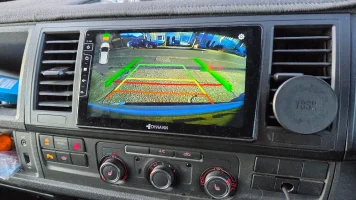
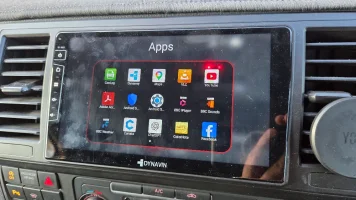
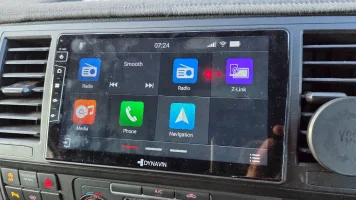
...
 www.dynavin.de
No so much for the HD audio side, but more basic stuff. speed, GUI, HDD space, integration with the van..... App available, etc etc.
For a T6 install?
...
...
VW T6
Upgrade your VW T6 with Dynavin’s Android radio – Wireless CarPlay, Blitzer.de data integrated & Powerful digital amplifier. Easy DIY install from €299.
www.dynavin.de
Cheers Antony. A few of the bits you mentioned we’ve already been through.
We’ve already tried most of the obvious Android-side stuff, including assistant settings, default apps, permissions, and general setup. I have actually got Google Voice Assistant working, but getting Google Assistant to become the true default assistant is the bit that still isn’t quite right, especially with DUDU insisting on having its own built-in assistant in the mix.
We’ve even tried uninstalling/turning off the DUDU assistant side of it, but that doesn’t seem to solve it either properly.
As for the button side of it, from what I can see, the press-and-hold behaviour seems to be a factory unit thing rather than something the DUDU is currently interpreting properly. That’s exactly what I’ve suggested to Mekede, though. It looks to me like they just need to detect roughly a 3-second press and hold on the OK button via CAN and then trigger the correct function from that.
Custom startup screens are sorted as well, so that side of it is all doable, and we’ve already made our own.
To be fair, none of the issues I’ve come across so far looks hardware-related. It all seems to be software, firmware and CAN interpretation stuff, which is actually encouraging because in theory it means it should be fixable.
That’s also where this seems a step ahead of a lot of the Android units we’ve seen before. The forum support and manufacturer involvement does actually seem to make a difference.
We’ve already tried most of the obvious Android-side stuff, including assistant settings, default apps, permissions, and general setup. I have actually got Google Voice Assistant working, but getting Google Assistant to become the true default assistant is the bit that still isn’t quite right, especially with DUDU insisting on having its own built-in assistant in the mix.
We’ve even tried uninstalling/turning off the DUDU assistant side of it, but that doesn’t seem to solve it either properly.
As for the button side of it, from what I can see, the press-and-hold behaviour seems to be a factory unit thing rather than something the DUDU is currently interpreting properly. That’s exactly what I’ve suggested to Mekede, though. It looks to me like they just need to detect roughly a 3-second press and hold on the OK button via CAN and then trigger the correct function from that.
Custom startup screens are sorted as well, so that side of it is all doable, and we’ve already made our own.
To be fair, none of the issues I’ve come across so far looks hardware-related. It all seems to be software, firmware and CAN interpretation stuff, which is actually encouraging because in theory it means it should be fixable.
That’s also where this seems a step ahead of a lot of the Android units we’ve seen before. The forum support and manufacturer involvement does actually seem to make a difference.
i have no personal experience but from what i've seen of the other android headunits this thinks light years aheadCan I ask If anyone knows how this unit compares to the DYNAVIN?
No so much for the HD audio side, but more basic stuff. speed, GUI, HDD space, integration with the van..... App available, etc etc.
For a T6 install?
...
View attachment 322387View attachment 322388View attachment 322389
...
VW T6
Upgrade your VW T6 with Dynavin’s Android radio – Wireless CarPlay, Blitzer.de data integrated & Powerful digital amplifier. Easy DIY install from €299.
Holmless
Member
How did you get the USB-C ports working? I’ve been meaning to get back to This but keep forgetting sounds like you’ve solved it. Please share and get us out of our misery.Cheers Antony. A few of the bits you mentioned we’ve already been through.
We’ve already tried most of the obvious Android-side stuff, including assistant settings, default apps, permissions, and general setup. I have actually got Google Voice Assistant working, but getting Google Assistant to become the true default assistant is the bit that still isn’t quite right, especially with DUDU insisting on having its own built-in assistant in the mix.
We’ve even tried uninstalling/turning off the DUDU assistant side of it, but that doesn’t seem to solve it either properly.
As for the button side of it, from what I can see, the press-and-hold behaviour seems to be a factory unit thing rather than something the DUDU is currently interpreting properly. That’s exactly what I’ve suggested to Mekede, though. It looks to me like they just need to detect roughly a 3-second press and hold on the OK button via CAN and then trigger the correct function from that.
Custom startup screens are sorted as well, so that side of it is all doable, and we’ve already made our own.
To be fair, none of the issues I’ve come across so far looks hardware-related. It all seems to be software, firmware and CAN interpretation stuff, which is actually encouraging because in theory it means it should be fixable.
That’s also where this seems a step ahead of a lot of the Android units we’ve seen before. The forum support and manufacturer involvement does actually seem to make a difference.
How do you mean got the USB-C ports working? Do you have a 7? It should work out of the box and can be used for all sorts of things I take it into a video capable USB port pub so I can use it for lots of other things When I plug in my USB C MiFi device with 5G SIM it transfers a direct internet supply as though it's wired to a router. I can also get two loss of video out from a USB-C to HDMI.How did you get the USB-C ports working? I’ve been meaning to get back to This but keep forgetting sounds like you’ve solved it. Please share and get us out of our misery.
HarryJonesT6
Member
The factory usb plug connector that plugs in to back of the factory head unit is different to the dudu head unit so can't be used without some sort of an adapter. I've had to order aftermarket usbs.
I think there was someone on this forum that sells an adaptor maybe?
I think there was someone on this forum that sells an adaptor maybe?
Holmless
Member
"we’ve also retained the factory USB-C ports and their illumination" How did you do this?I think you've got it about spot on there mate, there's a few things I reckon we can buff out of that list, but as you rightly say, not everyone is prepared to.
Assistant: On 6.1 for the life of me I don't know why they never put a phone button on the wheel. It would make more sense than view in my eyes but hey, first thing I do it turn off Dudu 'helper' aka Office2000 paperclip.. just a pest..I did upgrade it at one point to a 2 year AI version of itself which was infinitely more useless since it cost money, but;
When you install 'google assistant' from play store (doesn't come pre-installed!) it lets you set that as the new default. Moreover, they have a dedicated assistant launcher app which starts using it. 'voice launcher' which can bind to custom icons and or gestures. So you could either 'say the words' or even bind it to a button available in lin.. that's where you come in Chris.. get your most useless button on the wheel and find out how to make it generic using those key 1 and 2 inputs
In my T6 I either.. hold down the voice button, say hey g, or using the Dudu7 programmable remote, I programme holding the centre button in there and mount on the right handle. Additionally you can use gestures such as edge swiping, or swipe and hold to launch anything you like, including assistant, which is Gemini in my case and does a top job of navigating and grabbing new random playlists from Spotify. I will work though media play with you separately because deezer/tidal behaviours and integrations will be a little new to me.
Anyways I'm glad we got it in there finally and looking forward to twisting your arm again to see what you think of the 11.5" screen version I can retrofit directly to your unit, it doesn't sound much float, but hovers very close. I was very happy with a few recent solid installs. I will be back up to see you for lithium upgrades next I reckon. So we need to chat that one through for the Cali Ocean and all it's intricacies. Still absolutely loving that Gladen Mosconi T6 kit, especially with the helix optical hi-res BT Streamer sat in between, what a combo.. but it is definitely a gateway drug to me!
Free tip of the week: in the app 'downloader' search short code '28544' you might have to go into playstore click your name and disable safe thingy (which so far as I can tell dislikes anything not in playstore if enabled) *disclaimer do this at your own risk blah... that downloads 'smart tube' directly from the official site which is a clever way of watching YouTube without the ads. Which is a joy, but especially good for music videos since a 4K and free music channel with less adds than music doesn't seem to exist in today's world. You don't have to login to use it but with QR code login you can hot swap the whole families logins and now my kids don't fill my feed with the most random of garbage, I can just collect my own!
Speak soon pal, be back up with the van once I've got the new injectors in! Or if it turns out to be worse perhaps an engine project! Look forward to working through a clean interface setup stages to ensure smooth from the start. I'm going to be building an internal support wiki with screen record tutorials from ELC (early learning centre) right through to Yoda. Which is where you will be once you start playing in developer settings and rooted image flashing for fastest setups hmm..
Similar threads

- Replies
- 0
- Views
- 1K

- Replies
- 0
- Views
- 360

- Replies
- 0
- Views
- 445

- Replies
- 6
- Views
- 1K
- Replies
- 16
- Views
- 7K