

I've been promising to share the guide but been very busy to be able to write the full instructions in one go.
So I will start writing here in small chunks.
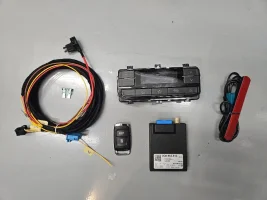
On the pic above you see a full set of the components required to convert your OEM Aux heater to the parking heater which basically allows to pre-heat your interior and engine in the morning.
Components required:
+ Overhead remote control. Part number depends on you car spec and what climate unit you have at the back.
+ Sender (keyfob)
+ Receiver (the 3Q0 unit above)
+ Antenna
+ Wiring loom
Choosing the overhead remote control
Important: the retrofit will not work on T6.1 without the upgraded overhead control unit. In other words, you need a unit with the webasto heater button (leftmost button).
Part number depends on you car spec and what climate unit you have at the back.
For sure it will be one of the following: 7LA907049G, 7LA907049C, 7LA907049B, 7LA907049D, 7LA907049E.
These units are scarce and expensive which makes this retrofit very pricey. At the moment the prices are between 150-180 eur.
For T6.1 California owners - you are lucky. You already have the right remote control and wiring installed going to the overhead unit.
If you know more about which remote to choose for which config - please post in this thread.
This is the info I got so far: 7LA907049E and C for vehicles with a control panel for the rear area.
As you can see from the photo, unlike the T5GP and T6, it is possible to control both air and water heaters
Choosing the remote sender and receiver
The following units are compatible:
1. (pictured above) 3Q0963513, 3Q0963513A/B/C receiver and keyfob 3G0963511, 3G0963511A, 3G0963511B, 3G0963511C, 3G0963511D, 3G0963511E
2. 5Q0963513 / 5Q0963513A receiver and 5Q0963511, 7N0963511 egg-shaped keyfob (I think both are compatible)
3. (NEW) 5WA963513 receiver and 5H0963511 keyfob (unconfirmed)
1, 2, 3 are not cross-compatible. in other words, keyfob from 1 won't pair with receiver from 2.
Regarding third option - 5WA963513 receiver and 5H0963511 keyfob - the keyfob looks exactly like 3G0963511 but once you pop the battery lid, you see that 3G0963511 is made in Germany by Digades and 5H0963511 is made in Poland by Bury company. They really look exactly the same:
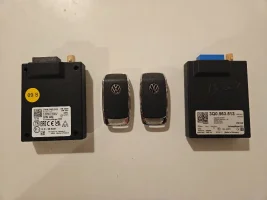
The problem is, the test receiver 5WA963513 I purchased doesn't pair with the 5H0963511 remote, possibly because my receiver is defect (I bought it for cheap), so this option is not confirmed and I recommend you go with either option 1 or 2.
Antenna and wiring loom
Antenna is available on Amazon (search for "Telestart Antenna") if you want a confirmed working option. Otherwise - aliexpress.
Wiring loom - easy to make.
Connector for overhead unit: 8W0971636
Connector for telestart: 6Q0972706
Installation
1. Install wiring
2. Reflash
3. Do the coding
If you already have an overhead panel (incl Cali) - you just need to wire the telestart. Here's a guide for T6 which is exactly how you install the Telestart in T6.1:
Telestart wiring loom is also available on Amazon, but as said, it's easy to make one.
If you don't have the overhead panel, it's better to make a combined loom.
Wiring diagrams, pinouts - maybe in the next post.
Reflash
You need a fresh ODIS (no, VCDS and VCP won't work!) and you need the correct ecu file.
For Diesel T6.1 the right file is 5WA963272C
I've heard that if you google for "mib solution one" and guest / guest, there was something somewhere.
Reflash process is the same as in the Youtube video included above.
Coding
Use ODIS if possible - it is the official tool.
Coding with VCDS was a problem last time.
Coding details to follow.
Is it possible to avoid spending 200 EUR on the overhead unit?
Officially - no. I have friends who have patched the firmware to avoid it but they do this work for living and I don't dare to ask them for a modified flash file.
At least one installation has been done with my help and knowledge above and everything works successfully.
So I will start writing here in small chunks.
On the pic above you see a full set of the components required to convert your OEM Aux heater to the parking heater which basically allows to pre-heat your interior and engine in the morning.
Components required:
+ Overhead remote control. Part number depends on you car spec and what climate unit you have at the back.
+ Sender (keyfob)
+ Receiver (the 3Q0 unit above)
+ Antenna
+ Wiring loom
Choosing the overhead remote control
Important: the retrofit will not work on T6.1 without the upgraded overhead control unit. In other words, you need a unit with the webasto heater button (leftmost button).
Part number depends on you car spec and what climate unit you have at the back.
For sure it will be one of the following: 7LA907049G, 7LA907049C, 7LA907049B, 7LA907049D, 7LA907049E.
These units are scarce and expensive which makes this retrofit very pricey. At the moment the prices are between 150-180 eur.
For T6.1 California owners - you are lucky. You already have the right remote control and wiring installed going to the overhead unit.
If you know more about which remote to choose for which config - please post in this thread.
This is the info I got so far: 7LA907049E and C for vehicles with a control panel for the rear area.
As you can see from the photo, unlike the T5GP and T6, it is possible to control both air and water heaters
Choosing the remote sender and receiver
The following units are compatible:
1. (pictured above) 3Q0963513, 3Q0963513A/B/C receiver and keyfob 3G0963511, 3G0963511A, 3G0963511B, 3G0963511C, 3G0963511D, 3G0963511E
2. 5Q0963513 / 5Q0963513A receiver and 5Q0963511, 7N0963511 egg-shaped keyfob (I think both are compatible)
3. (NEW) 5WA963513 receiver and 5H0963511 keyfob (unconfirmed)
1, 2, 3 are not cross-compatible. in other words, keyfob from 1 won't pair with receiver from 2.
Regarding third option - 5WA963513 receiver and 5H0963511 keyfob - the keyfob looks exactly like 3G0963511 but once you pop the battery lid, you see that 3G0963511 is made in Germany by Digades and 5H0963511 is made in Poland by Bury company. They really look exactly the same:
The problem is, the test receiver 5WA963513 I purchased doesn't pair with the 5H0963511 remote, possibly because my receiver is defect (I bought it for cheap), so this option is not confirmed and I recommend you go with either option 1 or 2.
Antenna and wiring loom
Antenna is available on Amazon (search for "Telestart Antenna") if you want a confirmed working option. Otherwise - aliexpress.
Wiring loom - easy to make.
Connector for overhead unit: 8W0971636
Connector for telestart: 6Q0972706
Installation
1. Install wiring
2. Reflash
3. Do the coding
If you already have an overhead panel (incl Cali) - you just need to wire the telestart. Here's a guide for T6 which is exactly how you install the Telestart in T6.1:
Telestart wiring loom is also available on Amazon, but as said, it's easy to make one.
If you don't have the overhead panel, it's better to make a combined loom.
Wiring diagrams, pinouts - maybe in the next post.
Reflash
You need a fresh ODIS (no, VCDS and VCP won't work!) and you need the correct ecu file.
For Diesel T6.1 the right file is 5WA963272C
I've heard that if you google for "mib solution one" and guest / guest, there was something somewhere.
Reflash process is the same as in the Youtube video included above.
Coding
Use ODIS if possible - it is the official tool.
Coding with VCDS was a problem last time.
Coding details to follow.
Is it possible to avoid spending 200 EUR on the overhead unit?
Officially - no. I have friends who have patched the firmware to avoid it but they do this work for living and I don't dare to ask them for a modified flash file.
At least one installation has been done with my help and knowledge above and everything works successfully.
Last edited:


