
Over the last few weeks I started investigating the possibility of using the infotainment to control the footwell lights and also add some lights to the door pockets and handles. The standard footwells lights aren’t controllable and turn off when the ignition comes on. I know that most will just tap of the vans present dimmer control circuit, but I didn’t want to cut any wires and also fancied the challenge of having them controlled individually from the infotainment like most cars do.
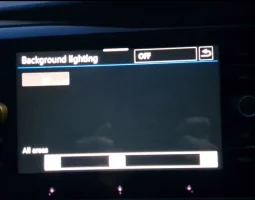
@DanW81 pointed out that there are 4 spare lighting channels on the BCM and these are assigned AMBL. Started googling and turns out all other VAG cars use these for their footwell and ambient lights. Manged to get the adaptations sorted so that footwell and front lighting appeared under the light menu. I did add the specific ambient menu and screen, but because there appears to be no image of a T6.1 dash stored on the 5F/BCM it didn’t work, but when I changed the vehicle type to the default Golf it did, but didn’t want a Golf over all my 5F. There is an option on the BCM to have Door lighting on the 5F, but for this to work you need a door ECU, so you are stuck with having Front Lighting.
No image of the van dash. i know some clever people can upload pictures, but I haven't figured that out
After researching genuine VAG LEDs to use for the door pockets and handles I got Robin at rocketwires to make up all the looms to my design, he was very helpful and all top quality.
In ODBEleven I went to Central Electrics, Adaptations
Firstly went to Ambient Lighting:
Ambience_borders_front – Installed
Fussraumbeleuchtung – Installed
This gets the two sliders on the 5F under lights menu which should already be there, if not additional adaptations are required.
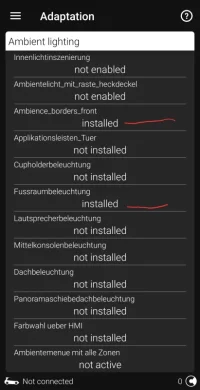
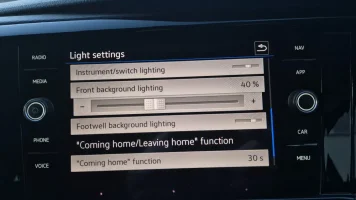
Then to get the BCM to output, Pin C72 is footwell lights, Pin C71 is in my case the door lights
Adaptations in Central Electrics again:
Leuchte33AMBL 3C72 – This is for the footwell lights
Leuchte34AMBL 4C71 – This is for the door lights or anything else you fancy.
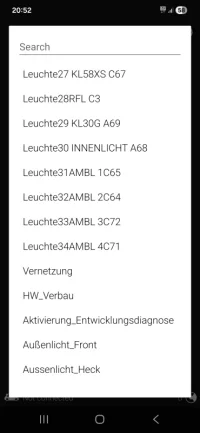
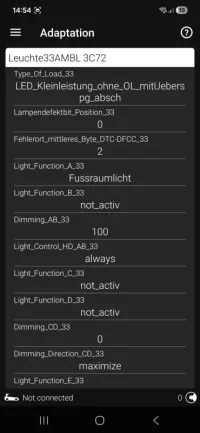
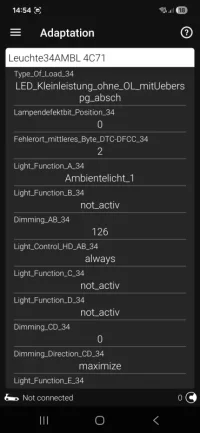
You can change the brightness of the LEDs within the adaptations so that you still have full control on the 5F, but they wont go too bright. Mine are set to max as they are aren’t that bright. This is the Dimming_AB_34 channel. 0-126. You can have upto 8 ways in which you can control these lights from the BCM in these adaptations, but I have just left it the standard way other VAG users have done so you only need to change bits in A and B, C to H are for additional control.
Applied the adaptations in the screen shots for the type of load, brightness and control then confirmed.
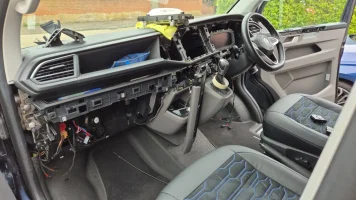
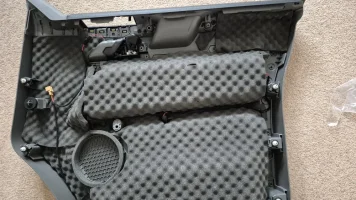
Then came running all the wires. My van was in at @BognorMotors for my seat retrim so they kindly added the pins into the BCM which I’m glad as it looked a pain. I then stripped the dash and ran the looms across, then into the doors with disconnection plugs before the door and also after so that the doorcard can be removed with a single plug.
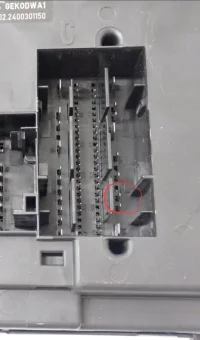
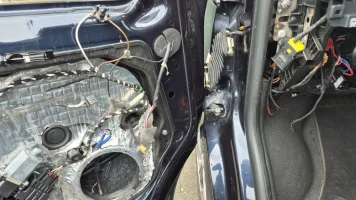
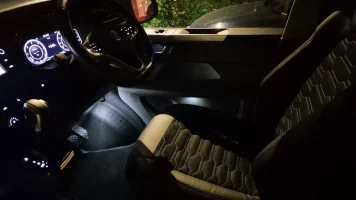
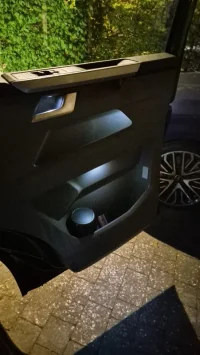
Now my footwell and door lights come on with door unlock regardless of whether the lights are on, door opening and also key out.
So that the existing footwell circuit didn’t go to waste, I extended these wires out into the doorcard and turned it into a puddle light as I know these come on with unlock and door opening before.
Overall it was a fiddly job to have all the looms made, run across the dash and also into the doors and cutting holes but I enjoyed it.
All in for the looms and genuine LEDs probably about £250 so not cheap for what you get.
Screenshots and my wiring diagram and measurements attached. What LEDs you use is upto you so not shown how to cut up your doorcards.
Any questions, get in touch, but copy at your own risk!
Thanks to @DanW81 and Robin at Rocketwires.
@DanW81 pointed out that there are 4 spare lighting channels on the BCM and these are assigned AMBL. Started googling and turns out all other VAG cars use these for their footwell and ambient lights. Manged to get the adaptations sorted so that footwell and front lighting appeared under the light menu. I did add the specific ambient menu and screen, but because there appears to be no image of a T6.1 dash stored on the 5F/BCM it didn’t work, but when I changed the vehicle type to the default Golf it did, but didn’t want a Golf over all my 5F. There is an option on the BCM to have Door lighting on the 5F, but for this to work you need a door ECU, so you are stuck with having Front Lighting.
No image of the van dash. i know some clever people can upload pictures, but I haven't figured that out
After researching genuine VAG LEDs to use for the door pockets and handles I got Robin at rocketwires to make up all the looms to my design, he was very helpful and all top quality.
In ODBEleven I went to Central Electrics, Adaptations
Firstly went to Ambient Lighting:
Ambience_borders_front – Installed
Fussraumbeleuchtung – Installed
This gets the two sliders on the 5F under lights menu which should already be there, if not additional adaptations are required.
Then to get the BCM to output, Pin C72 is footwell lights, Pin C71 is in my case the door lights
Adaptations in Central Electrics again:
Leuchte33AMBL 3C72 – This is for the footwell lights
Leuchte34AMBL 4C71 – This is for the door lights or anything else you fancy.
You can change the brightness of the LEDs within the adaptations so that you still have full control on the 5F, but they wont go too bright. Mine are set to max as they are aren’t that bright. This is the Dimming_AB_34 channel. 0-126. You can have upto 8 ways in which you can control these lights from the BCM in these adaptations, but I have just left it the standard way other VAG users have done so you only need to change bits in A and B, C to H are for additional control.
Applied the adaptations in the screen shots for the type of load, brightness and control then confirmed.
Then came running all the wires. My van was in at @BognorMotors for my seat retrim so they kindly added the pins into the BCM which I’m glad as it looked a pain. I then stripped the dash and ran the looms across, then into the doors with disconnection plugs before the door and also after so that the doorcard can be removed with a single plug.
Now my footwell and door lights come on with door unlock regardless of whether the lights are on, door opening and also key out.
So that the existing footwell circuit didn’t go to waste, I extended these wires out into the doorcard and turned it into a puddle light as I know these come on with unlock and door opening before.
Overall it was a fiddly job to have all the looms made, run across the dash and also into the doors and cutting holes but I enjoyed it.
All in for the looms and genuine LEDs probably about £250 so not cheap for what you get.
Screenshots and my wiring diagram and measurements attached. What LEDs you use is upto you so not shown how to cut up your doorcards.
Any questions, get in touch, but copy at your own risk!
Thanks to @DanW81 and Robin at Rocketwires.


 , and me pestering you!


