
Handbrake warning light

Mirvine

New Member
Hi new to forum

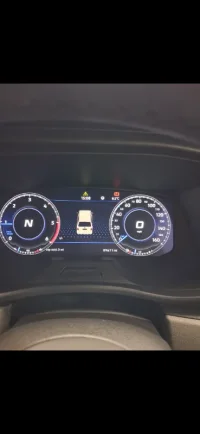
I currently have a 2020 t6.1, recently the handbrake warning light has come on aswell with this symbol ⚠️ it appeared on my dash. I have had van plugged in with vagcom and it doesnt show any issues what so ever, when driving if i got to pull handbrake it still makes the ping noise, but when released the two warning lights stay in dash.

Have tried deactivating the brake pad warning lights still shows, also tried deactivating the brake fluid warning and it still shows same issue. (Obviously have them both activated back on now) was just for testing purposes.

Any help be greatly appreciated. Thanks
Screenshot_20260623_074521_Gallery.webp
 
Thats not the handbrake light, just the general brake warning light. The handbrake light should still go on/off as the handbrake is applied.

Its a software issue with the aftermarket virtual dash affecting the 6.1. Our man Antony is working with the supplier for a software update that may be about ready.

Meantime, switching to G8 mode will clear it temporarily.

Alternatively, follow this procedure....

1.Switch ignition on, do not start engine. Wait for the clocks to fully wake up.

2. Switch ignition off, leave key in ignition. Wait for the display to go back to sleep.

3. Start engine as normal. It should now be back to normal and will remain so until the van is parked up and the canbus system goes back to sleep.

If you know how you can update the virtual dash software. There is an update but last time I spoke to Antony he wasnt sure if that included the cure for this, although he thought it may well do so.
 
Thats not the handbrake light, just the general brake warning light. The handbrake light should still go on/off as the handbrake is applied.

Its a software issue with the aftermarket virtual dash affecting the 6.1. Our man Antony is working with the supplier for a software update that may be about ready.

Meantime, switching to G8 mode will clear it temporarily.

Alternatively, follow this procedure....

1.Switch ignition on, do not start engine. Wait for the clocks to fully wake up.

2. Switch ignition off, leave key in ignition. Wait for the display to go back to sleep.

3. Start engine as normal. It should now be back to normal and will remain so until the van is parked up and the canbus system goes back to sleep.

If you know how you can update the virtual dash software. There is an update but last time I spoke to Antony he wasnt sure if that included the cure for this, although he thought it may well do so.
Thanks taking time to reply. I went done exactly as you suggested and it worked perfectly, will reach out to company i got them from as they had told me previously that they sort out the software updates? Has been fine for about 9months, just concerned as i will have mot coming up in near future. Hopfully they have the software to sort this now. Thanks for help appreciate it alot.
 
Back
Top